



Best Customer Support Software Pricing Compared (2026)
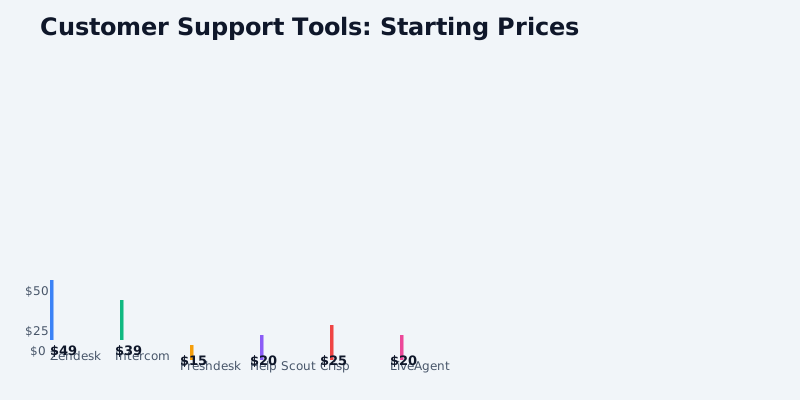
Customer support platforms are essential for businesses that want to scale service delivery without hiring endless teams. But choosing between Zendesk, Intercom, Freshdesk, Help Scout, Crisp, and LiveAgent means understanding how each platform charges-and where hidden costs hide.
This guide breaks down per-agent pricing, ticket volume impacts, chatbot add-ons, and omnichannel scaling to help you pick the right platform for your support budget.
Key Pricing Dimensions
Customer support software pricing varies across three main axes:
Get the free SaaS Pricing Playbook
How 500+ SaaS tools really price themselves. Pricing tier breakdowns, hidden costs, negotiation tactics. PDF-ready guide delivered to your inbox.
Free forever. No spam. Unsubscribe anytime.
Per-Agent Licensing: Most platforms charge per support agent seat. This is your baseline cost and scales with team size.
Ticket Volume & Usage: Some platforms cap tickets per month, while others charge based on billable contacts, customer engagement events, or support interactions.
Feature Add-Ons: Chatbots, knowledge bases, advanced routing, SLA management, and integrations often carry separate fees.
Omnichannel Complexity: Email, chat, social media, and phone support can each impact pricing. Some platforms bundle these; others charge per channel.
Zendesk Pricing Breakdown
Per-Agent Cost: $49–$115/agent/month (Team, Professional, Enterprise)
Zendesk is the industry standard for ticket management and scales from 5-person support teams to enterprise operations. Their tiering is aggressive on features, not price:
- Team Plan ($49/agent): 1M API calls/month, basic routing, 3 custom fields
- Professional Plan ($79/agent): Unlimited API calls, advanced routing, SLA management, 50 custom fields
- Enterprise Plan ($115/agent): Dedicated infrastructure, single sign-on, advanced reporting
Hidden Costs:
- Zendesk Suite (chat + ticketing) bundles agents across channels, but you pay per agent even if they only handle one channel
- Knowledge base add-on: $99–$399/month depending on articles and languages
- Custom workflows and macros: Included at Professional tier and above
Real-World Math: A 10-person team across email, chat, and social costs $490–$1,150/month just in agent seats. Add a knowledge base ($99–$399) and you're at $589–$1,549/month.
Intercom Pricing Breakdown
Per-Contact Charge: $39–$99/month based on monthly active contacts (MACs)
Intercom inverted the per-agent model. Instead, you pay for customer *contacts* you engage with-a volume-based approach that rewards focused customer communication:
- Essential Plan ($39/month): Up to 1,000 MACs, basic inbox
- Advanced Plan ($74/month): Up to 10,000 MACs, automations, AI-powered features
- Pro Plan ($99/month): Up to 100,000 MACs, custom bots, advanced reporting
Key Difference: Intercom doesn't charge per agent. Five agents or 50-you pay the same MAC-based tier. This favors businesses with smaller, focused support teams.
Hidden Costs:
- Intercom's AI bot (Copilot) is included starting at Advanced tier
- SMS and custom channel routing are included
- Your cost scales with customer base, not team headcount
Real-World Math: A SaaS company with 5,000 monthly active users pays $74/month base. If 50% contact support, that's 2,500 MACs = $74. Scale to 50,000 users with 10% support contact rate (5,000 MACs) and you stay at $74. But at 100,000 users with 15% contact rate (15,000 MACs), you jump to $99+.
Freshdesk Pricing Breakdown
Per-Agent Cost: $15–$65/agent/month (Sprout, Growth, Pro, Enterprise)
Freshdesk undercuts Zendesk aggressively on per-agent pricing, making it attractive for cost-conscious startups:
- Sprout Plan ($15/agent): 30 custom fields, basic reporting
- Growth Plan ($35/agent): Unlimited custom fields, advanced routing, SLA management
- Pro Plan ($55/agent): Workflow automation, API access, AI-powered suggestions
- Enterprise Plan ($65/agent): On-premise option, advanced security
Hidden Costs:
- Freshdesk charges per *active* agent-not all agent seats
- Sprout plan limits to 3 agents maximum, Growth plan to 10
- Knowledge base and community forum included at all tiers
- Phone support module adds $5/agent/month
Real-World Math: A 10-person team on Growth plan ($35/agent) costs $350/month. Phone support add-on: $50. Total: $400/month. Compare to Zendesk at $490–$1,150 for the same team size.
Help Scout Pricing Breakdown
Per-Mailbox Cost: $20–$65/month per shared inbox
Help Scout targets small teams (2–20 people) with a per-mailbox model rather than per-agent:
- Standard ($20/month): 1 mailbox, 2 users
- Plus ($50/month): 3 mailboxes, 8 users
- Professional ($65/month): Unlimited mailboxes, unlimited users
Key Difference: Help Scout bills by inbox (support channel), not agent. Two agents can share one mailbox without additional cost.
Hidden Costs:
- Live chat add-on: $99–$399/month depending on features
- Knowledge base: Included at all tiers
- API and custom integrations: Included
Real-World Math: A 5-person email-only team costs $20–$50/month. Add chat ($99/month) and you're at $119–$149/month for the whole team. Much cheaper than Freshdesk or Zendesk for small teams, but doesn't scale well to 20+ agents.
Crisp Pricing Breakdown
Unique Hybrid Model: $25/month base + $15/month per additional agent
Crisp charges a fixed base ($25) plus per-agent add-on ($15/agent). This creates a sweet spot for small-to-medium teams:
- Base Plan ($25/month): 1 agent, chat, email, SMS, knowledge base included
- Per Additional Agent ($15/month each): Add 1–20+ agents
Key Difference: Unlike Zendesk ($49+/agent), Crisp's marginal cost per agent is low ($15). The first agent is expensive ($25 fixed), but each additional agent is cheap.
Hidden Costs:
- Crisp includes chatbot, knowledge base, CRM, and phone support in the base plan
- SMS messages: $0.05 per outbound message (volume discounts available)
- No per-contact surcharges or overage fees
Real-World Math:
- 1 agent: $25/month
- 5 agents: $25 + (4 × $15) = $85/month
- 10 agents: $25 + (9 × $15) = $160/month
Compared to Zendesk ($490/month for 10 agents at $49), Crisp is 67% cheaper at scale for small teams.
LiveAgent Pricing Breakdown
Per-Agent with Volume Discounts: $20–$40/agent/month
LiveAgent targets budget-conscious teams with aggressive discounting for multi-year prepay:
- Monthly Billing ($40/agent/month): Full price, no commitment
- Annual Prepay ($20/agent/month): 50% discount, 1-year lock-in
- Multi-Year ($15–$18/agent/month): Available on custom enterprise plans
Key Difference: LiveAgent's real advantage is prepay discounting. Month-to-month is expensive; prepaid annual is competitive.
Hidden Costs:
- Phone integration: Included
- Chatbot (bot builder): Included at all tiers
- Reports and analytics: Included
- Custom integrations: API access included
Real-World Math:
- 10 agents on month-to-month: $400/month ($4,800/year)
- 10 agents on annual prepay: $200/month equivalent ($2,400/year)
- Compare to Zendesk: $490–$1,150/month
LiveAgent is cheapest for teams willing to commit to annual contracts.
Omnichannel Costs & Scaling
When support spans email, chat, phone, and social media, pricing changes:
Zendesk: Suite-based billing (same agent across channels, but you pay per agent per month regardless of channels used).
Intercom: MACs-based (customers who interact via any channel count as one contact). Most efficient for omnichannel.
Freshdesk: Per-agent for core ticketing; phone module is +$5/agent/month.
Help Scout: Per-mailbox (one mailbox = one channel), chat is separate add-on.
Crisp: All channels (chat, email, SMS, phone) included in base plan.
LiveAgent: All channels included.
Free Tiers & Trial Comparison
| Platform | Free Tier | Trial |
|---|---|---|
| Zendesk | No | 14 days |
| Intercom | No | 14 days |
| Freshdesk | Yes (up to 3 agents) | 7 days |
| Help Scout | No | 14 days |
| Crisp | Yes (1 agent, limited features) | 30 days |
| LiveAgent | No | 7 days |
Freshdesk and Crisp offer free tiers, making them ideal for bootstrapped startups with ≤3 agents.
Recommendation Matrix
Best for Startups (<$5/month limit): Crisp or Freshdesk free tier.
Best for Small Teams (5–10 agents): Help Scout ($20–$50) or Crisp ($85–$160).
Best for Growing Teams (10–50 agents): Freshdesk ($350–$1,750) or Zendesk if omnichannel complexity is high.
Best for Enterprise (50+ agents, omnichannel): Zendesk or Intercom if contact-volume-based billing favors your customer base.
Best for Lowest TCO with Prepay: LiveAgent annual contracts.
Best for Chat-First Teams: Intercom (no per-agent charges, AI included).
Actionable Next Steps
- Map your support team size and growth rate. Per-agent platforms (Zendesk, Freshdesk, LiveAgent) favor large, stable teams. Contact-based (Intercom) favors businesses growing customer base faster than support team.
- Audit your channels. Do you need email, chat, phone, and social? Crisp and LiveAgent bundle these. Zendesk and Freshdesk require channel-by-channel assessment.
- Run a 7-day free trial on your top 2–3 choices (or use free tiers if available) with your actual support volume to see which pricing model fits.
- Negotiate annual contracts if budget is a constraint. LiveAgent discounts to $20/agent on annual; others may match or beat Zendesk's enterprise discounting.
- Plan for add-ons. Knowledge base, phone support, and API access vary wildly. Intercom and Crisp include most; Zendesk is aggressive with bundling upsells.
The best platform is the one that scales *your* support cost with *your* growth curve-not against it.
