



Design Tool Pricing Ranges from Free to Enterprise
The design software market has exploded with options over the past five years. You can build professional visuals for nothing with Canva Free, invest in a $20-per-month subscription for Figma, or commit to $80+ per seat per month for Adobe's enterprise Creative Cloud bundles. The range is vast-and confusing.
This guide compares the leading design tools by pricing tier, so you can understand what each tier buys you and which tool fits your team's budget and workflow.
Design Tool Pricing at a Glance
Design tools fall into distinct pricing tiers:
Get the free SaaS Pricing Playbook
How 500+ SaaS tools really price themselves. Pricing tier breakdowns, hidden costs, negotiation tactics. PDF-ready guide delivered to your inbox.
Free forever. No spam. Unsubscribe anytime.
- Free tiers: Canva, Penpot, Figma (limited), Pixlr
- SMB pricing: $12–$20 per month per user (Figma Pro, Canva Pro, Adobe Express)
- Mid-market pricing: $20–$55 per month per user (Figma Team, Adobe Creative Cloud, Sketch)
- Enterprise pricing: $80–$150+ per month per seat or custom (Adobe Enterprise, Figma Enterprise)
Free tools are ideal for one-off projects and learning. Mid-market plans unlock collaboration, cloud storage, and advanced features. Enterprise pricing kicks in when you need dedicated support, SSO, and custom workflows.
Top Design Tools Ranked by Starting Price
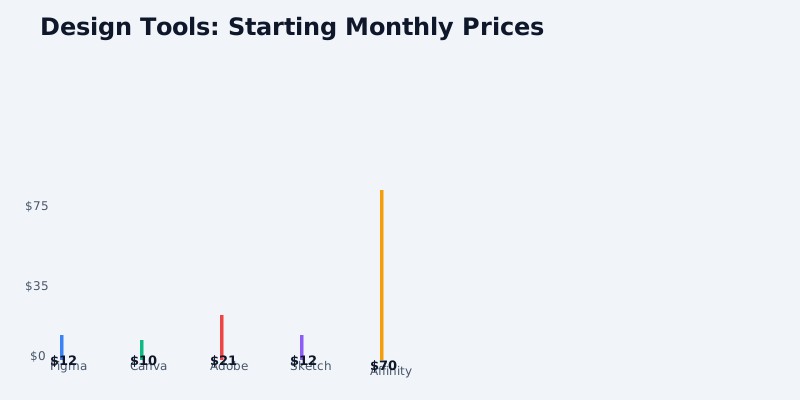
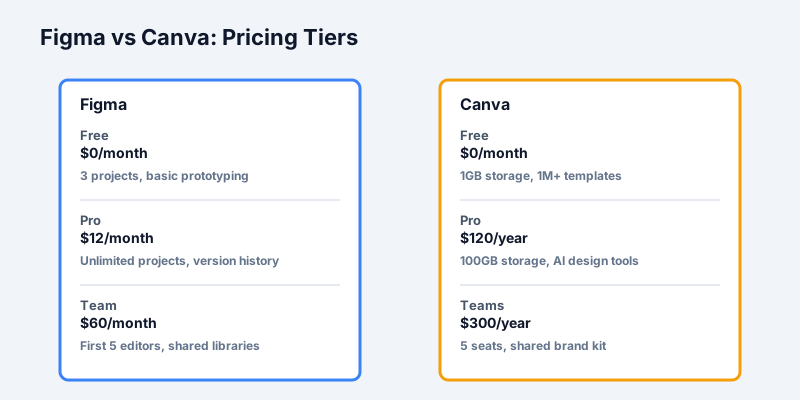
Figma begins at free with limited prototyping and 3 projects. Figma Pro costs $12/month for 1 person, unlocking unlimited projects, advanced prototyping, and file version history. Figma Team starts at $60/month for 5 editors, with shared libraries and better collaboration controls. See our Figma overview for full details, or compare Figma vs Canva or Figma vs Framer pricing side by side.
Canva offers a free tier with 1 GB storage and basic design tools. Canva Pro is $120/year ($10/month) for 1 person, including premium templates, 100 GB storage, and AI design features. Canva Teams is $300/year for up to 5 people with brand management and approval workflows.
Adobe Creative Cloud is the premium option. Single apps like Photoshop cost $20.99/month. The full Creative Cloud suite is $54.99/month for individuals, or $24.99/month if bundled with Photography Plan. Enterprise deployments start at $80/seat/month with custom pricing for teams of 50+.
Sketch targets design-focused teams. It costs $12/month per editor with a 7-day free trial. Sketch's business model shifted to a per-editor model in 2023. Teams need to pay per active designer, not per project or workspace.
Framer starts free for simple projects. Framer Pro is $12/month for 1 person, unlocking hosting, custom domains, and advanced interactions. Framer Team plans begin at $60/month for up to 5 editors with better asset management.
Adobe Express (formerly Adobe XD starter tier) is now $9.99/month for individuals, positioned as a faster, simpler alternative to the full Creative Cloud suite.
InVision offers a free tier for prototyping. Paid plans start at $25/month, scaling to $99/month for team tiers with design systems and advanced handoff tools.
Affinity Designer is a one-time purchase: $70 on desktop or $21.99/year on iPad. No subscription required. It directly competes with Adobe on capabilities but without recurring costs.
Free Design Tools Worth Your Time
If budget is tight or you're testing tools, these free options are legitimate:
- Canva Free: Best for quick social media graphics, presentations, and non-professional designs. Limited to basic templates and 1 GB storage, but no credit card required.
- Figma Free: Excellent for learning or small projects. Includes all major design features except team collaboration. Limits you to 3 open projects at a time.
- Penpot (open-source): A free, self-hosted Figma alternative with all collaboration features included. Best if you want unlimited projects with zero cost.
- Pixlr (freemium): Web-based editor with free and premium tiers. Good for photo editing and quick designs without software installation.
- Affinity Designer (30-day trial): Full-featured trial with no limitations. A great way to evaluate whether you prefer Affinity's one-time purchase model over subscriptions.
Use free tiers to validate your workflow before you pay. Most tools let you export at least basic files.
Per-Seat vs Per-Project Pricing: How Design Teams Scale
Design tool pricing models differ significantly:
Per-seat licensing (Figma, Sketch, Adobe) charges per active editor. A team of 10 designers on Figma Team pays $60/month + $10/month per additional seat = roughly $150/month total. Per-seat models work well for teams with stable membership.
Per-project or flat-rate plans (Canva, some Framer plans) charge a fixed monthly fee regardless of how many projects you create. Canva Teams at $300/year works for 5 people across unlimited designs.
Hybrid models (Adobe Enterprise) combine per-seat licensing with additional features like asset libraries and integration management.
For a team of 3 designers:
- Figma Team: $60/month base + $20/month (2 additional seats) = $80/month
- Sketch: $12/month × 3 editors = $36/month
- Adobe Creative Cloud: $54.99/month × 3 = $164.97/month
- Canva Teams: $300/year ÷ 12 = $25/month
Sketch is cheapest; Adobe is priciest. Figma offers good collaboration tools at mid-range cost. Compare Figma vs Canva or Figma vs Framer to see which fits your workflow.
Choosing by Team Type
Solo designers: Start with Canva Pro ($120/year) or Figma Pro ($12/month) depending on whether you need vector design or template-based workflows. Figma Pro gives you infinite projects and better export options.
Small design teams (2–5 people): Figma Team ($60/month + per-seat fees) or Sketch ($12–36/month depending on size) both work. Figma wins on collaboration; Sketch wins on cost.
Creative agencies: Adobe Creative Cloud ($164.97–274.95/month for 3–5 people) if you do photo editing, video, and print. Figma Team if you focus on UI/UX and web design. Many agencies use both.
Enterprise companies: Adobe Enterprise (custom pricing, $80+/seat/mo) with dedicated support, custom asset management, and SSO. Figma Enterprise ($40/month per team with advanced permissions).
Non-designers making marketing materials: Canva Teams at $300/year punches well above its weight. The template library and AI tools let marketing teams stay productive without hiring a designer.
Total Cost of Ownership Beyond Monthly Fees
Sticker price hides other costs:
Learning curve: Adobe tools require training time. Figma and Canva are faster to learn.
Integration costs: Do you need plugins for Slack, Jira, or your design system? Figma's plugin ecosystem is extensive; Adobe's integrations are often paid add-ons.
Cloud storage: Adobe and Figma include cloud storage. If you hit limits, additional storage costs money.
Export and collaboration: Cheaper tools sometimes limit file sharing or export formats. Verify what your team actually needs before choosing.
Switching costs: If you have 50+ design files in Adobe, migrating to Figma takes time and effort.
Hidden Costs and Scaling Traps in Design Tools
As your design team grows, watch out for these cost escalators that can balloon your budget beyond the initial per-seat estimate.
Per-seat pricing acceleration: Most design tools charge per active editor. A team of 3 designers on Figma Team ($60/month base + $10 per additional editor) costs $80/month. Add 2 more designers and you jump to $100/month-a 25% increase for just 67% more capacity. This compounds quickly. Plan ahead for team expansion when comparing total cost of ownership.
Storage limit overages: Canva Pro includes 100 GB storage. A design-heavy team might hit this within 6 months of archive exports and reference assets. Canva doesn't publish overage costs clearly-you upgrade to Teams instead. Adobe Creative Cloud includes 100 GB; exceeding that requires a separate 1 TB storage plan at $9.99/month. Budget for storage growth, especially if you maintain asset libraries and brand archives.
Export and file format restrictions: Affinity Designer and Sketch use proprietary formats (.afdesign, .sketch). Moving to Figma or Adobe requires exporting and re-importing, which can lose some layer information and effects. Some cheaper tools (Pixlr, some Canva tiers) limit export to web-only formats, making print design difficult. Verify export flexibility before committing-file lock-in is expensive.
Collaboration and version control: Figma's version history is unlimited on Pro and Team plans, but the free tier keeps only 30 days of history. If you need rollback capability or audit trails, you'll pay for it. Sketch charges per editor but doesn't include version history on lower tiers. Adobe's Creative Cloud includes Adobe Creative Cloud Libraries but charges extra for advanced team asset management.
Plugin and integration ecosystem costs: Figma's plugin ecosystem is free, but some professional plugins (like Anima for development handoff) are paid subscriptions on top of your Figma seat cost. Adobe's ecosystem includes expensive add-ons: Typekit (font management), Marketplace plugins, and API access. Budget for 2–3 essential plugins at $10–30/month each if your workflow depends on specific integrations.
User seat inactive vs. active: Most tools charge per "active" user, but definitions vary. Adobe counts as active if you log in once per month; Figma counts editors who edited files in the past 30 days. Inactive seats don't cost money, but you must deactivate them manually-forgetting to clean up unused accounts can inflate costs by 10–20% for growing teams.
How to Choose the Right Design Tool for Your Needs
With so many options, here's a framework to narrow your decision:
1. Identify your core workflow first. Are you designing UI/UX, building marketing graphics, doing photo editing, or creating print materials? Each category has an obvious winner:
- UI/UX web design: Figma (best collaboration), Sketch (lowest cost for smaller teams), or Framer (if you need prototyping)
- Graphic and social media: Canva (easiest templates and AI), Adobe Creative Cloud (most powerful)
- Photo editing: Adobe Photoshop (industry standard), Affinity Photo (one-time cost alternative)
- Print and brand design: Adobe InDesign + Photoshop, or Affinity Designer (no subscription)
2. Count your team and estimate per-seat cost. Use the pricing calculator on each tool's website to forecast annual spend at your actual team size. Factor in 10–20% growth. A tool that's cheap at 3 seats might be expensive at 10 seats.
3. Test the free tier for 2 weeks. Every major tool offers free trials or free plans. Import a real design project and see if the interface clicks with your team. Some teams find Figma's learning curve worth it; others prefer Sketch's simplicity or Canva's templates. Don't commit to annual billing until you're certain.
4. Map required integrations. If you need Slack notifications for design approvals, or Jira handoff for developers, verify that the tool supports these before selecting it. Missing integrations force workarounds that slow your team down.
5. Factor in switching costs. If you're moving from Adobe to Figma with 100+ files, allocate 40–60 hours for migration and file reorganization. If you're starting fresh, this isn't a factor. But if you're considering a switch, the effort matters.
6. Evaluate the roadmap and ecosystem. Figma is evolving fast with AI tools and dev mode. Adobe is investing heavily in AI-powered features. Canva's AI design generator is genuinely useful for marketing teams. Choose a platform that's innovating in areas that matter to your workflow.
Our Recommendation
Start free if you're new to design or testing a tool. Figma Free and Canva Free have zero activation energy and let you validate whether you like the interface.
When you're ready to upgrade, match the tool to your workflow:
- UI/UX designers: Browse our design tools category to compare Figma, Sketch, Framer, and others side by side. Try our Adobe Creative Cloud vs Canva comparison.
- Graphic and social media design: Compare Canva plans with Adobe Express and Pixlr.
- Photo editing and print design: Adobe Creative Cloud is still the gold standard, but consider Affinity Designer as a one-time purchase alternative.
Before committing, use our design tools category to compare features, free tiers, and pricing across the full landscape. Run a side-by-side comparison of your top 2–3 options with your actual team size factored in.
The best tool is the one your team will actually use. Choose based on workflow fit first, price second.
Building a startup design stack? Check our startup SaaS stack pricing guide.
Sources and References
- Figma Pricing Page - Official per-editor plans and team collaboration tiers
- Canva Pricing - Individual and team pricing with template access
- Adobe Creative Cloud Pricing - Subscription plans from single apps to enterprise
- Sketch Pricing - Per-editor licensing and design collaboration tools
- UXTools Design Tools Survey - Industry survey of design tool adoption and trends
