





Project Management Software Pricing Spans a Wide Range
Selecting the right project management tool is critical for team productivity and delivery outcomes, but pricing for PM software varies dramatically depending on features and team size. You can start for free with ClickUp or Asana and scale to enterprise deployments costing over $50 per seat per month with Jira or Basecamp.
Understanding the pricing landscape helps you evaluate both cost and capability before committing to a platform. This guide compares the leading project management tools side by side so you can make the right choice for your team.
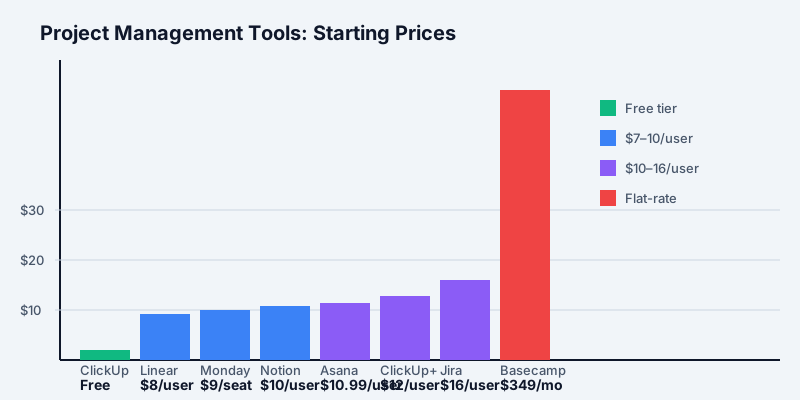
Project Management Pricing at a Glance
The PM market includes:
Get the free SaaS Pricing Playbook
How 500+ SaaS tools really price themselves. Pricing tier breakdowns, hidden costs, negotiation tactics. PDF-ready guide delivered to your inbox.
Free forever. No spam. Unsubscribe anytime.
- Free tiers: ClickUp Free, Asana Basic, Notion Free (no credit card required)
- SMB pricing: $5–$16 per seat per month (Linear, Notion, ClickUp, Jira)
- Mid-market pricing: $20–$30 per seat per month (Asana Business, Monday Pro)
- Enterprise pricing: $50+ per seat per month (Jira Premium, Monday Enterprise)
Free options let you test workflows and team coordination. SMB tiers offer strong value for small teams under 25 people. Mid-market plans unlock automation, advanced reporting, and integrations. Enterprise solutions provide customization, compliance, and dedicated support.
Top PM Tools by Starting Price
PROTECT_2 starts completely free with unlimited tasks, unlimited storage, and unlimited team members. Paid plans begin at $7/user/mo for ClickUp Plus, which adds timeline views, custom fields, and integrations. ClickUp Business starts at $12/user/mo with advanced automation and portfolios.
PROTECT_3 offers a free plan for up to 10 team members with basic task management and up to 5 active project templates. Premium starts at $10.99/user/mo with timeline views, custom fields, and advanced reporting. Business tier begins at $24.99/user/mo for portfolio management and governance tools.
PROTECT_4 includes a free individual plan for up to 2 seats with basic columns and workflows. The Basic plan starts at $9/seat/mo for small teams. Pro tier begins at $19/seat/mo with advanced automations and integrations. Enterprise pricing is custom. Compare Asana vs ClickUp or Monday.com vs Notion to see which fits your workflow.
Linear is purpose-built for engineering teams with a Standard plan starting at $8/user/mo. Features include issue tracking, sprints, and milestones. Pro plan at $12/user/mo adds advanced insights and team management. Annual billing offers a 20% discount. Compare Jira vs Linear for engineering-focused platforms.
Notion provides a free personal plan with unlimited pages and basic sharing. Team plan starts at $10/user/mo with full collaboration features, user permissions, and integrations. Business plan at $25/user/mo adds advanced security and team controls. See our ClickUp vs Notion comparison for a feature-by-feature breakdown.
PROTECT_9 offers a free tier for up to 10 users focused on small teams and open-source projects. Standard plan begins at $8.15/user/mo with advanced workflows and automation. Premium tier at $16/user/mo adds portfolio management and advanced permissions.
Basecamp is a flat-rate service at $349/mo for unlimited projects and users. It includes message boards, to-do lists, schedules, and file storage with no per-seat charges. A three-month free trial is available to test team adoption.
Free Project Management Tools Worth Testing
If you want to avoid upfront costs, several PM tools offer robust free tiers:
- ClickUp Free: Unlimited tasks, storage, and team members. Includes task lists, calendars, and basic automation. No feature restrictions for small teams; the free tier is genuinely functional for teams under 20 people.
- Asana Basic: Free for up to 10 team members with task management, timeline views, up to 5 active project templates, and basic reporting. This tier covers the essentials for nascent projects.
- Notion Free: Unlimited pages, database tables, and synced blocks for a single user. Requires paid upgrade for team collaboration, but excellent for individual project planning and templates.
Free tiers let you onboard your team, establish workflows, and validate that the platform suits your process before spending money. Use these free plans to eliminate poor fits and narrow down your final 2–3 contenders.
Per-Seat vs Flat-Rate Pricing for Project Management
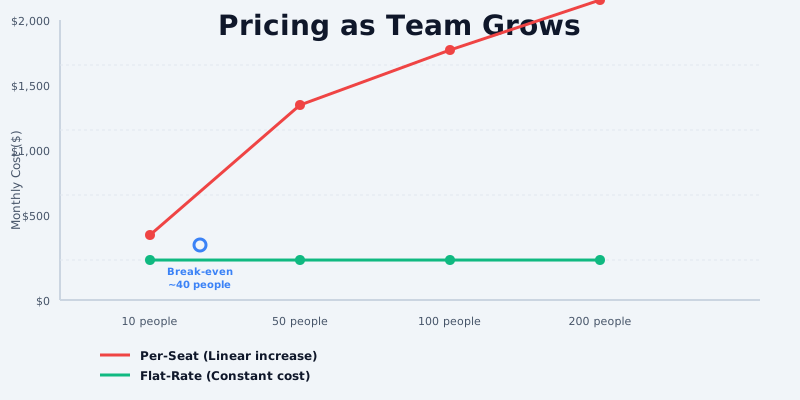
Most project management tools use per-seat pricing: you pay $X per user per month, multiplied by the number of active team members. This model rewards efficient licensing; if 10 people use the tool, you pay for 10 seats.
Basecamp is the exception with flat-rate pricing at $349/mo regardless of team size. This model benefits large teams where per-seat costs would escalate quickly.
Break-even analysis:
- At $9/seat/mo on Monday.com, a 40-person team costs $4,320/mo (per-seat model).
- Basecamp at $349/mo flat-rate is $103.50 per seat for a 40-person team, representing a significant discount if everyone participates.
- At a 15-person team, Monday.com costs $1,620/mo; Basecamp at $349/mo is $23.27 per seat, making per-seat tools cheaper.
For teams under 20 people, per-seat pricing from ClickUp, Asana, or Monday.com is typically more economical. For teams over 40 people, Basecamp's flat rate becomes attractive if the feature set aligns with your needs.
How to Choose by Team Size
Small teams (under 15 people): Start with free plans from ClickUp or Asana. If you need paid features, ClickUp Plus at $7/user/mo or Asana Premium at $10.99/user/mo offer strong value. Linear at $8/user/mo is ideal if your team is engineering-focused.
Mid-size teams (15–100 people): Asana Business at $24.99/user/mo or Monday Pro at $19/seat/mo unlock portfolio management, advanced automation, and governance. Basecamp at $349/mo becomes competitive above 35 people. Notion Team at $10/user/mo is a cost-effective secondary tool for documentation and wikis.
Enterprise teams (100+ people): Jira Premium at $16/user/mo or Asana Enterprise (custom pricing) provide advanced customization, compliance, and dedicated support. Basecamp flat-rate remains economical for large teams seeking simplicity without per-seat overhead.
Hidden Costs and Scaling Considerations
Beyond the visible per-seat fee, project management tools hide several cost escalators that can surprise you as your team grows or requirements evolve.
Seat inflation through sharing and guests: Most PM tools charge per team member with edit access, but some (like Asana and Monday.com) invite stakeholders as "guests" or "viewers" at no additional cost. However, as your org grows, you accumulate read-only users who don't technically need seats but still consume the tool. Some companies hit billing shock when they realize they've invited 60 people but only 30 have "active" seats. Clarify your tool's definition of an active seat: is it login frequency, edit capability, or invitation count?
Automation and workflow limits: ClickUp Free and Asana Basic restrict automations to a few per project. Monday.com's Basic tier caps automations and integrations-each premium feature might require an upgrade to Pro ($19/seat/mo). For teams with 50+ projects using automation, you may need premium tiers across the board, effectively doubling your per-seat cost. Calculate actual seat cost including the percentage of users who need premium features.
Storage and file limits by tier: Notion Free users get unlimited pages but only for a single person. Notion Team at $10/user/mo provides unlimited storage and collaboration. Asana Basic offers limited file storage (2 GB per workspace). If your team archives projects and attachments, you may hit limits within 12 months, forcing a tier upgrade or archival process that requires manual effort.
Integration and API costs: Some tools charge separately for API access. Zapier automations to sync PM data with CRM or accounting systems cost $15–30/month on top of your PM seat costs. If you need 3–5 integrations, budget $50–100/month for automation infrastructure.
Training, change management, and adoption costs: Implementing a new PM tool costs more than the software fee. Basecamp is intuitive; team adoption is fast (1–2 weeks). Jira requires administrator training and workflow customization (2–4 weeks for a team to be productive). ClickUp and Asana have steep feature sets-many teams need 30 days to reach full productivity. Calculate onboarding effort based on tool complexity and team size.
Custom workflows and support overages: Enterprise PM tools (Jira Premium, Asana Enterprise, Monday.com Enterprise) charge for custom workflows and dedicated support. These are often quoted as add-ons at $200–1,000/month. For a 50-person team, that's $4–20 per seat in hidden costs.
Annual billing commitment discounts and lock-in: ClickUp offers 20% off annual billing. Jira requires annual commitments with no month-to-month option, locking you in for 12 months. If you commit to annual billing and find the tool doesn't fit after 6 months, you've paid upfront for unused capacity. Weigh the discount against the flexibility you need.
Choosing the Right PM Tool for Your Team Size
Selecting the best PM tool depends on more than price-team size, workflow complexity, and adoption speed matter equally. Here's a framework to guide your decision:
For teams under 15 people: Cost is your primary concern. ClickUp Free or Asana Basic provide unlimited functionality at no cost. If you need paid tiers, ClickUp Plus at $7/user/mo is unbeatable value for teams with simple workflows. Linear at $8/user/mo is your pick if you're an engineering team managing sprints and issue tracking. Compare Asana vs ClickUp pricing before committing. Try the free tier for 2 weeks before committing to annual billing.
For teams 15–50 people: Balance cost with feature maturity. Asana Business at $24.99/user/mo or Monday.com Pro at $19/seat/mo both provide portfolio management, advanced automations, and governance-features you need when coordinating work across multiple teams or departments. Notion Team at $10/user/mo is a cost-effective secondary tool for team wikis and documentation, layered on top of your primary PM tool. Compare Jira vs Linear for engineering teams, or Asana vs ClickUp for general project management.
For teams 50–200 people: Basecamp's flat $349/mo rate starts looking attractive here. At 75 people, that's $4.65 per seat-far cheaper than per-seat tools at mid-market pricing. However, Basecamp sacrifices advanced workflow automation and portfolio management. If you need those features, Asana Enterprise (custom pricing) or Jira Premium at $16/user/mo are your options, but expect to pay $800–2,000/mo total.
For enterprise teams 200+ people: Jira Premium or Asana Enterprise (custom) with dedicated support and custom workflows. At this scale, support and customization matter more than price. Your per-seat cost becomes a rounding error compared to the productivity gains from native integrations and tailored workflows. Budget $15,000–50,000/month for a mature platform with compliance features (SOC 2, SSO, SAML).
For remote or distributed teams: Basecamp and Asana both excel at asynchronous communication. Linear is built for engineering velocity. Monday.com is flexible across all team types. Avoid Jira if your team is non-technical-the configuration overhead will slow adoption.
What to Look For When Comparing PM Pricing
Sticker price is only one dimension of PM software cost. These factors shape your total cost of ownership:
1. Seat count vs participation: Do all team members need accounts, or only project leads and managers? Some tools charge per active user; others charge per invited user. Clarify licensing terms before budgeting.
2. Integration and automation limits: Basic plans on Monday.com and Asana restrict automations and integrations. Advanced workflows may require premium tiers, increasing per-seat costs.
3. Storage and file limits: Notion, Asana, and Monday.com impose file storage limits on lower tiers. Calculate whether you will exceed limits and require paid upgrades.
4. Training and adoption costs: Basecamp is self-service and intuitive. Jira requires technical expertise for configuration. Budget for training time based on tool complexity.
5. Contract terms: ClickUp, Asana, and Monday.com allow month-to-month cancellation. Jira often requires annual commitments with discounts for longer terms. Evaluate lock-in and flexibility.
Our Recommendation
Start with a free plan if your team qualifies. ClickUp Free, Asana Basic, and Notion Free all provide real functionality without credit cards or commitments.
Before upgrading, compare your top contenders using CompareTiers PM category. Run a side-by-side comparison with your actual team size and required features. Most PM tools provide pricing calculators-use them to forecast annual cost at your team scale.
Remember: the cheapest PM tool is worthless if your team does not adopt it. Feature fit, ease of use, and mobile access matter as much as price. Choose a tool that your team will consistently use, and budget for training and process change.
Looking for team collaboration tools? See our best collaboration tools pricing guide.
Ready to compare? Browse our project management category or jump straight to Asana vs ClickUp, Jira vs Linear, or Notion vs Monday to see pricing, features, and free tiers in action.
Sources and References
- Asana Pricing Page - Official feature tiers and per-seat pricing for teams
- Monday.com Pricing - Flexible per-seat plans and feature breakdowns
- ClickUp Pricing - Free tier features and scaled pricing for teams
- Jira Pricing - Standard and premium tiers for project tracking
- Linear Pricing - Engineering-focused pricing and team collaboration features
