



Annual vs Monthly SaaS Pricing: When to Commit? (2026)
SaaS pricing typically offers a discount for annual upfront commitment vs. monthly billing. Annual plans are 15–30% cheaper, but lock you into a year of payments. Monthly plans are flexible but expensive. The choice depends on commitment certainty, product fit, and cash flow risk.
This guide compares annual and monthly billing, quantifies savings, and helps you decide when to commit to annual billing.
The Discount: How Much Do You Save?
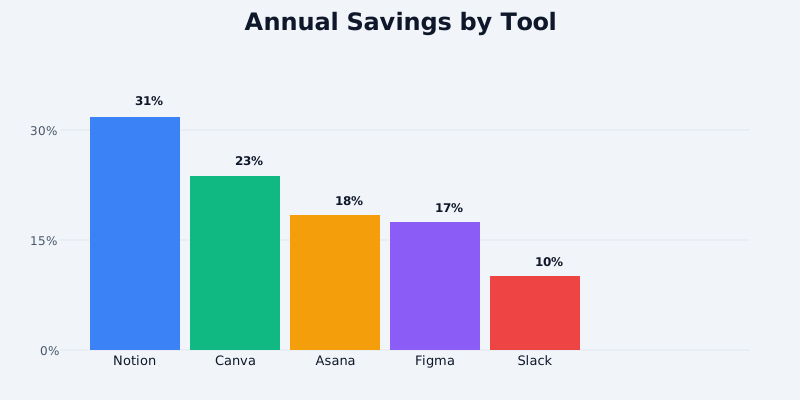
Most SaaS platforms offer 20–30% discounts for annual billing compared to monthly. Here's what the math looks like across popular tools:
Get the free SaaS Pricing Playbook
How 500+ SaaS tools really price themselves. Pricing tier breakdowns, hidden costs, negotiation tactics. PDF-ready guide delivered to your inbox.
Free forever. No spam. Unsubscribe anytime.
Design Tools
Figma Pro:
- Monthly: $12/month × 12 = $144/year
- Annual: $120/year (paid upfront)
- Savings: $24/year (17%)
Canva Pro:
- Monthly: $13/month × 12 = $156/year
- Annual: $120/year (paid upfront)
- Savings: $36/year (23%)
Productivity
Notion Plus:
- Monthly: $13/month × 12 = $156/year
- Annual: $108/year (paid upfront, $9/month)
- Savings: $48/year (31%)
Asana Premium:
- Monthly: $16.49/month × 12 = $197.88/year
- Annual: $13.49/month × 12 = $161.88/year (paid upfront)
- Savings: $36/year (18%)
Communication
Slack Pro:
- Monthly: $12.50/month × 12 = $150/year
- Annual: $11.25/month × 12 = $135/year (paid upfront)
- Savings: $15/year (10%)
Analytics
Google Analytics 360:
- Monthly: $12,500/month = $150,000/year
- Annual: Typically 15–20% discount if negotiated
- Estimated savings: $22,500–$30,000/year
Summary: Annual discounts range from 10–31% depending on the platform. Most products offer 20–25% savings.
---
Break-Even Analysis: When Annual Pays Off
The question isn't just "how much do I save?" but "how long until I recover the upfront cost?"
Figma Pro Example
- Monthly upfront cost: $12
- Annual upfront cost: $120
- Monthly savings: $12 – $10 = $2/month
- Break-even point: $120 ÷ $2 = 60 months
Wait, that doesn't make sense. Let's recalculate:
- Monthly commitment: $12/month × 12 months = $144/year
- Annual commitment: $120/year upfront
- Difference: Pay $120 now instead of $144 over the year
- Savings: $24/year
- Break-even: Immediate (month 1)
The confusion is that annual savings accrue immediately if you commit. You're not "breaking even" - you're saving money every month. The risk is: what if you don't use Figma for 12 months?
---
Risk Analysis: Reasons NOT to Commit Annual
1. Product Fit Uncertainty
You haven't fully tested the product. Most SaaS have 30-day free trials or free tiers. After 30 days, you might discover:
- The workflow doesn't match your team's needs
- A competing product is 20% better
- You outgrow the pricing tier (upgrade required anyway)
- Your business direction changes and you no longer need the tool
Risk level: HIGH if you've been using the product < 3 months
Mitigation: Use monthly billing for the first 2–3 months (cost: $24–$36 for Figma), then upgrade to annual once product-market fit is confirmed.
---
2. Budget Uncertainty
You're uncertain if the budget will be approved next quarter. Committing $120 upfront locks your cash flow.
Scenarios:
- Startup cash runway is tight (< 12 months of cash remaining)
- Company is in budget freeze or restructuring
- Your department's budget might be cut mid-year
- You're trying the tool on a personal credit card (can't expense large upfront costs)
Risk level: MEDIUM if cash flow is unstable
Mitigation: If cash flow is critical, use monthly billing even if it costs 20% more. The flexibility is worth the insurance.
---
3. Team Size Changes
Your team might shrink (layoffs, attrition) or significantly grow, changing your SaaS needs.
Example: You commit to Asana for a 5-person team at $13.49/user/month × 5 = $67.45/month. If your team shrinks to 3 people, you've overpaid for 2 unused seats.
Risk level: MEDIUM if you expect team changes
Mitigation: Use monthly billing for 6 months to confirm team stability, then commit annual once growth trajectory is clear.
---
4. Refund Policy Unknowns
Some SaaS vendors offer refunds on annual plans; others don't.
Common refund policies:
Full refund (most common):
- Figma, Notion, Slack, Asana: 30-day full refund if unsatisfied
- Some vendors offer refunds up to 90 days
Pro-rata refund (medium):
- Refund remaining months if you cancel
- Example: You pay $120/year for Figma, cancel after 3 months
- Refund: $120 × (9 ÷ 12) = $90
- You pay $30 for 3 months
No refund (rare, but exists):
- Some enterprise or specialized tools have no refund policy
- Annual prepayment is non-refundable
Risk level: LOW to MEDIUM depending on vendor policy
Mitigation: Check the refund policy before committing. If a vendor offers no refund, use monthly billing or get a refund guarantee in writing.
---
5. Feature Updates and Deprecation
SaaS vendors frequently change pricing, features, or deprecate tools. Annual billing locks you into the current feature set.
Example: Notion decides to remove a feature you rely on. You're locked into a year of Notion at the same price. Monthly billing lets you leave.
Risk level: LOW (most vendors don't deprecate heavily), but real for startup tools.
Mitigation: For early-stage or niche tools, use monthly billing. For established vendors (Slack, Asana, Figma), the risk is minimal.
---
When Annual Billing Makes Sense
1. Product-Market Fit Confirmed (3+ months usage)
You've used the tool for 3+ months without major complaints. You've tested core features and they work for your workflow. Annual billing is worth the 20% savings.
Action: Switch to annual after 90 days of monthly usage.
---
2. Team Size Is Stable
Your team size hasn't changed in 6+ months and you don't expect major changes in the next year. Annual billing is predictable.
Action: Commit annual for the next cycle.
---
3. Cash Flow Is Strong
Your company has 18+ months of runway and budget is approved for the year. You can afford $120 upfront without risking core operations.
Action: Pay annual upfront and capture 20% savings.
---
4. Vendor Has Strong Refund Policy
The vendor offers 30–90 day money-back guarantee. If the tool doesn't work, you can get a refund.
Action: Commit annual knowing you have an escape hatch.
Example: Asana's refund policy states:
"Try Asana free for 30 days. No credit card required. If you're not satisfied within the first 30 days of a paid plan, we'll refund you."
This means: You can commit annual and refund within 30 days if unsatisfied. The 20% savings is nearly risk-free.
---
5. Long-Term Tool (2+ years planned usage)
You're confident you'll use the tool for 2+ years (example: core project management tool, team communication platform). Annual billing is amortized across longer usage.
Action: Commit annual. Even if you pay $120/year for 3 years, the upfront discount is worth it.
---
Refund Policy Comparison: What Vendors Actually Offer
| Vendor | Refund Policy | Risk Level |
|---|---|---|
| Figma | 30-day full refund | Low |
| Canva | 30-day full refund | Low |
| Notion | 14-day refund during trial; after that, pro-rata | Medium |
| Asana | 30-day full refund | Low |
| Monday.com | 14-day refund on annual plans | Low |
| Slack | 30-day refund on annual; after that, non-refundable | Medium |
| Adobe Creative Cloud | 14-day refund | Low |
| Microsoft 365 | 30-day refund | Low |
| HubSpot | 30-day refund on upgrades from Free tier; Enterprise no refund | Medium–High |
| Salesforce | No refund on annual licenses (enterprise negotiates) | High |
Key insight: Most SaaS vendors offer 14–30 day refund windows on annual plans, which effectively makes them low-risk. Salesforce and enterprise vendors rarely offer refunds-don't commit annual unless you're certain.
---
Decision Framework: Monthly or Annual?
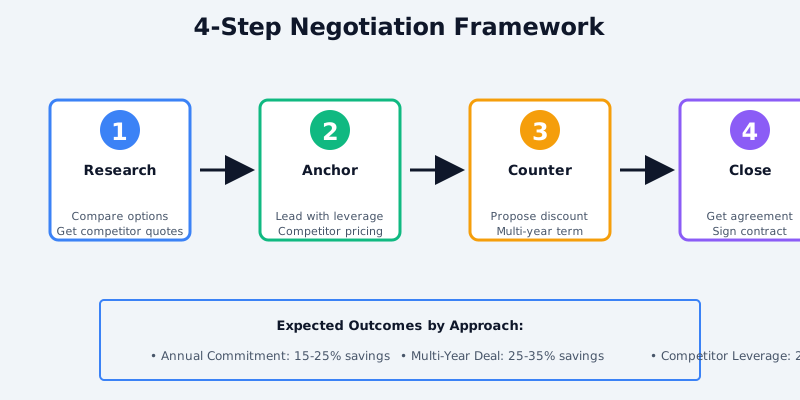
Use this simple framework to decide:
Monthly Billing if:
- Product used < 3 months
- Team size uncertain (hiring/layoffs expected)
- Cash flow tight or budget not approved
- Vendor refund policy unclear
- Using the tool on trial or personal credit card
Annual Billing if:
- Product tested for 3+ months
- Team size stable
- Cash flow strong (18+ months runway)
- Vendor offers 30+ day refund guarantee
- Plan to use tool 2+ years
---
Stacking Savings: Annual + Negotiated Discounts

Annual billing discount isn't the only discount available. You can often stack discounts:
Discount 1: Annual Billing
- Figma Pro: $12/month → $10/month (17% off)
Discount 2: Upfront Annual Commitment (negotiable for larger teams)
- Multiple editors on Figma Team: Add another 10–20% off if paying upfront
Discount 3: Multi-Year Commitment
- Example: "If I commit to 3 years, what discount do you offer?"
- Typical response: 20% annual discount + 10% multi-year discount = 28% total
Discount 4: Volume / Team Commitment
- Slack: "If we commit to 100 users, what discount do you offer?"
- Typical: 10–20% off
Real-world example:
- Figma Pro at $12/month = $144/year
- Annual discount (17%): $120/year
- Team/volume discount negotiation (10%): $108/year
- Total: 25% savings vs. monthly
Most SaaS vendors will negotiate if you ask, especially at quarter-end.
---
Tax and Accounting Considerations
Annual billing creates upfront cash outflow that affects your financial statements:
For Small Business/Freelancers
- Annual billing is an upfront expense (record in the year paid)
- Monthly billing spreads expense across months (better for matching revenue)
Example: Freelancer pays $120 for Figma annual in January. Tax year (Jan–Dec), the full $120 is deductible in Year 1.
For Growing Companies (Startups)
- CFOs prefer monthly billing for P&L predictability
- Annual billing creates "lumpy" expense recognition
- Accounting teams must track annual vs. monthly commitments
Best practice: For startup finance, monthly billing until you have financial visibility 18+ months into the future.
---
Annual vs. Monthly: Real-World Scenarios
Scenario 1: 5-Person Design Team (Figma)
Option A: Monthly ($12/user/month)
- 5 users × $12/month = $60/month = $720/year
- Month 1–3: Test Figma Free, risk low
- Month 4–12: Commit to paid
- Flexibility: Can downsize to 3 users if budget tightens
Option B: Annual ($10/user/month)
- 5 users × $120/year = $600/year upfront
- Savings: $120/year (17%)
- Risk: Locked in for 12 months
Recommendation: If team size is stable and cash flow is positive, go annual and save $120/year. If you expect team changes, use monthly.
---
Scenario 2: Startup Testing Tools (Slack + Asana + Notion)
Option A: Monthly (all three platforms)
- Slack Pro: 10 × $12.50 = $125/month
- Asana Premium: 10 × $13.49 = $134.90/month
- Notion Plus: $13/month
- Total: $272.90/month = $3,274.80/year
Option B: Annual (all three platforms)
- Slack Pro: 10 × $135/year = $1,350
- Asana Premium: 10 × $161.88/year = $1,618.80
- Notion Plus: $108/year
- Total: $3,076.80/year
- Savings: $198/year (6%)
Recommendation: If the startup is still in product-market fit discovery (first 6 months), use monthly. Potential savings of $198/year is not worth losing flexibility if a tool isn't working. After 6 months of stable usage, switch to annual for all three.
---
Scenario 3: Established Company with Budget Approval (30-person team, Slack + Notion + Asana)
Option A: Monthly
- Slack Business+: 30 × $25 = $750/month = $9,000/year
- Notion Business: $25/month = $300/year
- Asana Business: 20 × $43.99 = $879.80/month = $10,557.60/year
- Total: $19,857.60/year
Option B: Annual (with negotiation)
- Slack Business+: 30 × $25 × 12 × 0.80 (20% annual discount) = $7,200/year
- Notion Business: $25 × 12 × 0.85 (15% discount negotiated) = $255/year
- Asana Business: 20 × $43.99 × 12 × 0.80 (20% discount) = $8,446.08/year
- Total: $15,901.08/year
- Savings: $3,956.52/year (20%)
Recommendation: With 30 people and strong cash flow, annual + negotiated discounts save ~20% ($4k/year). Go annual.
---
When NOT to Commit Annual
Never commit annual if:
- Tool is completely new to your team (< 4 weeks of testing)
- Your company is in bankruptcy/restructuring
- Vendor has zero refund policy and you haven't fully tested
- You're on a personal credit card and can't expense it
- The discount is < 10% (not worth the lock-in)
---
Conclusion
Annual SaaS billing typically saves 15–30% compared to monthly billing. The savings are meaningful (15–30% of annual spend) but require commitment certainty.
Use this rule of thumb:
- First 3 months: Monthly billing (low risk, high flexibility)
- After 3 months of stable usage: Switch to annual (capture 15–30% savings)
- High-certainty tools (2+ year plans): Annual + negotiate multi-year discounts (30–40% total savings)
The break-even point for annual vs. monthly is immediate if you commit. The risk is: what if you don't use the tool for 12 months? With most vendors offering 30-day refund windows, that risk is minimal.
For tools with strong product-market fit and stable teams, annual billing is a no-brainer. For tools still in evaluation, stick with monthly until you're certain.
For detailed pricing comparisons across tools, visit our pricing comparison tool and use the annual vs. monthly calculator to estimate your actual savings.
