




Developer Tools Pricing: From Free to Enterprise
Building modern software requires a ecosystem of tools: version control, issue tracking, CI/CD deployment, and hosting. In 2026, most offer generous free tiers for small teams-but costs multiply as you scale. This guide dissects pricing from seven industry-standard platforms to help you budget your engineering stack.
Git Hosting: GitHub vs. GitLab
GitHub is the market leader, with overwhelming adoption. Pricing is simple:
- Free Tier: Unlimited public repositories, unlimited collaborators, 2,000 Actions minutes/month, basic CI/CD
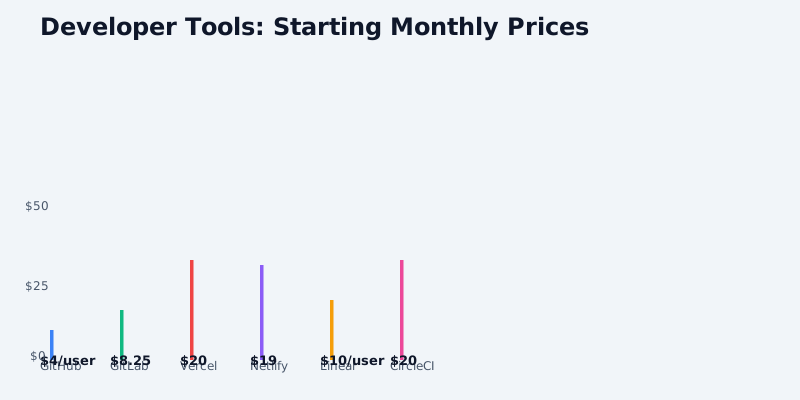
- Pro ($4/user/month): Private repositories (now included in Free), unlimited Actions minutes, advanced security, code owners
- Teams ($21/user/month): Shared access controls, team permissions, required for mid-size organizations
- Enterprise: Custom pricing; $21/user/month floor + $100,000-500,000 annual minimum typical
Get the free SaaS Pricing Playbook
How 500+ SaaS tools really price themselves. Pricing tier breakdowns, hidden costs, negotiation tactics. PDF-ready guide delivered to your inbox.
Free forever. No spam. Unsubscribe anytime.
For a 10-person engineering team on Pro: $40/month. On Teams: $210/month. This is negligible compared to infrastructure and developer time.
GitHub's recent pricing change (2024-2025) moved private repositories to Free tier, making the Pro distinction about access controls and Actions minutes. A team of 5 developers will fit comfortably in Free ($0) or Pro ($20/month total) unless using advanced security scanning or CODEOWNERS enforcement.
GitLab positions itself as the all-in-one DevOps platform (Git + CI/CD + security). Pricing tiers:
- Free Tier: Unlimited repositories, unlimited collaborators, 400 CI/CD minutes/month (shared pool)
- Premium ($99/user/year = $8.25/month): 50,000 CI/CD minutes/month, advanced security scans, SAST/DAST, code quality
- Ultimate ($228/user/year = $19/month): Unlimited CI/CD minutes, advanced analytics, security orchestration
The key difference: GitLab's CI/CD (GitLab CI) is included in all tiers, whereas GitHub Actions is metered separately. A small team with heavy CI/CD will find GitLab cheaper-the 400 free minutes/month is roughly 10-20 builds for a typical microservice team, exhausted quickly.
For a 10-person team running 100 CI/CD builds/month (10 per person), GitLab Premium ($82.50/month) is $8.25 per person. GitHub Free ($0) + external CI/CD tool (CircleCI, GitHub Actions overage) could cost $500-2,000/month depending on build frequency.
Winner for small teams (1-10 people): GitHub Free or Pro ($0-40/month). Both support unlimited collaborators and basic CI/CD.
Winner for CI/CD-heavy teams: GitLab Premium ($82-3,000/month depending on team size). The included CI/CD minutes and no metering make it predictable.
Deployment Platforms: Vercel vs. Netlify
Vercel (Next.js company) prices on usage:
- Hobby (Free): 100 GB bandwidth/month, unlimited deployments, limited serverless function execution (10s timeout), no custom domain with SSL (paid), 100 seconds build time limit
- Pro ($20/month): 1 TB bandwidth/month, $0.50/GB overage, unlimited serverless function execution, custom domain with SSL included, 60-minute build timeout, 12 concurrent builds
- Enterprise: Custom pricing; $3,000+/month typical for guaranteed SLA and dedicated support
For a Next.js app with moderate traffic (10,000 visitors/month ≈ 5-10 GB bandwidth), Hobby tier is sufficient. Upgrade to Pro when you need custom domains, longer builds, or higher function concurrency.
The hidden cost: bandwidth overages. A viral blog post or trending app can consume 1 TB in a day. Pro tier includes 1 TB ($240 worth of overage protection), then $0.50/GB beyond. A HackerNews front-page spike (100 GB extra) costs $50.
Netlify offers similar pricing:
- Free Tier: 100 GB bandwidth/month, unlimited sites, basic builds, limited serverless functions (100 executions/month)
- Pro ($19/month): 1 TB bandwidth/month, $0.55/GB overage, advanced analytics, team management
- Business ($99/month): On-demand bandwidth scaling, dedicated support, advanced security features
Netlify's serverless function allowance (100 executions/month Free, unlimited Pro) is the practical difference. A Free tier site with heavy function usage (API calls, form submissions) will hit the limit quickly. A typical SPA or static site generates 10-20 function invocations/month, fitting comfortably in Free.
Netlify also charges for add-ons:
- Forms: $19/month for 1,000 form submissions (overage $0.01 per submission)
- Analytics: $9/month for advanced event tracking
- Edge Functions: Included in Pro tier
Winner for content sites: Netlify Free or Pro ($0-19/month). Zero hidden bandwidth costs below 1 TB monthly.
Winner for Next.js apps: Vercel Pro ($20/month). Native Next.js optimization and faster deployments justify the cost.
Issue Tracking: Linear vs. Jira
Linear is the modern startup choice, using seat-based pricing:
- Free Tier: Unlimited issues, 1,000 API requests/month, basic reports, no guest access
- Pro ($10/user/month, min 3 seats): Advanced reports, custom workflows, priority support, guest access ($5/guest), unlimited API
- Plus ($20/user/month): All Pro features + analytics, integrations, SLAs on support
For a 5-person engineering team on Pro: 5 × $10 = $50/month. This is dramatically cheaper than Jira, which charges per-seat at $7/month but with a 10-seat minimum ($70/month floor).
Linear's strength: simplicity. The interface is faster than Jira, keyboard shortcuts are built-in, and setup is 10 minutes (not hours). The trade-off: fewer integrations and less customization than Jira's ecosystem.
Jira (Atlassian) uses seat-based pricing with high minimums:
- Free: Up to 10 users, limited features (no automation, advanced workflows)
- Standard ($10/user/month, min 10 seats): $100/month floor; advanced workflows, automation rules, add-on marketplace
- Premium ($20/user/month, min 10 seats): $200/month floor; advanced security, custom fields (up to 20), better API
- Enterprise: Custom pricing; $5,000+/month typical for 100+ users with SLA guarantees
The 10-seat minimum is Jira's hidden cost. A 3-person startup wanting Jira Standard will pay $100/month for 10 seats, not $30. Linear's 3-seat minimum ($30/month) is far more fair for early-stage teams.
Jira excels in complex projects (large teams, custom workflows, integrations with hundreds of tools). But for most startups and mid-size teams, Linear is faster, cheaper, and sufficient.
Winner for startups (1-10 people): Linear Free or Pro ($0-100/month). No seat minimum, modern UX.
Winner for large teams with complex workflows: Jira Standard+ ($200-5,000/month). Worth the cost if you need 50+ seat management and custom integrations.
CI/CD: CircleCI vs. GitHub Actions vs. GitLab CI
GitHub Actions is free and convenient for GitHub users:
- Free: 2,000 Actions minutes/month (public + private repos), sufficient for 20-50 small builds/month
- Pro: Unlimited Actions minutes per user
- Self-hosted runners: No monthly cost; you provision your own servers
The free 2,000 minutes/month is roughly 40 builds × 50 minutes average, or 100 builds × 20 minutes. Most teams exceed this. Upgrading every developer to Pro ($4/month × 10 team members = $40/month) gives unlimited minutes.
GitHub Actions' advantage: zero configuration (uses YAML workflow files) and no vendor lock-in. Disadvantage: build matrix complexity and debugging are harder than dedicated CI/CD tools.
CircleCI offers generous free credits and flexible metering:
- Free: 6,000 credits/month (~6 hours of build time per month), 1 concurrent job, unlimited repositories
- Starter ($20/month): 25,000 credits/month, 3 concurrent jobs, team management
- Performance ($240/month): 100,000 credits/month, 10 concurrent jobs, advanced features
Credits are consumption-based: a Docker build consumes 10 credits/minute. A 10-minute build = 100 credits. 6,000 free credits = ~60 builds/month. This is tight for active development teams.
Upgrading to Starter ($20/month) gives 25,000 credits/month (4.16x more). For a 5-person team running 20 builds/day = 400 builds/month, you'll need Performance tier ($240/month) or setup self-hosted runners ($0/month but ops overhead).
GitLab CI is bundled with GitLab:
- Free: 400 CI/CD minutes/month (shared pool), unlimited jobs
- Premium: 50,000 CI/CD minutes/month
- Ultimate: Unlimited CI/CD minutes
GitLab CI's advantage: no separate bill, included in Free tier. GitLab's web interface is mature (better than GitHub Actions UI), and pipeline debugging tools are superior. However, adoption is lower-expect fewer integrations and community examples compared to GitHub Actions.
| Team | GitHub Actions | CircleCI | GitLab CI |
|---|---|---|---|
| 1-5 people, <30 builds/month | Free ($0) | Free ($0) | Free ($0) |
| 5-15 people, 100+ builds/month | Pro ($40-60/month) | Starter ($20/month) | Premium ($82.50/month) |
| 15-50 people, 500+ builds/month | Performance ($1,000+/month) | Performance ($240/month) | Premium ($3,000+/month) |
Winner for startups with GitHub: GitHub Actions Free or Pro ($0-40/month). Zero integration overhead.
Winner for consumption-heavy teams: CircleCI Starter ($20/month). Clearest build UX, best debugging tools, most cost-predictable at mid-scale.
Winner for GitLab users: GitLab CI (included). No separate CI/CD bill; Premium tier ($82.50/month) is competitive.
Total Development Stack: Budget Examples

Bootstrapped startup (1-5 people):
- GitHub Free: $0
- Vercel/Netlify Hobby: $0
- Linear Free: $0
- GitHub Actions Free: $0
- Total: $0/month
Seed-stage (5-15 people):
- GitHub Pro: $40/month (or GitLab Premium: $82.50/month)
- Vercel Pro: $20/month
- Linear Pro: $50/month
- GitHub Actions Pro: Included in GitHub Pro
- Total: $110/month (or $152.50 with GitLab)
Series A (15-50 people):
- GitHub Teams: $210/month (10 people @ $21/user)
- Vercel Pro: $20/month
- Linear Pro: $100/month (10 people @ $10/user)
- CircleCI Starter: $20/month
- Total: $350/month
Series B+ (50+ people):
- GitHub Enterprise: Custom, estimated $300/month
- Vercel/Netlify Pro: $20-100/month
- Linear Pro/Plus: $500-1,000/month (50 people)
- CircleCI Performance: $240/month
- Jira Standard: $100-500/month (10-50 seats)
- Total: $1,160-2,140/month
Hidden Costs and Gotchas
- Bandwidth overages on Vercel: A single viral article can cost $50-500 in unplanned overage fees. Set bandwidth alerts or migrate traffic-heavy assets to a CDN.
- CI/CD minutes are easy to exceed: Developers running builds locally (yarn build) vs. CI (npm ci → build) consume 2-3x credits. Optimize build times first; metering is secondary.
- Seat licenses are per-user, not per-project: Removing a developer from GitHub Teams doesn't save money until you drop below the tier threshold (usually 10-20 seats). Plan team transitions accordingly.
- API rate limits are lower on Free tiers: Custom integrations (webhooks, CI/CD orchestration) will hit rate limits on Free tiers. Pro tiers (GitHub Pro, Linear Pro) have 10-100x higher limits.
- Self-hosted runners require ops maintenance: Saving $500/month on CI/CD by self-hosting servers costs $2,000-5,000/month in infrastructure and on-call engineer time. Usually not worth it under 100 developers.
- Netlify Edge Functions aren't included in Free tier: Advanced caching and request manipulation require Pro tier. Netlify's "Edge" pitch often implies included functionality that's actually tier-locked.
Recommendations by Team Stage
Months 0-6 (Idea stage, 1-3 people):
Use all Free tiers. No budget headroom. GitHub Free + Vercel Hobby + Linear Free + GitHub Actions = $0. Upgrade one tool (usually deployment platform) when you monetize.
Months 6-18 (MVP shipped, 3-10 people):
Budget $100-300/month on dev tools. Upgrade to Vercel Pro ($20) and Linear Pro ($50-100) when you're generating recurring revenue. GitHub Free still works at this scale unless you need advanced security features.
Year 1-2 (Seed funding, 10-25 people):
Budget $300-500/month. Standardize on GitHub Pro or Teams ($40-210/month), Vercel Pro ($20), Linear Pro ($100), and CircleCI Starter ($20). This combination supports most SaaS companies profitably.
Year 2+ (Series A+, 25-100 people):
Budget $1,000-2,000/month on dev tools. Evaluate Jira if you need mature workflow management, or stay with Linear for simplicity. Consider GitLab Premium if you want all-in-one Git + CI/CD. Migrate to self-hosted CI/CD runners only if bills exceed $1,000/month.
Bottom Line
The developer tools ecosystem in 2026 is deeply commoditized. Free tiers are genuinely useful (not just trials), and upgrading to Pro tiers is affordable for most teams. The largest variable cost is CI/CD metering-each extra developer adds 10-20 builds/month.
Most teams should target:
- GitHub Pro ($4/user/month) or GitLab Premium ($8.25/user/month) for Git hosting
- Vercel Pro ($20/month) or Netlify Pro ($19/month) for deployment
- Linear Pro ($10/user/month) for issue tracking (or Jira Standard at $100/month floor)
- GitHub Actions (included) or CircleCI Starter ($20/month) for CI/CD
This stack totals $100-300/month for a 5-10 person team, or $400-1,000/month for a 25-50 person team. Anything below this suggests missing tools; above this suggests enterprise complexity or over-provisioning.
Start with free tiers. Upgrade to Pro when you hit limits (build time, bandwidth, seat count). Avoid enterprise plans until you're 100+ engineers; the jump in cost ($10,000+/month) is rarely justified at mid-scale.
Compare tools directly using CompareTiers above. Most dev teams switch tools 2-3 times as they scale-starting free, upgrading Pro, then either consolidating (GitLab all-in-one) or optimizing per domain (best-of-breed).
