



Asana vs Monday.com: Which Costs Less in 2026?
If you're choosing between Asana and Monday.com, here's the short answer: Monday.com is cheaper, starting at $9/seat/month versus Asana's $10.99/seat/month. But that gap tells only part of the story. Monday.com has a 3-seat minimum on all paid plans, so a solo operator or tiny team often ends up paying for seats they don't use. Asana has no seat minimum - you pay for exactly the people on your team.
For a 5-person team billed annually, Monday.com costs roughly $45/month and Asana costs roughly $55/month. At 10 people the gap widens to $90 vs $110. By the time you're at 50 people, Monday.com saves you around $100/month - real money, though both tools offer broadly comparable feature sets at their mid-tier plans.
This guide covers every plan, calculates real costs at different team sizes, and flags the gotchas that could cost you more than the sticker price suggests.
Quick Pricing Facts
Asana 2026 Pricing (per seat, billed annually):
Get the free SaaS Pricing Playbook
How 500+ SaaS tools really price themselves. Pricing tier breakdowns, hidden costs, negotiation tactics. PDF-ready guide delivered to your inbox.
Free forever. No spam. Unsubscribe anytime.
- Personal: $0 (up to 10 users)
- Starter: $10.99/user/month
- Advanced: $24.99/user/month
- Enterprise: Custom pricing
- Enterprise+: Custom pricing
Monday.com 2026 Pricing (per seat, billed annually):
- Free: $0 (up to 2 seats)
- Basic: $9/seat/month (3-seat minimum, so $27/month minimum)
- Standard: $12/seat/month ($36/month minimum)
- Pro: $19/seat/month ($57/month minimum)
- Enterprise: Custom pricing
Monthly billing premium: Both tools charge roughly 20–30% more if you skip the annual commitment. On Asana Starter, monthly billing runs $13.49/user. On Monday.com Standard, it's $14/seat. Always compare annual prices to avoid surprises.
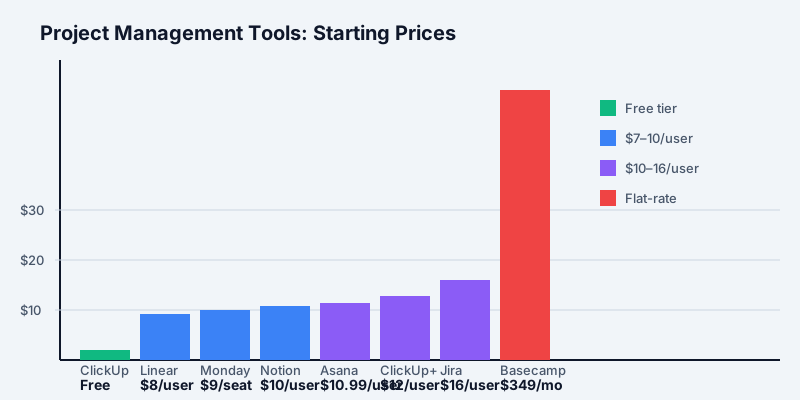
Asana Pricing Plans Breakdown
Personal (Free) - up to 10 users
Asana's free plan is genuinely usable, not a stripped-down teaser. You get unlimited tasks, unlimited projects, basic list and board views, integrations with Slack, Google Drive, and Microsoft Teams, and a mobile app. The key limitations are team size (10 users max), no timeline (Gantt) view, no custom fields, and no task dependencies.
For a small team managing straightforward projects with no cross-project dependencies, the free plan is a legitimate option - especially compared to Monday.com's 2-seat cap on its free plan.
Starter - $10.99/user/month (annual)
Starter is where most small teams land. You get everything in Personal plus:
- Timeline (Gantt) view
- Workflow Builder (basic automations - up to 250 automations/month)
- Custom fields (up to 100)
- Task dependencies
- Milestones
- Reporting dashboards
- Google SSO
- 100+ integrations
- Guest access (up to 10 guests for free)
For a project team that needs Gantt views and basic automation, Starter covers most ground. The 250 automation cap is the one constraint that bites growing teams - a single workflow triggered frequently can eat through that quota faster than expected.
Advanced - $24.99/user/month (annual)
Advanced is priced nearly 2.3x higher than Starter, which makes the jump harder to justify. What you gain:
- Unlimited automations (from 250/month)
- Advanced reporting and dashboards (with custom charts)
- Portfolios (view multiple projects in one dashboard)
- Goals (track OKRs and objectives)
- Time tracking
- Admin console with advanced permissions
- Priority support
- SAML SSO and custom security settings
Portfolios and Goals are the standout features at Advanced. If your team is tracking multiple strategic workstreams simultaneously - common at teams of 25+ - these features save meaningful time. For smaller teams doing straightforward project work, Starter is usually sufficient.
Enterprise and Enterprise+ - Custom pricing
Enterprise adds organization-wide governance: advanced user provisioning, custom branding, data residency options, enhanced SLA support, and audit logs. Enterprise+ adds more granular security controls and dedicated customer success. Pricing is negotiated - expect starting points around $40+/user/month based on publicly available reports, though actual deals vary widely with contract length and seat count.
Monday.com Pricing Plans Breakdown
Free - up to 2 seats
Monday.com's free tier is more limited than Asana's. You get up to 2 seats, 3 boards, unlimited documents, over 200 templates, and iOS/Android apps. Two people working on three boards is a narrow fit for any real team. The free plan is useful for evaluating the interface, but you'll hit the wall quickly.
Basic - $9/seat/month (annual, 3-seat minimum)
Basic includes unlimited boards, unlimited free viewers (read-only access for collaborators), 5 GB file storage, and prioritized customer support. What it doesn't include: timeline, calendar view, guest access, automations, or integrations. Basic is honestly underpowered for most project management use cases - most teams end up needing Standard.
The 3-seat minimum means the effective floor is $27/month, even if you're a 2-person team.
Standard - $12/seat/month (annual, 3-seat minimum)
Standard is where monday.com starts to shine. The jump from Basic to Standard adds:
- Timeline and Gantt views
- Calendar view
- Guest access (2 guests per paid seat)
- 250 automations/month
- 250 integrations/month
- 20 GB file storage
- Shareable forms for external intake
For most small to mid-sized teams, Standard delivers the core monday.com experience. At $12/seat it's $1/seat more than Asana Starter, but the guest ratio (2 guests per paid seat vs Asana's 10 fixed free guests) can tilt cost comparisons depending on how many external collaborators you have.
Pro - $19/seat/month (annual, 3-seat minimum)
Pro is monday.com's power tier, and it pulls ahead of Asana Starter significantly on automations:
- 25,000 automations/month (100x more than Standard)
- 25,000 integrations/month
- Time tracking
- Chart view and workload view (capacity planning)
- Private boards and docs
- Formula columns
- 100 GB file storage
- Google authentication
The automation jump from 250 to 25,000 is enormous. If your team builds even moderately complex workflows - status-change triggers, recurring task creation, cross-board dependencies - Pro's automation headroom is a major upgrade over both Standard and Asana Starter.
Enterprise - Custom pricing
Monday.com Enterprise covers enterprise-grade security, HIPAA compliance, advanced reporting, multi-level permissions, tailored onboarding, and enterprise integrations. Like Asana Enterprise, pricing is negotiated, typically starting around $40–50/seat/month for large contracts.
Head-to-Head Feature Comparison
| Feature | Asana Starter ($10.99) | Monday Standard ($12) |
|---|---|---|
| Timeline / Gantt | Yes | Yes |
| Automations/month | 250 | 250 |
| Integrations | 100+ | 250/month |
| Guest access | 10 free guests | 2 guests per seat |
| Dashboards | Basic | Basic |
| Custom fields | Yes (100 fields) | Yes |
| Time tracking | No (Advanced only) | No (Pro only) |
| SSO | Google SSO | No (Pro+) |
| Reporting | Limited | Limited |
| Mobile apps | Yes | Yes |
The feature sets at the mid-tier are nearly identical. Monday.com edges ahead on integration quotas (250/month at Standard vs Asana's count-based list), while Asana's guest model (10 free guests flat) is better for teams with many external collaborators.
Monday.com Pro pulls significantly ahead of Asana Starter on automations (25,000 vs 250/month), time tracking, workload management, and private boards. To match Pro on Asana you'd need Advanced ($24.99), which is cheaper than Pro ($19) - a rare win for Asana at higher tiers.
Project views: Monday.com has historically led on customizable views (board, timeline, Gantt, calendar, chart, workload all available by tier), while Asana has focused more on list and timeline. Both now cover the major views - the difference is user interface preference more than capability.
Automations and integrations: At Starter/Standard, both tools offer 250 automations/month. The gap opens dramatically at the next tier: Monday.com Pro gives 25,000/month while Asana Advanced gives unlimited. If automations are core to your workflow, both higher tiers handle serious volume - the question becomes which is cheaper, and Asana Advanced ($24.99) is actually less expensive than Monday.com Pro ($19) only if you have more than roughly 19 seats (since you're paying per seat on both).
Reporting: Asana Advanced has strong portfolio-level reporting and OKR tracking (Goals). Monday.com Pro has workload charts and custom dashboards. For cross-project strategic visibility, Asana's Goals and Portfolios are compelling. For operational team capacity, Monday.com's workload view is cleaner.
Which Is Cheaper for Your Team Size?
Let's do the math at common team sizes, comparing Asana Starter vs Monday.com Standard (the most comparable mid-tier plans).
5-person team (annual billing):
- Asana Starter: 5 × $10.99 = $54.95/month ($659/year)
- Monday Standard: 5 × $12 = $60/month ($720/year)
- Asana saves: $5/month ($61/year)
10-person team:
- Asana Starter: 10 × $10.99 = $109.90/month ($1,319/year)
- Monday Standard: 10 × $12 = $120/month ($1,440/year)
- Asana saves: $10/month ($121/year)
25-person team:
- Asana Starter: 25 × $10.99 = $274.75/month ($3,297/year)
- Monday Standard: 25 × $12 = $300/month ($3,600/year)
- Asana saves: $25/month ($303/year)
50-person team:
- Asana Starter: 50 × $10.99 = $549.50/month ($6,594/year)
- Monday Standard: 50 × $12 = $600/month ($7,200/year)
- Asana saves: $50/month ($606/year)
Wait - this is the opposite of the headline claim that Monday.com is cheaper. The reversal happens because Basic ($9/seat) is the cheaper Monday.com plan, not Standard. If your team can work on Basic:
10-person team on Basic vs Standard:
- Monday Basic: 10 × $9 = $90/month
- Asana Starter: 10 × $10.99 = $109.90/month
- Monday saves: $19.90/month ($239/year)
The honest comparison: Monday.com Basic is cheaper than Asana Starter, but Basic lacks timeline, calendar, automations, and guest access - features most teams actually need. At the comparable feature tier (Standard vs Starter), Asana is marginally cheaper per seat.
At the higher tiers:
- Asana Advanced ($24.99) vs Monday Pro ($19): Monday Pro is $5.99/seat cheaper - but Monday Pro lacks Asana's Portfolio and Goals features, and the automation headroom on both is massive. For a 10-person team, Monday Pro saves $599/year over Asana Advanced.
Hidden Costs to Watch
Asana Hidden Costs
Automation limits on Starter: The 250 automation/month cap sounds like a lot until your team builds a few triggers. A simple "when task is completed → assign next task → notify in Slack" chain can burn 3 automations per task. A team closing 100 tasks/month on a multi-step workflow will exhaust the Starter quota. Upgrading to Advanced for unlimited automations costs an extra $14/user/month - that's $700/month more for a 50-person team.
Guest access math: Asana gives 10 free guests on Starter. Once you exceed that, additional guests must be added as paid members or you need to upgrade to Advanced (where guests scale with team size). If you regularly work with agencies, contractors, or clients, the 10-guest cap can become a forcing function for a plan upgrade.
Timeline on Personal: Timeline (Gantt) is not available on the free Personal plan. Teams that outgrow free but only need the Gantt view - not automations, custom fields, or dependencies - must upgrade to Starter to get it.
Monday.com Hidden Costs
3-seat minimum on all paid plans: This is monday.com's most significant pricing quirk. A 2-person team on Standard pays for 3 seats ($36/month instead of $24/month). A solo operator needs to pay for 3 seats minimum. For small teams, this effectively raises the price floor and can make monday.com more expensive than it appears on a per-seat basis.
Automation and integration caps at Standard: The 250 automations/month cap applies to integrations separately - you get 250 automation actions AND 250 integration actions. A Slack notification triggered by a status change consumes one automation action and one integration action. Active teams hit both caps simultaneously. Moving to Pro ($19/seat) for 25,000 each is a significant cost jump just to handle moderate workflow volume.
Storage tiers: Basic includes 5 GB for the entire account. Standard offers 20 GB. If your team handles design files, video assets, or large documents through monday.com, you may hit storage limits faster than expected. Monday.com does not offer additional storage purchases - you upgrade the plan.
Free viewer seats: Monday.com offers unlimited free viewers (read-only) on Basic and above. This looks generous, but viewers cannot edit tasks, create items, or use automations. Any contractor who needs to update a task status becomes a paid seat.
When to Choose Asana
Asana is the better choice when:
Your team has many external collaborators. The 10 free guest seats on Asana Starter are a real advantage for agencies, consulting firms, or any team that routinely brings in clients or freelancers. Monday.com charges more quickly once you exceed the 2-guests-per-seat ratio.
You need portfolio-level visibility. Asana's Advanced plan Portfolios feature - view all your projects in a single dashboard with health indicators and progress metrics - is genuinely useful for managers overseeing multiple workstreams. Monday.com has dashboards, but Asana's Portfolios are more structured for cross-project reporting.
You want OKR / goal tracking baked into your project tool. Asana Goals (Advanced tier) links team projects directly to strategic objectives. If you track OKRs and want them connected to daily task work, Asana is the better fit. Monday.com requires third-party integrations or workarounds to replicate this.
You have a team of exactly the right size. Asana's no-minimum-seat model means a 2-person team pays for 2, a 1-person team pays for 1. Monday.com's 3-seat minimum adds unnecessary cost for small teams.
Your team prefers task-centric workflows. Asana's interface is organized around tasks and subtasks. Project management is explicit - tasks belong to projects, projects belong to teams. This mental model suits teams doing clearly scoped work like product launches, content calendars, or software sprints.
Visit the Asana pricing page for the latest tier details and annual discount breakdowns.
When to Choose Monday.com
Monday.com is the better choice when:
Your workflows are data-heavy or table-driven. Monday.com is built on a highly flexible "Work OS" model - every item is essentially a row in a spreadsheet, and you add any column type (status, person, date, number, formula, mirror). Teams managing inventory, tracking deals, or running operations where data structure matters find monday.com's grid model more intuitive than Asana's task list.
You need powerful automations at scale. Monday.com Pro's 25,000 automations/month is genuinely class-leading at that price point. If automation is core to your workflows - triggering notifications, creating recurring items, moving tasks between boards, updating stakeholders automatically - Monday Pro's headroom is substantial. Asana Advanced offers unlimited automations, but at $24.99/seat vs $19/seat, Monday.com Pro is cheaper per seat once you factor in the automation volume.
You need flexibility across different departments. Marketing teams running campaigns, HR managing onboarding, sales tracking pipelines, and dev teams running sprints can all run in monday.com using different board structures without needing separate tools. Asana's structure is excellent for project management but less natural for CRM-adjacent or data-tracking use cases.
Your team is visual and prefers customization. Monday.com's color-coded status columns, flexible views, and drag-and-drop interface tend to get faster user adoption from non-technical teams. The onboarding experience is more intuitive for people who've never used project management software.
You have at least 3 people paying. Monday.com's 3-seat minimum stops mattering once your team is large enough that you'd pay for 3+ seats anyway. Beyond that threshold, the per-seat cost advantage of Basic ($9 vs Asana's $10.99) starts to accumulate.
Visit the Monday.com pricing page to compare current plans and calculate annual savings.
Bottom Line
Monday.com and Asana are both mature, capable project management tools. Neither will let your team down on core functionality at the Standard or Starter tier. The decision mostly comes down to team size, workflow style, and which specific features your team will actually use.
Choose Asana Starter ($10.99/seat) if your team has external guests, values task-centric workflows, or wants OKR tracking built in. It's marginally more expensive per seat than Monday.com Standard, but the guest access and portfolio features often justify the difference.
Choose Monday.com Standard ($12/seat) if your team is data-driven, needs flexible board structures across departments, or wants a more visual/customizable interface. Accept the $1/seat premium over Asana knowing you're getting broader column and view options.
Choose Monday.com Pro ($19/seat) specifically if automations are central to how your team operates. The jump from 250 to 25,000 automations/month is worth paying for before considering Asana Advanced at $24.99.
For growing teams (25+ people): run the numbers both ways with your actual guest count and automation usage. The differences are real but modest at mid-scale - the bigger question is which interface your team will adopt and actually use. A cheaper tool everyone ignores costs more than an expensive tool that becomes part of the daily workflow.
For a live side-by-side breakdown, see our Asana vs Monday.com comparison page. You can also browse the full project management category to compare Asana, Monday.com, ClickUp, Notion, and others.
