


Figma vs Canva Pricing: Which Is Cheaper? (2026)
Figma and Canva are both modern design tools, but they serve different audiences and use cases. Figma targets professional designers and product teams building user interfaces and prototypes. Canva targets marketers, content creators, and non-designers making social media graphics and presentations. Their pricing models reflect this: Figma charges per editor per month, while Canva charges per person annually with a fixed team plan.
This guide compares pricing, hidden costs, scaling economics, and helps you choose based on team size and workflow.
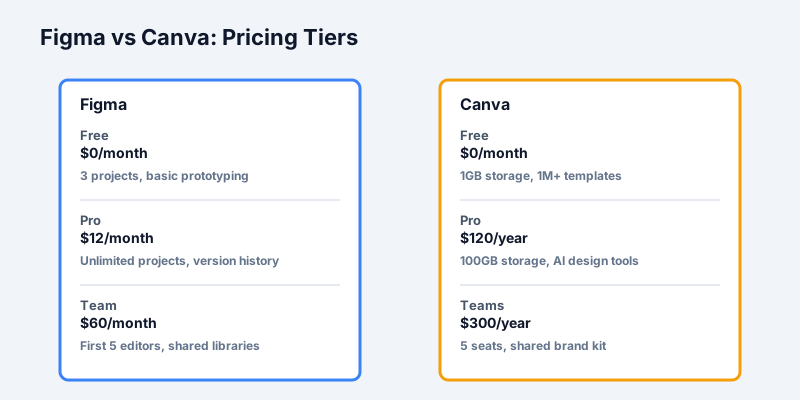
Quick Pricing Snapshot
Figma 2026 Pricing (USD):
Get the free SaaS Pricing Playbook
How 500+ SaaS tools really price themselves. Pricing tier breakdowns, hidden costs, negotiation tactics. PDF-ready guide delivered to your inbox.
Free forever. No spam. Unsubscribe anytime.
- Free: $0/month (3 open projects, limited prototyping)
- Pro: $12/month per editor (unlimited projects, advanced prototyping, version history)
- Team: $60/month per team (unlimited editors on shared workspace, shared libraries)
- Organization: $240/month (multiple teams, advanced admin controls)
Canva 2026 Pricing (USD):
- Free: $0/month (1 GB storage, basic templates, limited fonts)
- Pro: $120/year ($10/month equivalent) for 1 person (100 GB storage, 8M+ premium templates, AI design tools)
- Teams: $300/year for up to 5 people ($25/person/year or $2.08/person/month)
- Enterprise: Custom pricing (SSO, advanced brand management, dedicated support)
The headline: At single-user scale, Canva is 2–5x cheaper annually. At team scale (5+ people), Figma's per-editor Team plan becomes competitive or cheaper than Canva Teams, depending on editor vs. viewer count.
Free Tier Comparison
Figma Free
- 3 open projects (unlimited archived projects)
- All major design features (vector, text, shapes, components)
- Basic prototyping (basic flows, not interactive)
- View-only mode (unlimited stakeholders can view for free)
- Desktop and web access
- Community files for learning
- No version history (current version only)
- Limited to personal use (no team collaboration)
Canva Free
- Unlimited designs
- 1 GB cloud storage
- 1M+ free templates and design elements
- Basic fonts (100+)
- AI photo background removal
- Basic AI design generation (limited credits)
- Standard export (PDF, PNG, video)
- No team collaboration
- Watermark on some exports
Winner: Canva Free is more generous. Canva lets you create unlimited designs with 1 GB storage and AI tools. Figma's free tier limits you to 3 open projects and lacks interactive prototyping and version history. For non-designers experimenting with templates, Canva Free is more accessible. For UX/UI designers learning Figma's professional workflow, Figma Free is sufficient.
Pro Tier Comparison (1 Designer/Content Creator)
Figma Pro: $12/month
- Unlimited projects and files
- Advanced prototyping (interactive components, branching flows)
- 30-day version history (rollback capability)
- Unlimited shared libraries
- Multiplayer collaborative editing (with other Pro+ users)
- File inspection mode for developers
- API access and webhooks
- Desktop app
- 3 GB file storage (can upgrade to 100 GB for $15/month)
- Professional hand-off capabilities
Canva Pro: $120/year ($10/month)
- Unlimited designs
- 100 GB cloud storage
- 8M+ premium templates
- 8M+ premium photos, videos, music
- 1000+ premium fonts
- Bulk design feature (create multiple designs from CSV data)
- Brand kit (save brand colors, fonts, logos)
- Background remover AI tool
- Magic design AI (auto-generate layouts from text)
- Video editing up to 10 minutes
- Animation and transitions
- Export to PNG, PDF, MP4, GIF, HTML
- Priority customer support
Cost Comparison:
- Figma Pro annual: $144/year
- Canva Pro annual: $120/year
- Difference: $24/year (Canva cheaper by 17%)
Winner: Canva Pro is cheaper, but Figma Pro is better for design professionals. Canva Pro is ideal for social media managers, content creators, and marketers who need unlimited templates and AI design assistance. Figma Pro is essential for UX/UI designers, product designers, and anyone building interactive prototypes. If you're designing interfaces for web or apps, Figma is non-negotiable despite the $2 premium per month.
Team Tier Comparison (3–5 Person Team)
This is where the pricing models diverge most significantly.
Figma Team Plan: $60/month base + per-editor pricing
- Unlimited editors on shared workspace
- $10/month per additional editor beyond first 5
- Shared component libraries and design tokens
- Team permissions and asset management
- Multiplayer real-time collaboration
- 3 GB per editor storage (100 GB upgradeable per editor at $15/month each)
- Slack integration for notifications
- Team dashboard and audit logs
Cost at 3 editors:
- Base: $60/month (covers first 5 editors)
- Total: $60/month or $720/year
Cost at 5 editors:
- Base: $60/month (covers first 5 editors)
- Total: $60/month or $720/year
Cost at 10 editors:
- Base: $60/month + (5 × $10) = $110/month or $1,320/year
---
Canva Teams: $300/year for up to 5 people
- Seats for up to 5 people
- Each person gets Pro features (100 GB storage, 8M+ templates, AI tools)
- Shared brand kit (company colors, fonts, logos)
- Team folder management
- Approval workflows (content review before publishing)
- Activity logs for compliance
- Priority support
Cost scaling at different team sizes:
- 1–5 people: $300/year ($60/person/year or $5/person/month)
- 6–10 people: $600/year ($60/person/year or $5/person/month)
- 11–15 people: $900/year ($60/person/year or $5/person/month)
---
Cost Comparison at 5 Designers/Editors:
- Figma Team: $60/month × 12 = $720/year
- Canva Teams: $300/year
- Difference: Canva Teams saves $420/year (58% cheaper)
Cost Comparison at 10 Editors (3 designers + 7 brand/marketing team members):
- Figma Team: $110/month × 12 = $1,320/year
- Canva Teams: $600/year
- Difference: Canva Teams saves $720/year (54% cheaper)
Nuance: The Figma base $60/month covers the first 5 editors. If you have 7 editors, you pay for 2 additional editors ($20/month extra). Canva scales differently - once you exceed 5 people, you jump to the 6–10 tier at $600/year for the whole team.
Winner (price): Canva Teams is significantly cheaper. However, this comparison assumes all users are active editors. If your team has 5 active UI designers and 20 stakeholders viewing designs, Figma's view-only mode is free for stakeholders - but Canva still charges per team seat regardless of role.
Enterprise Tier Comparison
Figma Enterprise: $240/month per organization
- Unlimited editors across multiple teams
- Advanced org-level admin and SSO (single sign-on)
- Workfile (version control and file management)
- Advanced permissions and access controls
- Shared design tokens and component libraries across teams
- Organization-wide API access
- Dedicated Slack channel to Figma support
- Advanced audit logs
- Custom contracts and SLAs
Canva Enterprise: Custom pricing
- Custom seat count and billing
- SSO integration
- Advanced brand asset management
- Custom approval workflows
- API access and data export
- Dedicated account manager
- Custom domain for Canva content (Brand.canva.com)
- Advanced security and compliance (SOC 2, HIPAA available)
- Premium phone and email support
Pricing Reality:
- Figma Enterprise: Starting $240/month or $2,880/year (minimum for org-level features)
- Canva Enterprise: Estimated $3,000–$10,000/year for 10–50 seat equivalent (no published pricing)
Winner (features): Figma Enterprise is more transparent. Figma's $240/month fixed cost is known. Canva requires a sales call, which suggests pricing is negotiated per customer. For large, design-heavy teams (20+ designers), Figma Enterprise is often cheaper due to unlimited editor seats after the base $240/month.
Scaling Economics: 3-Year TCO
Let's project costs over 3 years as a team grows.
Scenario 1: Solo Designer Growing to 3-Person Team
Figma:
- Year 1: Pro ($12/month) = $144
- Year 2: Pro ($12/month) = $144
- Year 3: Team ($60/month with 3 editors) = $720
- 3-Year Total: $1,008
Canva:
- Year 1: Pro ($120/year) = $120
- Year 2: Pro ($120/year) = $120
- Year 3: Teams ($300/year for 5 seats) = $300
- 3-Year Total: $540
Difference: Canva saves $468 over 3 years
---
Scenario 2: 5-Person Design Team Staying Stable
Figma:
- Year 1–3: Team ($60/month × 12) × 3 years = $2,160
Canva:
- Year 1–3: Teams ($300/year) × 3 years = $900
Difference: Canva saves $1,260 over 3 years (58% cheaper)
---
Scenario 3: 10-Person Mixed Team (6 designers + 4 brand/marketing)
Figma:
- All 10 as editors on Team plan: Base $60 + (5 × $10) = $110/month
- Year 1–3: $110 × 12 × 3 = $3,960
Canva:
- 10 people across two team seats: 2 × $300/year = $600/year
- Year 1–3: $600 × 3 = $1,800
Difference: Canva saves $2,160 over 3 years (54% cheaper)
Key insight: At team scales of 5–15 people, Canva Teams is dramatically cheaper. Figma's advantage only emerges at 25+ editors because Figma's base $60 covers unlimited people - the pricing is front-loaded.
Hidden Costs and Restrictions
Figma's Hidden Costs
- File storage: Base includes 3 GB per editor. Upgrading to 100 GB costs $15/month per editor.
- Multiplayer collaboration: Only Pro+ users can edit simultaneously. Viewer accounts are free, but if your team needs 20 active editors, you pay for all 20.
- Plugins: Most Figma plugins are free, but some premium plugins charge separate subscriptions ($5–$50/month for tools like Anima, Breakpoints, etc.).
- API access: Free tier is 1,000 queries/month. Beyond that, API pricing is pay-per-call ($0.01–$0.05 per query).
Canva's Hidden Costs
- Team seat usage: Once you assign someone a team seat, you pay for them even if they're inactive. No automatic unused seat cleanup like Figma.
- Brand Kit: Included, but you can only create 1 brand kit on Teams. Creating a second brand kit requires upgrading.
- Video and advanced features: Some premium features (like Magic Design with AI) are limited to Pro+. Teams get full access, but individual Free users don't.
- Bulk design: Feature to create 100s of designs from data requires Pro or Teams tier.
Use Case Breakdown
| Use Case | Better Choice | Why |
|---|---|---|
| Freelance UI/UX Designer | Figma Pro | Need version history, prototyping, export quality, professional hand-off. Canva is too basic. |
| Solo Content Creator | Canva Pro | Templates, AI design, bulk creation, 100 GB storage. Cheaper and easier than Figma. |
| In-house Design Team (3–5) | Canva Teams | 58% cheaper. Team collaboration, approval workflows, shared brand kit. |
| Product Design Team (5–10 UX/UI) | Figma Team | Multiplayer editing, component libraries, file inspection for developers. Must-have for product work. |
| Marketing/Social Media Team | Canva Teams | AI design, template library, brand management, approval workflows. Non-designers can self-serve. |
| Enterprise (50+ people, mixed roles) | Figma Enterprise | Unlimited editors, SSO, org-wide asset management, dedicated support. |
| Startup with Designer + Marketer | Hybrid | Figma Pro for product design + Canva Pro for marketing. $120 + $12/month = $132/month. |
When to Switch (Cost Optimization)
Switch from Canva to Figma if:
- You're hiring your first UX/UI designer and need interactive prototyping
- Your team is building a product or app (Canva's export quality is insufficient for dev hand-off)
- You need multiplayer real-time collaboration with developers
Switch from Figma to Canva if:
- Your team is primarily marketers, content creators, or brand managers (not designers)
- You need AI-powered design generation and template library
- You're budget-constrained and don't need advanced prototyping
Use Both if:
- Your company has separate product design and marketing teams (common at mid-market startups)
- Your budget is $200–300/month for design tools (Figma for product, Canva for marketing)
Recommendations by Team Size
Solo (you): Canva Pro ($120/year) if you're making templates and social content. Figma Pro ($12/month) if you're designing user interfaces.
2–5 people: Canva Teams ($300/year) unless you're a pure product design team, then Figma Team ($60/month).
5–15 people: Canva Teams ($300–600/year) for mixed teams. Figma Team ($60–$150/month) for design-focused teams. Consider hybrid approach.
15+ people: Figma Enterprise ($240/month) for org-wide design systems. Canva Enterprise (custom) for large marketing teams.
Conclusion
Canva is unbeatable on price at small team scales (1–10 people) and excels for non-designers and content creators. Figma dominates for professional product design, prototyping, and developer collaboration - but costs 2–3x more.
The best choice depends on your workflow, not just your budget. A 5-person marketing team will save $420/year using Canva Teams. A 5-person product design team will struggle with Canva's limitations and benefit from Figma's professional features.
For detailed side-by-side feature comparisons, visit our Figma vs Canva comparison with pricing calculators and filtering options. Or explore our design tools category to evaluate Figma, Canva, and other alternatives side by side.
