




Best Collaboration Tools Pricing Compared (2026)
Collaboration tools are the backbone of remote and hybrid work. Teams need to communicate (Slack, Teams), organize projects (Asana, Monday.com), and share knowledge (Notion, Confluence). But choosing between these platforms means comparing wildly different pricing models-per-user, per-team, per-project-making true cost comparison difficult.
This guide breaks down the market leaders: Slack, Microsoft Teams, Notion, Asana, and Monday.com. We'll compare pricing, hidden costs, scaling economics, and help you choose based on team size and use case.
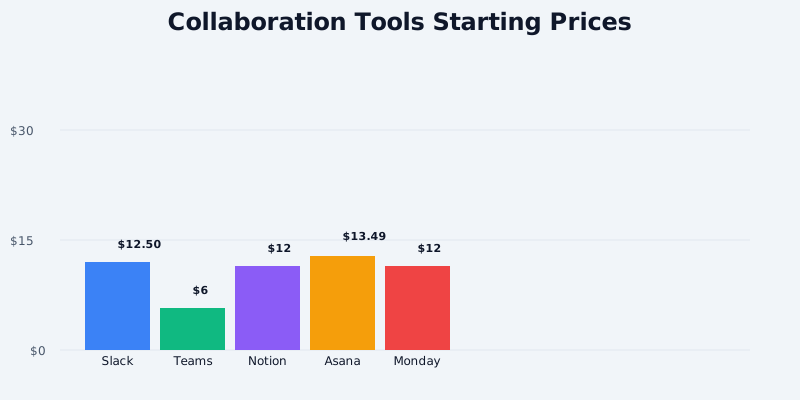
Collaboration Tools Pricing at a Glance
Communication Platforms:
Get the free SaaS Pricing Playbook
How 500+ SaaS tools really price themselves. Pricing tier breakdowns, hidden costs, negotiation tactics. PDF-ready guide delivered to your inbox.
Free forever. No spam. Unsubscribe anytime.
- Slack: Free ($0), Pro ($12.50/user/month), Business+ ($25/user/month), Enterprise Grid (custom)
- Microsoft Teams: Free ($0), Standard ($6/user/month), Premium ($12.50/user/month), Enterprise (custom)
Project & Task Management:
- Asana: Free ($0), Premium ($13.49/user/month), Business ($35.99/user/month), Enterprise (custom)
- Monday.com: Free ($0), Standard ($12/user/month), Pro ($24/user/month), Enterprise (custom)
Knowledge & Document Management:
- Notion: Free ($0), Plus ($12/month per workspace), Business ($25/month per workspace), Enterprise (custom)
These platforms often integrate with each other, so many teams use 2–3 simultaneously. Understanding individual pricing is crucial before calculating total collaboration budget.
Slack vs Microsoft Teams Pricing
Slack and Teams both serve as communication hubs, but their pricing structures diverge significantly.
Slack Free:
- Unlimited members in workspace
- 90 days of message history (limited search)
- 5 GB shared file storage per workspace
- Basic integrations (10 at a time)
- Desktop and mobile apps
- Video calls (1:1 and group, limited to 24 hours)
- Thread search and saved messages
Slack Pro: $12.50/user/month (billed monthly) or $11.25/user/month (billed annually)
- Unlimited message history
- 20 GB file storage per user
- Unlimited integrations
- Advanced search and filters
- Custom emoji and reactions
- User groups and org chart
- DLP (Data Loss Prevention) policies
- 99.99% uptime SLA
Slack Business+: $25/user/month (billed monthly) or $22.50/user/month (billed annually)
- Everything in Pro, plus:
- Org-wide visibility and user management
- Advanced security (SAML SSO, mandatory 2FA)
- Audit logs (3-year retention)
- Secure guest access
- Enhanced reporting and analytics
- Slack Connect (secured channel with external orgs)
- Priority support
Slack Enterprise Grid: Custom pricing (typically $500k+/year for 100+ seats)
- Unlimited everything
- Org-wide governance and compliance
- Data residency options
- 24/7 dedicated support
- Custom contracts and SLAs
---
Microsoft Teams Free:
- Unlimited members
- 90 days of message history
- 5 GB file storage per user (60 GB for group chats)
- Basic integrations
- Video calls (up to 100 participants, 60 minutes for group)
- Basic app ecosystem
- Online meetings and screen sharing
Microsoft Teams Standard (formerly Teams Essentials): $6/user/month
- Unlimited message history
- Unlimited cloud storage (via Microsoft 365)
- Advanced security (SAML SSO)
- Unlimited 1:1 video calls
- Unlimited meetings (up to 300 participants)
- Advanced search
- Meeting recordings (unlimited storage)
- Breakout rooms for meetings
Microsoft Teams Premium: $12.50/user/month
- Everything in Standard, plus:
- AI-powered features (meeting insights, note-taking)
- Live captions in 16 languages
- Meeting templates and custom backgrounds
- Policies for meeting attendee roles
- Extended retention for recordings (7 years)
- Priority support
---
Cost Comparison at 10 Users (Annual):
| Tier | Slack (Annual) | Teams (Annual) | Difference |
|---|---|---|---|
| Free | $0 | $0 | Tie |
| Entry (Pro/Standard) | $1,350 | $720 | Teams saves $630 (47%) |
| Mid (Business+/Premium) | $2,700 | $1,500 | Teams saves $1,200 (44%) |
Winner (price): Microsoft Teams is significantly cheaper. Teams Standard ($6/user/month) is half the cost of Slack Pro ($12.50/user/month). For budget-conscious teams, Teams is the obvious choice.
Winner (features): Slack is more feature-rich for communication. Slack has better integrations, more powerful search, and a larger app ecosystem. Teams is better integrated with Microsoft 365 (Outlook, OneDrive, SharePoint). Choose Slack if communication is your primary workflow; choose Teams if you're already in Microsoft 365.
Notion vs Asana vs Monday.com
These platforms handle project management, task tracking, and knowledge management-overlapping but distinct.
Notion Free:
- Unlimited pages and databases
- Web clipper
- Synced blocks
- Comments and mentions
- 5 MB file upload limit
- Template gallery
- 7-day export history
- Suitable for 1–3 collaborators
Notion Plus: $12/month per workspace
- Unlimited file uploads
- Unlimited guests (people sharing documents without paid seats)
- 30-day version history
- Priority support
- Covers all team members in workspace (not per-user)
Notion Business: $25/month per workspace
- Everything in Plus, plus:
- 90-day version history
- Advanced permissions and privacy controls
- Team analytics
- Covers all team members (no per-user charge)
Key insight: Notion's pricing is per-workspace, not per-user. A 10-person team pays $12/month (all 10 people on Plus) or $25/month (all 10 on Business). This makes Notion dramatically cheaper than per-user pricing at scale.
---
Asana Free:
- Up to 15 team members
- 3 project templates
- Unlimited tasks and projects
- Timeline, list, board, and calendar views
- Basic reporting
- 2 GB file storage
- Mobile app access
Asana Premium: $13.49/user/month (billed annually) or $16.49/month (billed monthly)
- All Free features, plus:
- Timeline (Gantt) and workload views
- Custom fields and templates
- Portfolio management
- Unlimited file storage
- Advanced reporting
- Form intake (capture requests from external stakeholders)
- Approval workflows
Asana Business: $35.99/user/month (billed annually) or $43.99/month (billed monthly)
- Everything in Premium, plus:
- Goal tracking and alignment
- Advanced governance
- API and webhooks
- Sandboxes for testing
- Advanced access control
- Admin console
- Org reporting and insights
- Dedicated customer success manager
---
Monday.com Free:
- Up to 2 team members
- Basic automation
- 3 boards max
- Up to 5 external users
- Mobile app
- Integrations (Slack, email, etc.)
Monday.com Standard: $12/user/month (billed annually) or $14/month (billed monthly)
- Up to 500 team members
- Unlimited boards
- Advanced automation
- Reporting and dashboards
- Timeline and Gantt views
- Recurrence automation
- Public board sharing
- Guest access (unlimited)
Monday.com Pro: $24/user/month (billed annually) or $29/month (billed monthly)
- Everything in Standard, plus:
- Advanced integrations
- Priority support
- Bulk operations
- Content blocks for documentation
- Mirror column (dynamic data pulling)
- Org-wide templates library
---
Cost Comparison at 10 Users (Annual):
| Platform | Free | Entry Tier | Mid Tier | Annual (10 users) |
|---|---|---|---|---|
| Notion | $0 | $144 (Plus/all 10) | $300 (Business/all 10) | $144–$300 |
| Asana | $0 (up to 15) | $1,618.80 (Premium/10 users) | $4,318.80 (Business/10 users) | $1,618–$4,318 |
| Monday.com | $0 (up to 2) | $1,440 (Standard/10 users) | $2,880 (Pro/10 users) | $1,440–$2,880 |
Winner (price): Notion is dramatically cheaper. A 10-person team on Notion Plus is $144/year. The same team on Asana Premium is $1,618/year (11x more expensive) and Monday.com Standard is $1,440/year (10x more expensive).
Winner (features): Asana and Monday.com are better for serious project management. Notion is better for documentation and knowledge management. Asana has superior timeline (Gantt) capabilities. Monday.com excels at flexible workflow automation.
Total Cost of Ownership: Real-World Scenarios
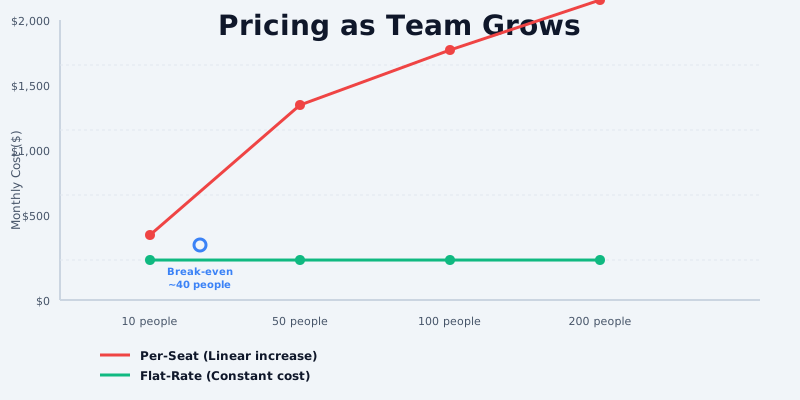
Scenario 1: 8-Person Startup (Early Stage)
Stack: Slack Pro + Notion Plus
- Slack Pro: 8 × $12.50 × 12 = $1,200/year
- Notion Plus: $12 × 12 = $144/year
- Total: $1,344/year ($112/month)
Stack: Microsoft Teams Standard + Notion Plus
- Teams Standard: 8 × $6 × 12 = $576/year
- Notion Plus: $12 × 12 = $144/year
- Total: $720/year ($60/month)
Difference: Teams-based stack saves $624/year (46% cheaper)
---
Scenario 2: 15-Person Growth Stage (Separate PM & Comms Teams)
Stack: Slack Business+ + Asana Premium
- Slack Business+: 15 × $25 × 12 = $4,500/year
- Asana Premium: 15 × $13.49 × 12 = $2,428.20/year
- Total: $6,928.20/year ($577/month)
Stack: Teams Premium + Notion Business + Monday.com Standard
- Teams Premium: 15 × $12.50 × 12 = $2,250/year
- Notion Business: $25 × 12 = $300/year (whole team)
- Monday.com Standard: 10 users × $12 × 12 = $1,440/year
- Total: $3,990/year ($332/month)
Difference: Mixed stack saves $2,938/year (42% cheaper) than Slack + Asana
---
Scenario 3: 30-Person Company (Multi-Department)
All-Slack Stack:
- Slack Business+: 30 × $25 × 12 = $9,000/year
- Slack Workflow Builder (automation): Already included
- Total: $9,000/year
Mixed Stack (Microsoft + Notion + Monday):
- Teams Premium: 30 × $12.50 × 12 = $4,500/year
- Notion Business: $25 × 12 = $300/year (whole workspace)
- Monday.com Pro: 20 PM/workflow users × $24 × 12 = $5,760/year
- Total: $10,560/year
Difference: All-Slack is actually $1,560/year cheaper (15%) at this scale
Key insight: At 30+ people, the all-Slack stack can be cost-competitive with mixed tools if you're building internally. But Slack's higher per-user cost makes it less efficient than a hybrid Teams + specialized tools approach for teams under 20.
Hidden Costs and Scaling Traps
Slack Hidden Costs:
- Slack Connect: Paid integration between workspaces for enterprise customers only
- Slack Workflow Builder: Included in Pro+ but limited automation compared to Zapier
- Apps and integrations: Free integrations exist, but premium integrations (Salesforce, Zendesk) may charge separately
- Archiving and compliance: Long-term message archival requires export/third-party tools
Microsoft Teams Hidden Costs:
- Microsoft 365 licensing: Standard/Premium Teams requires Microsoft 365 subscription ($6–$22/user/month). Teams can be used with basic Microsoft 365 Business plans.
- Meeting recording storage: Unlimited recordings stored in OneDrive/SharePoint, but storage limits apply if you hit 1 TB per user
Notion Hidden Costs:
- Guest limitations: External stakeholders who need view-only access don't count as paid seats, but full collaborators do
- API access: API calls are free, but heavy API usage might trigger rate limits requiring enterprise plan
Asana Hidden Costs:
- Premium integrations: Some apps (Salesforce, Jira) are behind premium tier
- Portfolio management: Project portfolio requires Premium tier; timeline views also require Premium
- Approval workflows: Approval routing is a Premium-only feature, not available on Free
Monday.com Hidden Costs:
- Guest seats: External stakeholders count as users and require paid seats
- Automation credits: Automations use "credits" that cap out on certain tiers
- Power-ups (integrations): Some integrations require additional credits or subscription
Platform Comparison by Use Case
| Use Case | Best Choice | Why |
|---|---|---|
| Communication-focused team | Slack Pro | Unbeatable for chat, integrations, search. Feature-rich but pricey. |
| Microsoft 365 Org | Teams Standard | Deeply integrated with Outlook, OneDrive, SharePoint. Half Slack's cost. |
| Knowledge management & docs | Notion Plus | Unlimited users per workspace, easy knowledge base, cheaper than alternatives. |
| Project management | Asana Premium | Timeline/Gantt views, portfolio management, form intake. Best for complex workflows. |
| Flexible automation | Monday.com Standard | Automation builder, multiple view types, strong in marketing/ops workflows. |
| Budget-conscious startup | Teams + Notion | $60–$144/month for 10 people. Most cost-effective combo. |
| Design/Creative team | Slack + Asana | Slack for real-time feedback, Asana for design review and approval workflows. |
| Sales team | Slack + Salesforce | Slack for quick comms, Salesforce CRM integrated. Asana is better for sales ops. |
Recommendations by Team Size
1–5 people: Use free tiers (Slack Free + Notion Free). Upgrade when you hit collaboration needs. Cost: $0–$50/month.
5–15 people: Slack Pro + Notion Plus is ideal ($144–$264/month). Or Teams Standard + Notion Plus ($72–$144/month) if you're Microsoft-heavy.
15–30 people: Either all-Slack (Business+) at $577+/month, or mixed stack (Teams Premium + Notion + Asana/Monday) at $330–$400/month. Hybrid is usually cheaper.
30+ people: Audit your usage. All-Slack might be cheaper than expected, or a specialized stack saves 30–40% annually. Consider consulting a workflow optimization specialist.
Conclusion
Slack is the market leader for communication but commands a premium price. Microsoft Teams is 50% cheaper for similar features if you're already in Microsoft 365. Notion is unbeatable for knowledge management due to its per-workspace pricing. Asana and Monday.com are strong for project management but costly at scale.
For most teams under 15 people, a Teams + Notion combo is the most cost-effective. For teams with heavy project management needs, add Asana Premium selectively to your power users rather than paying per-seat for everyone.
Explore pricing for your specific team size and workflow on our collaboration tools category page. Compare Slack, Microsoft Teams, Notion, Asana, and Monday.com side by side with our detailed tool comparisons.
