



The Two Pricing Models That Dominate SaaS
When comparing SaaS tools, two pricing models dominate the landscape: per-seat and flat-rate. Both have dedicated advocates, and the best choice depends entirely on your team size and growth trajectory. This guide breaks down the cost dynamics so you can predict your bill before signing a contract.
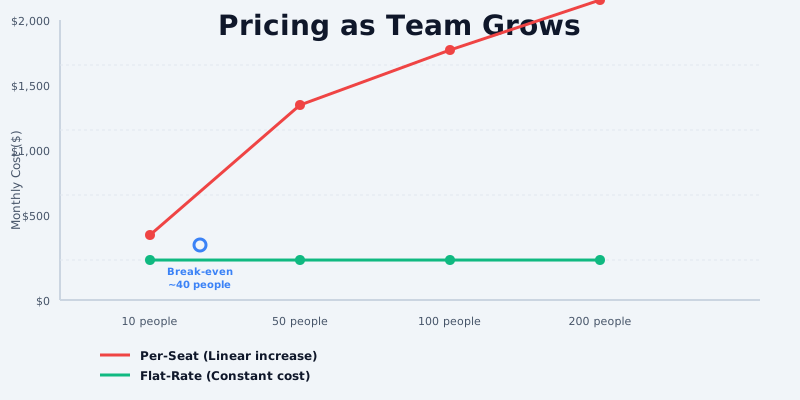
How Per-Seat Pricing Works
Per-seat pricing charges a fixed monthly fee for each user who needs access. The cost scales linearly with headcount.
The math is simple: If a tool charges $8.75 per user per month (like Slack's standard plan), a team of 10 pays $87.50/month. A team of 50 pays $437.50/month. View the full Slack pricing breakdown.
Get the free SaaS Pricing Playbook
How 500+ SaaS tools really price themselves. Pricing tier breakdowns, hidden costs, negotiation tactics. PDF-ready guide delivered to your inbox.
Free forever. No spam. Unsubscribe anytime.
Examples: Slack at $8.75/user/mo, Notion at $10/user/mo, Linear at $7/user/mo, and Salesforce at $25/user/mo are all per-seat models.
Predictability: Per-seat pricing is straightforward to forecast because cost is tied directly to a metric you control - headcount. There are no surprises if you stay within your user budget.
Scaling: The cost grows linearly. Add one more person, add one more monthly fee. This simplicity makes financial planning easier for small and medium teams.
How Flat-Rate Pricing Works
Flat-rate pricing charges a single price for full access, regardless of team size or usage volume. You pay one fee, and everyone gets access.
The model: A tool like Basecamp charges $349/month flat. Whether you have 5 users or 500 users, the price stays the same. Browse project management tools for other flat-rate options.
Examples: Basecamp at $349/mo flat, many niche B2B tools, and legacy SaaS applications often use flat-rate structures.
Predictability: Flat-rate pricing offers ultimate cost certainty. Your monthly bill never changes, making annual budgeting trivial.
Scaling: The cost stays fixed as your team grows. This model incentivizes the vendor to serve large teams cheaply, since they cannot raise the price.
Cost Comparison at Scale
Theory is useful, but numbers tell the real story. Let us compare actual costs at three critical team sizes using real pricing examples.
At 10 users:
- Per-seat (Slack at $8.75/user/mo): 10 × $8.75 = $87.50/month
- Flat-rate (Basecamp at $349/mo): $349/month
- Winner: Per-seat by $261.50/month
At small team sizes, per-seat pricing is dramatically cheaper. A 10-person team saves thousands per year by choosing per-seat.
At 50 users:
- Per-seat (Slack at $8.75/user/mo): 50 × $8.75 = $437.50/month
- Flat-rate (Basecamp at $349/mo): $349/month
- Winner: Flat-rate by $88.50/month
The break-even point falls around 40 users. Beyond that, flat-rate becomes the more economical choice.
At 200 users:
- Per-seat (Slack at $8.75/user/mo): 200 × $8.75 = $1,750/month
- Flat-rate (Basecamp at $349/mo): $349/month
- Winner: Flat-rate by $1,401/month
For large teams, flat-rate is undeniably cheaper - and the advantage grows exponentially as you add more users. A 200-person team saves nearly $17,000 per year by choosing flat-rate pricing.
When to Choose Per-Seat Pricing
Per-seat works best if you meet one of these criteria:
- Small to medium teams under 40 users. The cost advantage is clear and substantial.
- Variable team size. If you hire and layoff seasonally, per-seat lets you scale costs up and down.
- Budget predictability per person. Some finance teams prefer knowing the exact cost per headcount for accurate modeling.
- Limited feature set. If the tool offers identical features to all users, per-seat avoids subsidizing power users.
When to Choose Flat-Rate Pricing
Flat-rate pricing makes sense if you have:
- Large teams of 50 or more users. The monthly cost becomes a rounding error compared to per-seat alternatives.
- Rapid growth planned. If you are scaling from 20 to 100 users in 12 months, flat-rate locks in costs while you expand.
- Budget certainty. If CFO approval requires a fixed, unchanging monthly bill, flat-rate eliminates surprises.
- Heavy feature use across the org. Flat-rate encourages adoption without per-user charges.
The Bottom Line
Neither pricing model is inherently better - the best choice depends on your team size.
- Under 40 users? Per-seat pricing is almost always cheaper.
- Over 40 users? Flat-rate pricing saves money and grows more attractive as you scale.
- Growing fast? Flat-rate removes the risk of cost spiraling as headcount increases.
The key is to model the actual cost for your situation before committing. Use CompareTiers to browse our catalog and compare tools side-by-side with your expected team size. Check out project management tool pricing or compare communication tools to find the right fit. Many tools offer both pricing models on different tiers - run the numbers on each before you decide.
Calculation Examples and Break-Even Analysis
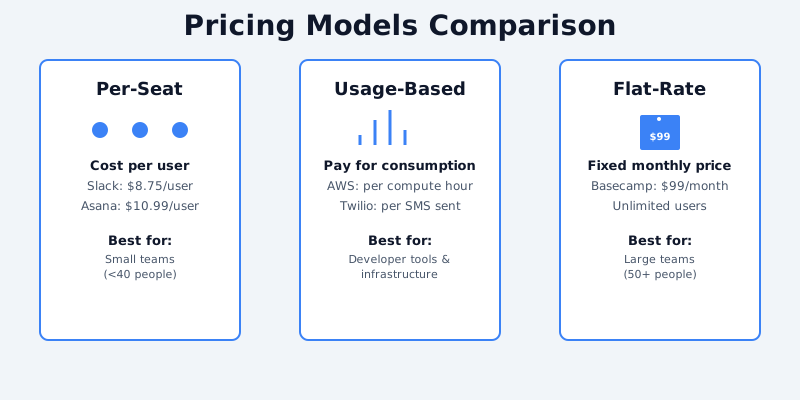
Scenario: 10-Person Marketing Team, Annual Commitment
Per-Seat Model Example: Asana Pro
- Per-seat cost: $10.99/user/month
- Team size: 10 users
- Annual cost: 10 × $10.99 × 12 = $1,318.80/year ($109.90/month)
- If team grows to 15 users: 15 × $10.99 × 12 = $1,978.20/year (+$659.40 annual cost)
- If team shrinks to 5 users: 5 × $10.99 × 12 = $659.40/year (-$659.40 annual savings)
Flat-Rate Model Example: Basecamp
- Flat monthly cost: $99/month
- Team size: unlimited (10, 15, 100 users all cost the same)
- Annual cost: $99 × 12 = $1,188/year
- If team grows to 15 users: still $1,188/year (no additional cost)
- If team shrinks to 5 users: still $1,188/year (cost doesn't decrease)
Break-Even Analysis:
At 10 users, Asana's per-user model ($1,318.80/year) costs slightly more than Basecamp ($1,188/year). Asana becomes more expensive at 11+ users. Basecamp becomes more expensive if you need to scale beyond 20+ users AND require specialized features like task dependencies or timeline views that Basecamp doesn't offer natively. According to SaaStr, the break-even point for per-seat vs flat-rate pricing ranges from 8-15 users depending on the tool category.
Scenario: Seasonal Team Fluctuation (Startup Running Campaigns)
Campaign production team expands from 8 people (off-season) to 25 people (3-month campaign), then contracts back to 8.
Per-Seat Model (Asana Pro): Total Annual Cost
- 6 months × 8 users = 48 user-months
- 3 months × 25 users = 75 user-months
- 3 months × 8 users = 24 user-months
- Total: 147 user-months × $10.99 = $1,615.53/year
This assumes you maintain seats even during off-season (typical). If you add/remove seats monthly, management overhead becomes significant. Research from Zuora Subscription Economy Index shows seat management overhead adds 10-15 hours per month for teams with volatile headcount.
Flat-Rate Model (Basecamp): Total Annual Cost
- $99/month × 12 months = $1,188/year
Regardless of how many users you have during each season, flat-rate pricing is constant. In this scenario, flat-rate saves the startup $427.53 annually and eliminates the need to manage seat additions/removals every quarter.
Scenario: Enterprise with Multiple Teams (50-Person Company)
Sales team (8 users) on Salesforce Professional ($330/user/month) = $2,640/month
Support team (5 users) on Zendesk ($69/user/month) = $345/month
Marketing team (7 users) on Marketo ($1250 base + $500/additional user) = $3,250/month
Total: $6,235/month across per-seat tools
This is where hybrid/flat-rate models shine. If these teams could consolidate to a single workspace with flat-rate pricing, the savings would be substantial. McKinsey research on pricing strategy shows enterprises can reduce software spending by 15-30% by consolidating tools and negotiating enterprise-wide flat-rate agreements.
When Per-Seat Pricing Becomes Expensive (Cost Threshold Analysis)
Per-Seat Breaks Even When Team Size Exceeds Capacity Limit
Notion Pro ($10/user/month) for unlimited members makes sense at 20+ users. At 20 users, you're paying $200/month vs. Basecamp ($99/month). But Notion's flexibility often justifies the premium because it consolidates tool sprawl.
However, if you're choosing purely between Notion and Basecamp for project management, per-seat pricing becomes expensive beyond 10-12 users.
Per-Seat Becomes Expensive When Casual Users Are Included
Example: A 50-person manufacturing company uses a project management tool. Only 10 people actively manage projects. The other 40 are occasional view-only stakeholders.
- Per-seat model (Asana): All 50 users × $10.99 = $549.90/month ❌
- Flat-rate model (Basecamp): $99/month ✅
Per-seat pricing punishes large organizations with many read-only stakeholders. This is why many enterprises push back on per-user SaaS tools and demand per-workspace or per-org pricing. Stripe Billing Guide documents how successful SaaS platforms transition from per-user to per-organization pricing as they move upmarket.
Per-Seat Breaks Even When Seat Count is Volatile
Companies with fluctuating headcount (contractors, seasonal hires, consulting projects) experience cost friction on per-user models:
- Constant seat management overhead
- Inability to downsize quickly (contracts lock you in)
- Unexpected bills when team expands
- Unused seat waste during contraction
Flat-rate eliminates this friction. ProfitWell analysis shows teams with volatile headcount face average annual seat management costs of $5,000-15,000 in labor overhead, making flat-rate pricing competitive even on a per-user basis.
Recommendation Framework
- Per-seat is cheaper IF: Team size is stable, <15 people, and only power users need access
- Flat-rate is cheaper IF: Team size is >15 people OR volatile OR includes many casual users
- Hybrid is cheapest IF: You can negotiate committed-use discounts with per-user vendors (annual contracts with volume discounts typically reduce per-user rates by 20-30%, making per-seat competitive even at larger team sizes)
