



The SaaS Pricing Landscape is Shifting Faster Than Ever
The price you pay for software today looks different than it did two years ago. Vendors are experimenting with AI surcharges, tightening free tiers, abandoning per-seat predictability for usage-based models, and hiding pricing behind "Contact Sales" walls. For teams managing 10+ subscriptions, these shifts add up to real budget pressure.
Understanding what is changing - and why - helps you negotiate better contracts and avoid overpaying for tools that no longer fit your needs.
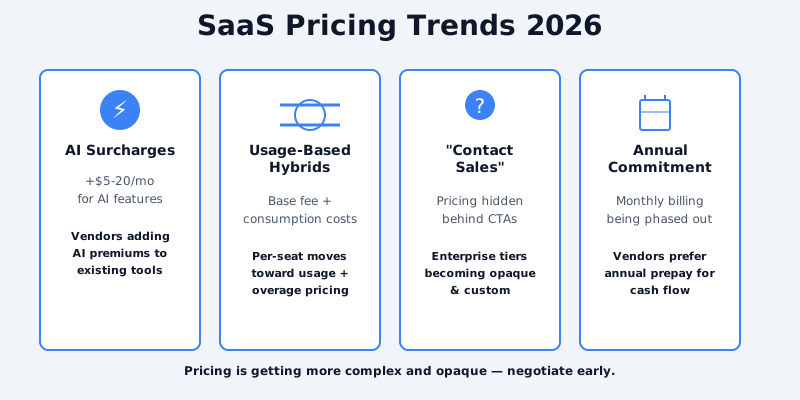
Trend 1: AI Features Are Driving $5-20/Month Price Premiums
OpenAI's success sparked a feature arms race. Every SaaS vendor now ships an "AI" toggle, and most are charging extra for it.
Get the free SaaS Pricing Playbook
How 500+ SaaS tools really price themselves. Pricing tier breakdowns, hidden costs, negotiation tactics. PDF-ready guide delivered to your inbox.
Free forever. No spam. Unsubscribe anytime.
The pricing pattern is consistent:
- Slack added AI features to higher tiers (starting at $12.50/user/month)
- Notion introduced Notion AI as an $8/month add-on on top of base subscriptions
- GitHub Copilot charges $10/month for code completion, or $20/month for GitHub Copilot Pro
- Grammarly added generative features to Premium ($144/year)
The problem: most of these "AI features" are basic completions or content generation that users can replicate with free tools like ChatGPT. Vendors are monetizing AI as a tax on existing customers rather than a distinct product. Many buyers are pushing back, viewing AI add-ons as feature inflation rather than genuine innovation. As AI becomes table-stakes rather than premium, vendors who charge $15+ per month for basic AI access risk losing customers to competitors offering similar functionality at lower cost or bundled in base tiers.
What this means for you: Don't accept AI premiums at face value. Ask whether the AI features genuinely replace tools you are already paying for. Often, you can disable the AI add-on and route through ChatGPT or Claude API directly at lower cost. Calculate the annual cost of the AI add-on per user (e.g., $8/month × 20 team members = $1,920/year) and compare it to building the same workflow with direct API access.
Related: Compare Notion pricing and GitHub pricing to see how AI is factored into tier structures.
Trend 2: Usage-Based Hybrid Models Are Replacing Pure Per-Seat
For years, per-seat pricing dominated B2B SaaS. You picked a tier, paid per user, and scaled linearly. That is changing.
Tools like Slack, Notion, and Figma are experimenting with consumption-based components:
- Slack now charges for "Slack Connect" connections and overage storage separately
- Notion moved toward seat-based + space usage hybrid
- Figma combines editor seats + viewer seats + storage overage pricing
- Loom added team collaboration features that bump you to higher usage tiers
This shift benefits vendors (they capture more value as you grow) but creates pricing unpredictability for buyers.
What this means for you: Usage-based models are harder to forecast. When evaluating a tool with hybrid pricing, model your costs at 2x and 5x your current usage. Ask the sales team for their average customer's spend at different scale milestones. Tools that offer spending caps are worth a premium.
See Figma pricing or browse design tools to understand how consumption-based models compare to flat-rate alternatives.
Trend 3: Price Transparency is Declining - More "Contact Sales" Tiers
Five years ago, B2B SaaS vendor websites published detailed tier breakdowns. Today, the trend is reversing.
- Salesforce has shifted most enterprise features into "Contact Sales"
- HubSpot hides pricing for advanced tiers behind a CTA
- Workday publishes no pricing publicly; it is all custom
- Atlassian Cloud products have added custom licensing for larger accounts
The reason: companies want to capture more customer value by personalizing pricing based on use case, company size, and willingness to pay. For customers, it means you have to negotiate with every vendor rather than accepting published rates.
What this means for you: Opaque pricing is a negotiation opportunity, not a drawback. If pricing is hidden, the vendor expects you to ask. Prepare your negotiation with competitor pricing from CompareTiers, your current spend, and alternatives. You can often secure 20-40% discounts on "Contact Sales" tiers if you are willing to negotiate.
Compare Salesforce pricing or explore CRM alternatives to see which vendors publish transparent pricing.
Trend 4: Annual-Only Pricing Is Becoming More Common
Fewer vendors now offer pure month-to-month billing. Instead, they are bundling discounts with annual commitments.
- Slack discontinued pure monthly billing for new workspaces; annual prepay is required
- Asana shifted from monthly to annual-only for team plans
- Loom increased the monthly-to-annual discount gap from 15% to 30%
- Linear pushes annual commitments as the path to lower per-user rates
Annual-only pricing locks in customers and improves vendor cash flow, but it increases buyer risk - you are committing to a tool for a full year without an easy exit.
What this means for you: Negotiate month-to-month terms if you are new to a tool. A vendor who will not offer monthly billing is signaling that they prioritize cash flow over customer flexibility. If a tool is mature in your workflow, annual commitment is usually worth the discount (15-25% savings). Just verify the contract allows plan downsizing if your team shrinks.
Trend 5: Platform Bundling Is Consolidating the Software Stack
Microsoft 365, Google Workspace, and Atlassian Cloud are bundling previously separate tools into single subscriptions. This changes the economics of competing point solutions.
- Microsoft bundled Teams into Office 365, making standalone communication tools harder to justify
- Google consolidated Gmail, Drive, Docs, Meet, and Chat into Workspace
- Atlassian bundled Jira, Confluence, and Opsgenie into Cloud bundles
- Adobe and JetBrains offer bundled suites at lower per-tool cost than individual subscriptions
Bundling benefits large organizations (fewer vendor relationships, consolidated billing, volume discounts) but makes it harder for niche tools to compete.
What this means for you: Evaluate bundled suites holistically. Microsoft 365 might seem expensive until you factor in the communication and collaboration tools you no longer need separately. Use the comparison tool to model bundled vs. point solution costs for your specific use case.
Trend 6: Free Tier Restrictions Are Tightening Across the Industry
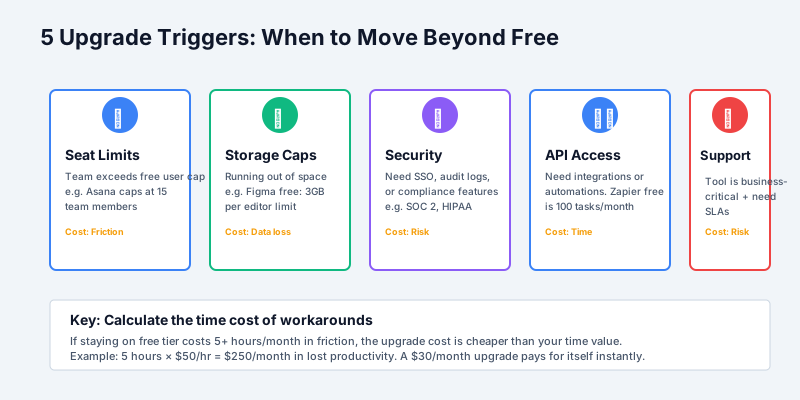
The freemium model is under pressure. Vendors are tightening free tiers to convert free users into paid customers faster.
- Figma reduced the free tier from 3 projects to 1 project
- Notion introduced stricter usage limits on free workspaces
- Airtable capped free base counts and reduced API rates
- GitHub limited free CI/CD minutes on public repositories
- Linear removed free team access (moved to free personal tier only)
The reasoning: many vendors spent years supporting large free-tier populations that generated minimal revenue. Tightening free tiers forces faster conversion or deflects to competitors.
What this means for you: Free tiers are no longer reliable for team evaluation. If you are considering a tool, expect that your free trial will run into feature walls. Factor the conversion cost (moving from free to paid tier) into your vendor evaluation timeline. Browse tool comparisons to model the paid tier cost from day one.
What This Means for SaaS Buyers: Three Strategies to Navigate Pricing Changes
1. Build a Software Inventory and Model Growth Costs
You cannot negotiate effectively if you do not know what you spend. Audit your current subscriptions, map actual usage for each tool, and model costs at 2x and 5x your current team size. Tools with the steepest cost curves are your negotiation targets.
2. Develop Multi-Tool Alternatives Within Each Category
Do not depend on a single vendor in any category. Maintain awareness of 2-3 alternatives for your critical tools. When a vendor raises prices or tightens tiers, you have a credible walk-away option to bring to the negotiation table.
See communication tools for Slack alternatives, or use the catalog to browse options by software type.
3. Negotiate Annual Commitments Only with Strategic Tools
Reserve annual commitments for tools that are deeply embedded in your workflow. For new tools or non-critical subscriptions, keep monthly billing to maintain flexibility. The 15-25% annual discount rarely justifies the lock-in risk for tools you might replace within 6-12 months.
The Bottom Line: Pricing Predictability is Dead
SaaS pricing is becoming more complex, opaque, and personalized. The days of publishing a simple tier chart and calling it done are over. Vendors are experimenting with AI premiums, usage-based hybrids, annual-only commitments, and hidden enterprise pricing.
For teams with 10+ subscriptions, this is a risk. For savvy buyers who negotiate, it is an opportunity. Understand the trends, model your costs, and use tool comparisons to stay informed on pricing changes across your stack.
Start by comparing your current tools or exploring pricing categories to stay ahead of these shifts.
Sources and References
- OpenAI Pricing - AI pricing benchmarks and API cost structures
- Gartner IT Spending Forecast - Enterprise SaaS spending trends and market projections
- Zuora Subscription Economy Index - Subscription model adoption rates and usage-based pricing data
- KeyBanc SaaS Survey - Annual survey of SaaS pricing strategies and growth metrics
- Paddle State of SaaS Pricing - Industry pricing model analysis and trend data
