








Best Communication Tools Pricing Compared (2026)
Team communication has splintered into five tiers: chat (Slack), unified collaboration (Teams), gaming/community (Discord), video (Zoom), and async video (Loom). Most organizations now use 2-3 tools simultaneously. This guide compares pricing, features, and ROI so you can build the right stack without overspending.
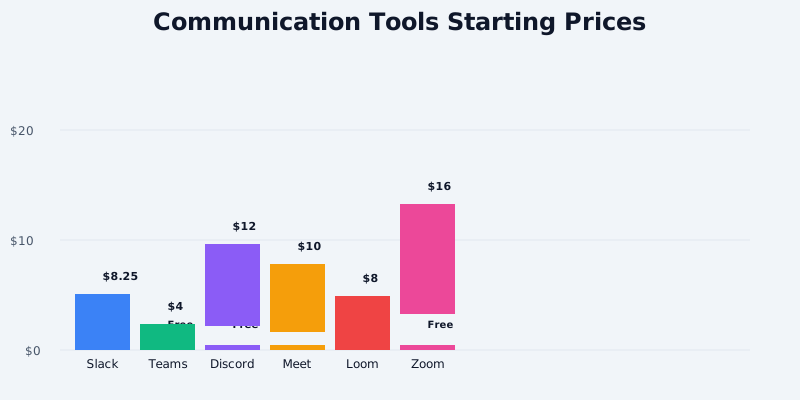
The Five Communication Tiers
Tier 1: Workplace Chat - Slack, Microsoft Teams
Tier 2: Community/Gaming - Discord
Get the free SaaS Pricing Playbook
How 500+ SaaS tools really price themselves. Pricing tier breakdowns, hidden costs, negotiation tactics. PDF-ready guide delivered to your inbox.
Free forever. No spam. Unsubscribe anytime.
Tier 3: Video Conferencing - Zoom, Google Meet
Tier 4: Async Video - Loom, Wistia
Tier 5: Phone Systems - Twilio, RingCentral
Most teams adopt tiers 1, 3, and sometimes 4. This guide focuses on the heaviest hitters.
---
Slack: The Chat Standard
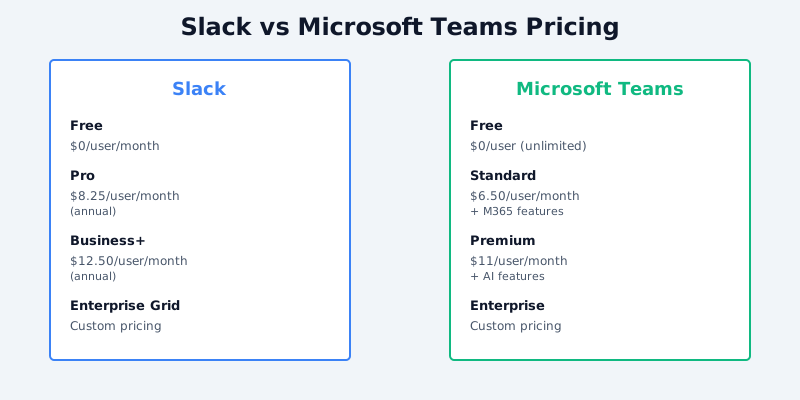
Slack Pricing (Per User/Month, Annual Commitment):
- Free: Unlimited messages, 90-day search history, 10K integrations, 1:1 voice/video
- Pro: $8.25/user/month (billed annually) → Full message history, Slack Connect, Canvas for docs
- Business+: $12.50/user/month → Admin controls, compliance, unlimited Canvas, enhanced search
- Enterprise Grid: Custom → Unlimited everything, 24/7 support, IP whitelisting, single sign-on
Real Cost Examples:
| Team Size | Free | Pro | Business+ |
|---|---|---|---|
| 5 users | $0 | $495/year | $750/year |
| 10 users | $0 | $990/year | $1,500/year |
| 50 users | $0 | $4,950/year | $7,500/year |
| 100 users | $0 | $9,900/year | $15,000/year |
Why Free Tier Works for Small Teams:
90-day message history retention covers most use cases (recent decisions, project memory). The free tier limitation is integrations (Slack Connect for cross-org sharing), not chat capacity.
Pro vs Business+ Trade-Off:
Pro ($8.25/user) adds unlimited history. Business+ ($12.50/user) adds compliance, advanced admin, and Canvas (shared documents within Slack). Only worth $4.25/user if your team needs audit trails or shared documents. Most teams stay on Pro.
Hidden Costs:
- Slack apps from third-party developers can cost $5-50/month (Salesforce, Jira, Asana integrations)
- Slack Connect allows sharing channels with external companies; each invitation counts against user seats
- Archival and eDiscovery add $5-10/user/month for compliance-heavy orgs
Annual Savings:
Paying annually saves 15% vs monthly. $8.25/month = $99/year per user; annual pricing is typically $84-90/year per user (3-month discount).
Best for: Startups, remote teams, agile orgs. Strong integrations, mobile app, unlimited async communication.
---
Microsoft Teams: The Bundled Alternative
Microsoft Teams Pricing:
Standalone Teams:
- Free: Unlimited chat, 60-min group calls, cloud storage (5GB/user)
- Teams Essentials: $4/user/month → Unlimited cloud storage (100GB), meeting recording, larger meetings (300 attendees)
- Teams Premium: $10/user/month → Advanced calling, real-time translation, smart recap, Teams rooms
Bundled with Microsoft 365 (Recommended):
- Microsoft 365 Business Basic: $6/user/month → Teams, Exchange email, OneDrive (1TB), Office apps
- Microsoft 365 Business Standard: $12.50/user/month → Teams + full Office desktop apps + OneDrive
- Microsoft 365 Business Premium: $20/user/month → Teams + Office + advanced security/compliance
Cost Comparison:
| Scenario | Slack | Teams Essentials | Teams via 365 Basic |
|---|---|---|---|
| 10 users, 1 year | $990 (Pro) | $480 | $720 |
| Email + chat needed | N/A | N/A | $720 (Teams + email) |
| Video calling + chat | $990 | $480 + $99 (Zoom) | $720 (both included) |
Why Teams via 365 Wins for Email Users:
If your team uses Outlook email, Teams Premium ($10) OR Teams Essentials ($4) bundled with Microsoft 365 Business Basic ($6) = $10/user/month total for chat + email + 1TB storage + 60-min video. Slack Pro ($8.25) + Zoom Pro ($16) + email elsewhere costs $24.25 - Teams saves $14.25/user/month.
Integrations Comparison:
- Slack: 2,000+ pre-built integrations, Zapier, webhooks
- Teams: 1,000+ integrations, strong Microsoft ecosystem (Dynamics, Power Automate), slower third-party adoption
- Winner: Slack for non-Microsoft shops; Teams for Microsoft-heavy orgs
Meeting Recording Storage:
Teams Essentials includes unlimited recording storage (OneDrive). Slack's video recordings aren't stored by Slack (use Zoom or Teams for that). This is a hidden Teams advantage.
Best for: Organizations already using Microsoft 365, email-dependent teams, budget-conscious enterprises. Lower cost when bundled.
---
Discord: Free Community Alternative
Discord Pricing:
- Free: Unlimited servers, channels, messaging, 1:1 voice/video, 8-hour call limit
- Discord Nitro: $12/month → 4K video, custom emojis, no 8-hour call limit, 500MB upload size
- Nitro Basic: $3/month → 4K video, 100MB upload, no nitro perks
Discord's Unexpected Value:
Discord is free with generous limits. Many teams use Discord instead of Slack ($8-12/user/month) as their chat platform. Cost: $0 vs $99-1,200/year per team.
Trade-Offs:
- Discord is built for gaming/communities, not enterprise (no SSO, limited admin controls, no compliance)
- Message search is poor
- No official integrations with CRM/project tools (rely on bots)
- 8-hour call limit on free tier is annoying for remote teams
Nitro Analysis:
$12/month per user (same as Slack Business+) for 4K video + perks, but no chat advantages. Niche use case: creators who stream or need high-quality video.
Best for: Open-source communities, gaming teams, low-budget startups, DevOps teams already familiar with Discord. Not suitable for regulated industries (healthcare, finance) due to lack of compliance.
---
Zoom: Video Conferencing Leader
Zoom Pricing (Per Host/Month):
- Free: Unlimited 1:1 meetings, group calls (limited to 40 min), basic recording
- Pro: $16/month per host → Unlimited group meeting duration, cloud recording, 1TB storage
- Business: $25/month per host (minimum 10) → Admin controls, dedicated support, 40GB recording storage
- Enterprise: Custom → Unlimited hosts, phone system, custom integrations, 24/7 support
Why "Per Host" Pricing Matters:
You pay Zoom Pro ($16/month) only for people who schedule/host meetings. Your 100-person company might only need 10 Pro hosts, totaling $160/month, not $1,600. Attendees (participants) don't need licenses.
Real Cost Example:
| Scenario | Free (40-min limit) | 5 Pro Hosts | 10 Pro Hosts |
|---|---|---|---|
| 50-person company | $0 (frustrating) | $80/month | $160/month |
| 200-person company | $0 (breaks workflows) | $320/month | $640/month |
Zoom Pro Features:
- Unlimited group call duration (huge: free tier caps at 40 min, killing daily standups)
- Cloud recording and transcript (1TB storage; auto-deletes after 30 days on free)
- Virtual backgrounds, speaker notes, polls
- Waiting room, participant limits (100 free, 300 Pro, 500+ with add-on)
Phone System Add-On:
Zoom Phone costs $9.99/month per user (not host) and replaces your office phone system. For 20 users: $200/month + $320/month (10 Pro hosts) = $520/month ($6,240/year) for fully unified Zoom solution (chat + video + phones).
Compare to Vonage/RingCentral:
RingCentral's all-in-one phone system costs $30-50/user/month (same as Zoom Phone + Zoom Pro bundled). Zoom is cheaper if you already use it for meetings.
Recording Storage Limits:
- Free: 1 GB (local storage only)
- Pro: 1TB cloud (auto-delete after 30 days if not downloaded)
- Business+: 40GB per host (slower auto-delete, better archival)
Best for: Remote teams, frequent video meetings, organizations needing 40+ minute calls. Dominates the market; integrates with calendars, Slack, Teams.
---
Google Meet: Freemium Simplicity
Google Meet Pricing:
- Free: Unlimited 1:1 calls, group calls (limited to 24 hours, but effectively unlimited), no recording
- Google One Premium: $10/month (personal) → Meet recording, 2TB storage (shared with Gmail/Drive)
- Google Workspace Business Standard: $12/user/month → Meet recording, 2TB storage per user, full workspace suite
Google Meet Advantages:
- Free tier doesn't cap group call duration (technically 24-hour limit, but practically unlimited for daily standups)
- No per-host licensing; anyone with a Google account can host
- Seamlessly integrated with Google Calendar, Sheets, Docs
- Lower friction than Zoom for casual teams
Recording Limitation:
Google Meet free tier doesn't record. You can't save meeting videos without paying $10/month (Google One) or $12/user/month (Workspace). This kills adoption for remote-first teams.
Cost vs Zoom:
| Need | Free | $16 Zoom Pro | $12 Google Workspace |
|---|---|---|---|
| Unlimited group calls | ✓ | ✓ | ✓ |
| Recording | ✗ | ✓ | ✓ |
| Chat with recordings | ✗ | ✓ (via Slack) | ✓ |
| ✗ | ✗ | ✓ | |
| Docs/sheets | ✗ | ✗ | ✓ |
Best for: Google Workspace users, budget teams unwilling to pay for recording, startups prioritizing simplicity over recording.
---
Loom: Async Video Messaging
Loom Pricing (Per User/Month):
- Free: 25 videos/month, 5-minute limit, basic editing, 7-day retention
- Starter: $8/month → Unlimited videos, 15-min limit, cloud storage, custom domain
- Professional: $25/month → 60-min limit, advanced editing, AI transcript, priority support
- Organization: Custom → Team workspace, usage controls, SSO, audit logs
Why Loom Matters:
Loom replaces synchronous meetings for async teams. Instead of scheduling a 30-min call, record a 5-min Loom walkthrough. Watch at 2x speed. Cuts meeting time 80%.
Cost Comparison: Meeting vs Async Video
| Scenario | Zoom Costs | Loom Costs | Savings |
|---|---|---|---|
| 5 people, 10 videos/month | $160 (Pro host) | $40 (5 × $8 Starter) | $120/month |
| 20 people, 100 videos/month | $480 (10 Pro) | $200 (5 × $25 Pro) | $280/month |
Real-World Example:
A 5-person distributed team uses Zoom for 2 hrs/day of meetings (120 hrs/month = $640/month in lost productivity at $100/hr rates). Switching to Loom for walkthroughs, design reviews, and onboarding cuts meetings to 30 min/day. Saves 75 hrs/month = $7,500/month in productivity. Loom cost ($40/month) pays for itself 187x over.
Loom vs Wistia:
- Loom: Simpler, cheaper ($8-25/month), better for internal comms
- Wistia: Marketing-focused, better analytics, $25-350/month depending on plan
Best for: Remote-first teams, async orgs, large companies cutting meeting overhead, customer onboarding (pre-recorded demos).
---
The Complete Communication Stack: Pricing Breakdown
Scenario: 10-Person SaaS Startup (Annual Costs)
Minimal (Free/Freemium):
- Discord Free: $0
- Google Meet Free: $0
- Total: $0/year
- Tradeoff: No recordings, limited admin controls, poor integrations
Lean (Startup):
- Slack Pro (10 users): $990
- Zoom Pro (2 hosts): $384
- Total: $1,374/year
- Includes: Chat history, unlimited calls, cloud recording
Balanced (Growing):
- Slack Business+ (10 users): $1,500
- Zoom Pro (5 hosts): $960
- Loom Starter (3 users): $288
- Total: $2,748/year
- Includes: Compliance, unlimited recordings, async video, advanced canvas
Premium (Enterprise):
- Microsoft 365 Business Standard (10 users): $1,500 → Chat + email + Teams + 1TB storage
- Zoom Business (10 hosts): $3,000
- Loom Professional (5 users): $1,500
- Total: $6,000/year
- Includes: Full enterprise compliance, AI transcripts, unified ecosystem
---
Storage Limits & Overage Costs
Recording Storage:
| Platform | Free | Pro | Notes |
|---|---|---|---|
| Zoom | 1GB (local) | 1TB cloud | $0.04/GB after |
| Teams Essentials | 5GB | Unlimited (OneDrive) | Included in 365 |
| Google Meet | None | 2TB (One) | Shared with Gmail/Drive |
| Loom | 7-day retention | Unlimited | Deleted after 7 days on free |
Storage Overage Risk:
Teams with 50+ monthly meetings quickly exceed Zoom's 1TB cloud storage. Loom clips typically use 100-300MB per video, so a team recording 100 videos/year needs 10-30GB - easily hit Loom's free 25-video limit.
---
Integration & Ecosystem Strength
Slack Integrations (2,000+ apps):
- CRM: Salesforce, HubSpot, Pipedrive
- Project: Asana, Monday, Jira, Linear
- Productivity: GitHub, Typeform, Stripe, Zapier
- Cost: Free-$50/month per app
Teams Integrations (1,000+ apps):
- CRM: Dynamics, Salesforce
- Project: Planner, Power Automate, Jira
- Productivity: Forms, Stream, SharePoint
- Cost: Often free through 365 bundle
Discord Integrations (Bots + webhooks):
- Community: MEE6, Dyno, Mantaro
- Dev: GitHub, GitLab, Sentry
- Cost: Free (community-built, no SLA)
Zoom Integrations:
- Calendar: Google Calendar, Outlook, iCal
- Chat: Slack, Teams, Discord
- CRM: Salesforce, Hubspot
- Cost: Free (native) or $5-20/month (third-party)
---
Which Tool Stack Should You Buy?
For Pure Collaboration (Chat + Video):
- Budget (<$100/mo): Discord Free + Google Meet Free
- Startup ($500-1,500/yr): Slack Pro + Zoom Pro (2-5 hosts)
- Growth ($2,000-5,000/yr): Slack Business+ + Zoom Pro (5+ hosts) + Loom Starter
For Microsoft-Integrated Teams:
- All-in-one ($6-20/user/mo): Microsoft 365 Business Basic/Standard
- Skip standalone Zoom; include Zoom Phone ($9.99) if needing enterprise phones
For Async-First, Remote-Heavy Orgs:
- Core ($1,500-3,000/yr): Slack Pro + Loom Professional (3-5 users)
- Add-on: Zoom Pro (2 hosts) for client calls only, not internal standups
For Enterprise (100+ Users):
- Unified: Microsoft 365 Enterprise + Zoom Business ($25/host) + Loom Organization
- Niche: Slack Enterprise Grid + Zoom Phone system + Loom org (best-of-breed)
---
Negotiation Tips (Enterprise)
For Slack:
- 100+ users: Expect 10-20% discount off list price
- 500+ users: Custom pricing, often $6-7/user/month for Pro equivalent
- Negotiate: Multi-year commitment (3-year locks in 15% discount), bundled renewals
For Zoom:
- 50+ hosts: Qualify for Business plan discount ($20-22/host instead of $25)
- 200+ hosts: Custom enterprise pricing, often $12-15/host
- Negotiate: Volume discounts, extended support, seat flexibility
For Teams:
- Microsoft 365 volume licensing: 10-25% discount at 100+ users
- 5-year commitment can reach 20% off (negotiate)
---
2026 Communication Trends
1. Consolidation Around Slack or Teams: Microsoft's bundling strategy (Teams + email + storage) at $12-20/user is winning over pure Slack shops. Expect Slack's growth to slow as Microsoft gains enterprise share.
2. Async-First Adoption: Companies are moving from synchronous (Zoom) to asynchronous (Loom, Discord) to cut meeting overhead. Loom's 40% YoY growth reflects this shift.
3. AI Transcription Bundling: Google Meet and Teams adding real-time translation; Zoom adding AI summaries. This will become table-stakes by end of 2026, pushing free tiers to upgrade.
4. Phone System Consolidation: Zoom Phone, Microsoft Teams Phone, and RingCentral are replacing legacy PBX systems. Expect 30% of SMBs to adopt by 2027.
5. AI Recording Assistants: Meeting notes generation (via Claude, GPT-4) becoming table-stakes. Expect new products bundling Zoom + AI + CRM syncing.
---
Pricing Comparison & Setup
Explore communication tools side-by-side on CompareTiers:
Browse the full Communication category to analyze 40+ tools and build your ideal stack.
