




Slack vs Microsoft Teams Pricing: Complete Comparison (2026)
When choosing a workplace communication platform, pricing is often the deciding factor. Slack and Microsoft Teams are the two market leaders, but their pricing models couldn't be more different. This guide breaks down every tier, hidden costs, and total cost of ownership scenarios so you can make the right choice for your team.
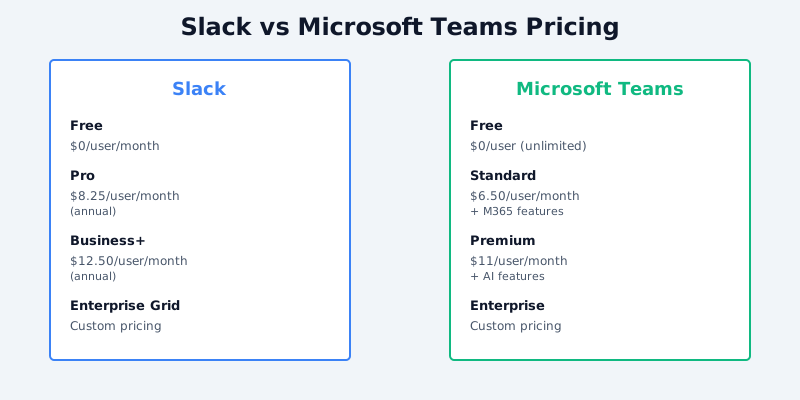
Quick Pricing Snapshot
Slack 2026 Pricing (USD):
- Free: $0/month (1 user minimum)
- Pro: $7.25/user/month (billed annually, $8.75/user/month billed monthly)
- Business+: $12.50/user/month (billed annually, $15/month billed monthly)
- Enterprise Grid: Custom pricing
Get the free SaaS Pricing Playbook
How 500+ SaaS tools really price themselves. Pricing tier breakdowns, hidden costs, negotiation tactics. PDF-ready guide delivered to your inbox.
Free forever. No spam. Unsubscribe anytime.
Microsoft Teams 2026 Pricing (USD):
- Free: $0/month (unlimited users)
- Standard: $6.50/user/month
- Premium: $11/user/month
- Enterprise: Custom pricing
The headline difference: Teams' free tier supports unlimited users, while Slack's free plan is limited to 10,000 most recent messages across all channels. But dig deeper, and the pricing story changes dramatically based on how many people you're adding.
Free Tier Comparison
Slack Free ($0)
- Unlimited channels and users
- Access to 10,000 most recent messages
- File storage: 5GB combined across workspace
- 1:1 and group messaging unlimited
- Standard integrations (up to 10)
- Workflow Builder with limited automations
Microsoft Teams Free ($0)
- Unlimited channels and users
- Message history: 1 month (30 days)
- File storage: 2GB per user (up to 100GB total)
- Unlimited 1:1 and group chat
- Video calling: up to 60 minutes (3 people), unlimited 1:1
- 300 integrations and apps
- M365 apps: Word, Excel, PowerPoint web versions included
Winner: Microsoft Teams. Teams' free tier allows unlimited users with significantly better video calling limits and integrated M365 apps. Slack's free plan forces you to pay once you need message history beyond 10,000 messages.
For teams under 10 people with light usage, Teams' free tier is genuinely production-ready. Slack's free tier becomes bottlenecked quickly as message volume grows.
Pro/Standard Tier Comparison (10-50 User Teams)
This is where most SMBs operate.
Slack Pro: $7.25/user/month (annual) = $87/month for 12 users
- Unlimited message history
- 20GB file storage per user
- Advanced search
- Workflow Builder (advanced automations)
- Guest access (up to 5 guests per workspace)
- Mobile app priority support
- Single Sign-On (SSO)
Microsoft Teams Standard: $6.50/user/month = $78/month for 12 users
- Unlimited message history
- 1TB file storage per user (via OneDrive)
- Video: 60-minute group calls, unlimited 1:1
- Advanced search
- Unlimited integrations and custom apps
- Guest access (unlimited from outside org)
- SSO included
- M365 apps: Word, Excel, PowerPoint, OneNote
Cost difference at 12 users: Slack $87 vs Teams $78 = $9/month ($108/year) in favor of Teams
Cost difference at 50 users: Slack $362.50 vs Teams $325 = $37.50/month ($450/year) in favor of Teams
The Teams advantage compounds with headcount because:
- 1TB file storage per user (Teams Standard) vs 20GB per user (Slack Pro) - Teams saves you from hitting paid upgrade limits
- M365 bundle economics - if you're already paying for Microsoft 365 Business Standard ($12.50/user), Teams is often already included (reducing incremental cost to $0)
Pro tip: Check your Microsoft licensing. If you're already on Microsoft 365 Business Standard or Microsoft 365 E3, Teams is often included at no additional cost, making the effective cost $0.
Business/Premium Tier Comparison (50-200 User Teams)
Slack Business+: $12.50/user/month (annual) = $625/month for 50 users
- Unlimited everything from Pro
- 3x advanced integrations (Analytics, custom workflows)
- Compliance exports
- Security features: IP restrictions, OAuth 2.0
- Advanced audit logs
- Preferred support
Microsoft Teams Premium: $11/user/month = $550/month for 50 users
- Unlimited everything from Standard
- Video calling with AI-powered features (background blur, live captions)
- Advanced audio/video quality
- Intelligent capture for meeting recordings
- "Together mode" video layouts
- Premium meeting templates
- Advanced compliance features
- 24/7 premium support
Cost difference at 50 users: Slack $625 vs Teams $550 = $75/month ($900/year) in favor of Teams
Cost difference at 100 users: Slack $1,250 vs Teams $1,100 = $150/month ($1,800/year) in favor of Teams
Teams Premium pulls further ahead here because:
- AI-powered meeting features (live captions, background blur) are built-in rather than third-party add-ons
- Meeting recording storage is generous (OneDrive-backed, up to 1TB per user)
- Enterprise integrations come at no extra cost (Slack charges more for advanced apps)
Total Cost of Ownership: Real-World Scenarios
Let's model actual TCO including integrations, apps, and ecosystem costs.
Scenario 1: 25-Person Growth-Stage Startup
Baseline (Slack):
- 25 users × $7.25 Pro = $181.25/month
- Integrations (HubSpot, Jira, GitHub, Salesforce): ~$200/month (paid tiers to unlock advanced features)
- Slack App Directory premium apps: ~$100/month
- Total: $481.25/month ($5,775/year)
Baseline (Microsoft Teams):
- 25 users × $6.50 Standard = $162.50/month
- M365 Business Standard (if not already licensed): $12.50 × 25 = $312.50/month
- Integrations (HubSpot, Jira, GitHub, Salesforce): ~$100/month (Teams has cheaper/free connectors)
- Total: $575/month ($6,900/year) - but M365 provides Word, Excel, Teams all-in-one
- If M365 already licensed: $262.50/month ($3,150/year)
Verdict: Teams wins if M365 is already in your stack. Slack wins if you're avoiding Microsoft entirely.
Scenario 2: 100-Person Mid-Market Company
Baseline (Slack):
- 100 users × $12.50 Business+ = $1,250/month
- Advanced integrations, custom bots, compliance tooling: ~$500/month
- Slack Connect (partner channels): $1,000/month (for 10 teams)
- Total: $2,750/month ($33,000/year)
Baseline (Microsoft Teams):
- 100 users × $11 Premium = $1,100/month
- M365 Business Standard/E3: $12.50–$20/user (assume $15): $1,500/month
- Advanced integrations: ~$200/month (Power Automate flows included)
- Teams Premium features (meeting governance, recording storage): Included
- Total: $2,800/month ($33,600/year)
- Core savings if M365 already licensed: $1,300/month ($15,600/year)
Verdict: Essentially tied in total cost, but Teams includes office apps, Teams Premium, and compliance tooling by default. Slack requires building a comparable stack à la carte.
Scenario 3: 500-Person Enterprise
At this scale, both require custom Enterprise Grid/Enterprise licensing.
Slack Enterprise Grid:
- Base: $12.50/user/month
- Volume discount (typically 15–30%): ~$1,875–$2,625/month for 500 users
- Custom integrations, advanced security, audit controls: ~$1,000/month
- Slack Connect, priority support: ~$2,000/month
- Total: $5,000–$6,500/month ($60,000–$78,000/year)
Microsoft Teams Enterprise (with M365 E5):
- M365 E5: $22/user/month × 500 = $11,000/month
- Teams Premium features included
- Advanced security (DLP, advanced threat protection): Included
- Unlimited Teams Channels, Power Automate: Included
- Total: $11,000/month ($132,000/year)
Verdict: Slack Enterprise Grid is cheaper for pure messaging at enterprise scale, BUT M365 E5 includes email, Office, Teams, Defender, and compliance all-in-one. Compare to Slack + email (Google Workspace $14/user or Exchange $15/user) + separate security tools, and total cost is similar or higher than M365.
Hidden Costs & Gotchas
Slack Hidden Costs
- Guest users: Free outside org, but limited to 5 guests per workspace (upgrade to Enterprise Grid for unlimited)
- Message archival: Need paid apps ($100+/month) for compliance/eDiscovery
- Video conferencing: Slack video calls are limited to 15 participants; larger meetings require Zoom/Google Meet integration (+$10–30/person/month)
- Integrations scale: Advanced integrations (API access, custom workflows) on Business+ tier require Enterprise Grid ($12.50/month minimum)
Teams Hidden Costs
- Phone system: Teams Phone requires E5 or add-on ($5–10/user/month) - Slack doesn't have native phone system
- Recording storage: Premium/Enterprise Plan recordings stored in OneDrive (1TB per user) - large teams may hit limits
- Compliance complexity: Enterprise features (DLP, retention policies) require E5 ($22/user/month), not premium
- Video limit quirk: Free tier video calls are 60 minutes for 3+ people (Slack Business+ has no time limit but lower participant limits)
Migration Costs & Switching Friction
From Slack to Teams:
- Message history export: Free (manual via Slack admin portal)
- Shared channels/Slack Connect relationships: Require rebuilding in Teams
- Custom bots/integrations: Some require rewriting (Slack SDK vs Teams SDK)
- User training: Teams interface is different; ~2–4 weeks ramp-up
- Estimated cost: 5–10 person-days of IT/admin time + user retraining
From Teams to Slack:
- M365 integration loss: Requires moving Word collab to separate tool (Google Docs, Notion)
- Video conferencing: Slack lacks native phone/PSTN; requires Teams Phone license replacement
- Estimated cost: 10–20 person-days (more disruptive due to M365 ecosystem)
Feature Parity Analysis
| Feature | Slack Pro | Teams Standard | Winner |
|---|---|---|---|
| Message History | Unlimited | Unlimited | Tie |
| File Storage | 20GB/user | 1TB/user | Teams |
| Video Calls | 15-person limit, 40 min | 60-min (3+), unlimited 1:1 | Teams |
| Guest Access | 5 guests max | Unlimited | Teams |
| Integrations | 10 free, paid beyond | 300+ included | Teams |
| Compliance/Audit | Limited (Pro) | Advanced (Standard) | Teams |
| AI Features | Limited | Built-in (captions, blur) | Teams |
| Phone System | None | Requires add-on | Tie |
| Office Integration | Zapier workaround | Native (Word, Excel) | Teams |
Recommendations by Team Size & Use Case
Choose Slack if:
- You value best-in-class chat/collaboration UX
- You're technology-forward but not M365-invested
- You need seamless third-party app ecosystems
- Team size < 30 and budget allows per-user costs
Choose Microsoft Teams if:
- You're already using M365 Business or Enterprise
- You need integrated office tools + chat + video
- You want built-in compliance and security features
- You value total cost of ownership over feature parity
- Team size > 50 (cost advantages compound)
Cost Summary:
- Under 20 users: Teams free tier is unbeatable
- 20–100 users: Teams + M365 Standard typically 20–30% cheaper than Slack + tools
- 100–500 users: Slack Business+ ($1,250/100 users) vs Teams Premium + M365 ($2,800/100 users), but Teams includes everything
- 500+ users: Slack Enterprise Grid vs M365 E5 - roughly equivalent all-in cost, but Teams ecosystem is more unified
Conclusion
The "cheaper" platform depends entirely on what you already own. If you're already invested in Microsoft 365, switching to Teams is an obvious financial win. If you're building a fresh tech stack, Slack's per-user pricing ($7.25 at scale) is attractive, but add up integrations, apps, and video conferencing, and Teams' integrated approach often wins on TCO.
For head-to-head comparison, check out our Slack vs Microsoft Teams comparison page for an interactive side-by-side breakdown of all features and pricing tiers.
