



HubSpot vs Salesforce Pricing: Which CRM Costs Less? (2026)
HubSpot and Salesforce are the two market-leading CRM platforms, but their pricing approaches couldn't be more different. HubSpot uses a freemium, per-user model. Salesforce charges per-seat with mandatory multi-year commitments and expensive add-ons. This guide breaks down every pricing tier, hidden costs, implementation fees, and calculates total cost of ownership at real team sizes.
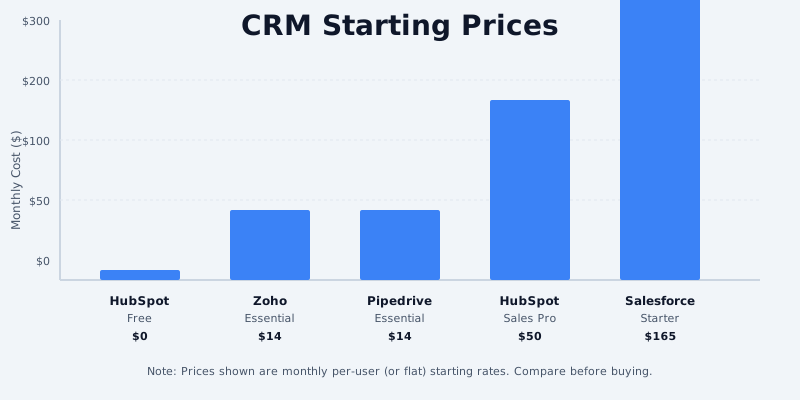
Quick Pricing Snapshot
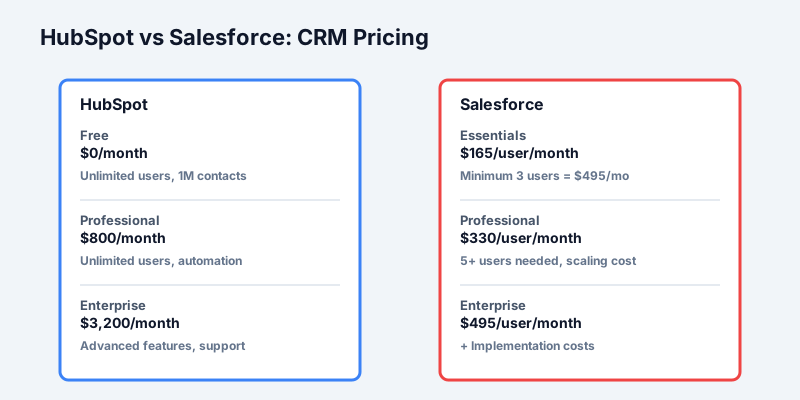
HubSpot CRM 2026 Pricing (USD):
- Free: $0/month (unlimited users, 1 million contacts)
- Starter: $50/month (unlimited users, 10,000 contacts)
- Professional: $800/month (per-user add-ons available)
- Enterprise: $3,200/month (custom seats, advanced features)
Get the free SaaS Pricing Playbook
How 500+ SaaS tools really price themselves. Pricing tier breakdowns, hidden costs, negotiation tactics. PDF-ready guide delivered to your inbox.
Free forever. No spam. Unsubscribe anytime.
Salesforce CRM 2026 Pricing (USD):
- Essentials: $165/user/month (minimum 3 users = $495/month)
- Professional: $330/user/month (minimum 3 users = $990/month)
- Enterprise: $495/user/month (minimum 5 users = $2,475/month)
- Unlimited: $660/user/month (no feature limits)
The headline: HubSpot's free CRM is genuinely useful (1M contacts, unlimited users). Salesforce has no free tier. But Salesforce's per-user pricing can be cheaper for large teams if you negotiate heavily.
Free Tier Comparison
HubSpot Free CRM ($0)
- Unlimited users
- 1 million contact records
- 50 MB file storage
- Basic email integration
- Deal, ticket, and contact management
- Up to 3 custom objects
- Workflow Builder (basic automation)
- Standard reporting
- Live chat: 1 operator
- Sequence Builder (basic email automation)
Salesforce CRM (No Free Tier)
- Salesforce offers no free tier for CRM
- 30-day trial with full Essentials features
- After trial, minimum commitment: Essentials tier ($165/user/month)
Winner: HubSpot by a landslide. HubSpot's free tier is genuinely production-ready for SMBs. Unlimited users means a 10-person sales team can use HubSpot for free indefinitely. Salesforce forces you to pay minimum $495/month for 3 users immediately, making the cost calculation simple: HubSpot free saves you $495–$1,500/month just to get started.
This is why HubSpot dominates among startups and small businesses under 20 people.
Starter Tier Comparison
HubSpot Starter: $50/month (per seat, unlimited users with 10K contact limit)
- Unlimited users (entire company can access)
- 10,000 contact records
- Basic deal automation
- Email integration
- Sales playbooks
- Sequences (email workflows)
- Basic reporting
- 1GB file storage
- Mobile CRM
Salesforce Essentials: $165/user/month (minimum 3 users)
- Professional/tiered access (users have different permission levels)
- 5,000 record limit per user
- Advanced automation (Process Builder, Flow)
- Unlimited file storage
- Advanced reporting
- Chatter (internal collaboration)
- API access (10,000 calls/day)
Cost at 5 users:
- HubSpot Starter: $50/month (all 5 users on same plan)
- Salesforce Essentials: 3 × $165 = $495/month
Cost at 10 users:
- HubSpot Starter: $50/month
- Salesforce Essentials: 5 × $165 = $825/month
HubSpot's advantage: The Starter tier has a pricing quirk - it's $50/month flat for the entire team, not per-seat. This makes it absurdly cheap for teams up to 50 people. Salesforce's minimum 3-user commitment immediately costs $495/month.
Verdict: HubSpot wins decisively at this tier. For teams under 10 people with basic CRM needs, HubSpot Starter at $50/month is unbeatable.
Professional Tier Comparison
Here's where both platforms get expensive.
HubSpot Professional: $800/month (base)
- Unlimited users
- 50,000 contact records (base)
- Advanced automation (Workflows Builder)
- Lead scoring
- Advanced reporting and dashboards
- Custom objects (up to 20)
- Sequence intelligence (predictive sending)
- Inbox with multi-email support
- Advanced file storage (100GB)
- Call recording and transcription (limited)
- AI-powered content assistant (limited)
- Custom properties and associations
Per-user add-ons on Professional:
- Sales Hub Professional: Already $800/month (no per-seat charge)
- Single Users: $50/user/month (for additional seats beyond base package)
Salesforce Professional: $330/user/month
- $330 × 5 users = $1,650/month
- $330 × 10 users = $3,300/month
- $330 × 20 users = $6,600/month
Cost Comparison at 5 Users:
- HubSpot Pro: $800 + (4 × $50) = $1,000/month
- Salesforce Pro: $330 × 5 = $1,650/month
- Difference: $650/month ($7,800/year) in HubSpot's favor
Cost Comparison at 10 Users:
- HubSpot Pro: $800 + (9 × $50) = $1,250/month
- Salesforce Pro: $330 × 10 = $3,300/month
- Difference: $2,050/month ($24,600/year) in HubSpot's favor
Cost Comparison at 20 Users:
- HubSpot Pro: $800 + (19 × $50) = $1,750/month
- Salesforce Pro: $330 × 20 = $6,600/month
- Difference: $4,850/month ($58,200/year) in HubSpot's favor
Key insight: HubSpot's professional tier scales cheaply because the base $800 includes most features for unlimited users. Additional per-user fees ($50/user) only apply for Sales Hub specific features. Salesforce's per-user model means every single person costs $330/month.
Enterprise Tier Comparison
HubSpot Enterprise: $3,200/month (base)
- Unlimited users (!)
- 100,000+ contact records (negotiable)
- Advanced automation (Workflows, custom code)
- Custom objects (unlimited)
- Revenue operations tools (forecasting, deal tracking)
- Advanced AI features (content, sequences, meeting intelligence)
- Dedicated support (Slack channel, weekly check-ins)
- Custom integrations and API access
- Sandbox environment for testing
- Advanced security and compliance
Per-user add-ons:
- Revenue Operations Hub: Included in base
- Sales Pro add-on: $100/user/month (for advanced forecasting)
Salesforce Enterprise: $495/user/month (minimum 5 users)
- $495 × 10 users = $4,950/month
- $495 × 20 users = $9,900/month
- $495 × 50 users = $24,750/month
Includes:
- Advanced automation and customization
- Salesforce Flow, Process Builder (unlimited)
- 500,000 API calls/month per org
- Advanced security and compliance (FedRAMP ready)
- Custom Salesforce apps and extensions
- Advanced analytics (Einstein Analytics, optional $50/user)
Cost Comparison at 20 Users:
- HubSpot Enterprise: $3,200 + (optional add-ons) = ~$3,200/month
- Salesforce Enterprise: $495 × 20 = $9,900/month
- Difference: $6,700/month ($80,400/year) in HubSpot's favor
BUT - Hidden Salesforce costs kick in here:
- Einstein Analytics (AI insights): +$50/user = $1,000/month
- Service Cloud add-on (if needed): +$100/month
- CPQ (quote generation): +$50/user = $1,000/month
- Field Service Lightning: +$40/user = $800/month
- Realistic Salesforce Enterprise total: $9,900 + $2,800 = $12,700/month
Adjusted difference: HubSpot $3,200 vs Salesforce $12,700 = $9,500/month saved by switching to HubSpot
Total Cost of Ownership: Real-World Scenarios
Let's include implementation, training, integrations, and ongoing support.
Scenario 1: 5-Person Early-Stage Sales Team
HubSpot:
- HubSpot Starter: $50/month
- Email integrations (Gmail, Outlook): Included
- Basic training (1 admin): 8 hours @ $100/hr = $800 one-time
- Onboarding: Free (HubSpot Academy)
- Year 1 total: $50 × 12 + $800 = $1,400
- Year 2+ annual: $600/year
Salesforce:
- Essentials (3 users minimum): 3 × $165 = $495/month
- Implementation (consultant): 40 hours @ $200/hr = $8,000 one-time
- Admin training: 16 hours @ $150/hr = $2,400 one-time
- Salesforce certification (admin): $200
- Year 1 total: $495 × 12 + $10,600 = $16,540
- Year 2+ annual: $5,940/year
TCO Winner: HubSpot saves $15,140 in Year 1 and $5,340 annually
The gap is so wide that for a 5-person team, Salesforce is almost never the right choice economically.
Scenario 2: 15-Person Growth-Stage Company (3 Teams)
Sales team (8), Customer Success (4), Ops (3)
HubSpot Professional:
- HubSpot Professional (Sales Hub): $800/month
- HubSpot Service Hub (CS ticketing): $400/month (Professional tier)
- Per-user add-ons (5 users for advanced features): 5 × $50 = $250/month
- Integrations (Slack, Zapier, Intercom): ~$100/month (mostly free)
- Implementation consulting (setup, workflows, integrations): 60 hours @ $150/hr = $9,000 one-time
- Admin training (3 admins): 24 hours @ $125/hr = $3,000 one-time
- Year 1 total: ($800 + $400 + $250 + $100) × 12 + $9,000 + $3,000 = $24,600
- Year 2+ annual: $19,800
Salesforce Professional:
- Sales Cloud Professional: 8 × $330 = $2,640/month
- Service Cloud Professional: 4 × $330 = $1,320/month
- Ops/admin user (1): $330/month
- Total user licenses: 13 × $330 = $4,290/month
- Implementation partner (critical for Salesforce): 120 hours @ $250/hr = $30,000
- Admin certification + training: 40 hours @ $150/hr = $6,000
- Annual maintenance (1 consultant, 10 hours/month): 120 hours @ $250/hr = $30,000/year
- Storage overage (if needed): ~$500/month
- Year 1 total: ($4,290 + $500) × 12 + $30,000 + $6,000 = $72,480
- Year 2+ annual: $63,480
TCO Winner: HubSpot saves $47,880 in Year 1 and $43,680 annually
Salesforce requires a full-time implementation investment ($30K+) that HubSpot doesn't need. Plus ongoing admin overhead is much higher.
Scenario 3: 50-Person Enterprise (Sales, CS, Ops)
Sales (20), Customer Success (15), Operations (8), Leadership (7)
HubSpot Enterprise:
- HubSpot Revenue Operations Hub: $3,200/month
- HubSpot Service Hub Enterprise: $3,200/month (separate suite)
- Per-user add-ons (15 users for advanced features): 15 × $100 = $1,500/month
- Integrations (Slack, Zapier, Intercom, Segment): ~$200/month
- Implementation (setup, customization, training): 160 hours @ $175/hr = $28,000
- Ongoing support (0.5 FTE admin): $60,000/year
- Annual feature optimization consulting: 20 hours @ $250/hr = $5,000/year
- Year 1 total: ($3,200 + $3,200 + $1,500 + $200) × 12 + $28,000 + $60,000 + $5,000 = $144,700
- Year 2+ annual: $113,700
Salesforce Enterprise:
- Sales Cloud Enterprise: 20 × $495 = $9,900/month
- Service Cloud Enterprise: 15 × $495 = $7,425/month
- Ops/admin users (3): 3 × $495 = $1,485/month
- Total core licenses: 38 × $495 = $18,810/month
- Add-ons (Einstein Analytics, CPQ, advanced features): $3,000/month
- Total monthly: $21,810
- Implementation (Salesforce partner, critical): 200 hours @ $300/hr = $60,000
- Admin + developer training/certification: 80 hours @ $200/hr = $16,000
- Ongoing admin support (1.5 FTE): $120,000/year
- Annual maintenance and optimization: 40 hours @ $300/hr = $12,000/year
- Year 1 total: ($21,810 + $3,000) × 12 + $60,000 + $16,000 + $120,000 + $12,000 = $415,320
- Year 2+ annual: $335,320
TCO Winner: HubSpot saves $270,620 in Year 1 and $221,620 annually
At 50 people, HubSpot's TCO advantage is massive. Salesforce's per-user model and implementation overhead become prohibitive.
Implementation & Setup Costs Breakdown
HubSpot Implementation
- Admin setup (standard workflows, custom properties): 20–40 hours @ $150–200/hr = $3,000–8,000
- Integration setup (Zapier, Salesforce sync, email): 20–30 hours @ $100–150/hr = $2,000–4,500
- CRM data import and cleaning: 10–20 hours = $1,000–3,000
- Training and documentation: 10–20 hours = $1,000–2,000
- Total: $7,000–$17,500 (typically $10K for SMBs)
Salesforce Implementation
- Enterprise architect consulting: 40–80 hours @ $300–400/hr = $12,000–32,000
- Admin setup (custom objects, workflows, validation): 60–120 hours @ $200–250/hr = $12,000–30,000
- Integration (middleware, APIs, data migration): 80–160 hours @ $250–350/hr = $20,000–56,000
- Security, compliance, user management setup: 40–80 hours @ $200/hr = $8,000–16,000
- Training (admin, power users, end users): 40–60 hours = $6,000–9,000
- Total: $58,000–$143,000 (typically $75K–100K for enterprise)
Salesforce's implementation is 5–10x more expensive because the platform is more complex and typically requires external expertise.
Feature Parity & Hidden Costs
| Feature | HubSpot Pro | Salesforce Pro | Winner |
|---|---|---|---|
| Contact Records | 50,000 | Unlimited | Salesforce |
| Users | Unlimited | Per-seat | HubSpot |
| Automation Workflows | Unlimited | Unlimited | Tie |
| Custom Objects | 20 | Unlimited | Salesforce |
| API Calls | 40,000/day | 100,000/day | Salesforce |
| File Storage | 100GB | 20GB + $1/MB overage | HubSpot |
| Email Sequences | Unlimited | Requires add-on | HubSpot |
| AI Features (native) | Call recording, content assist | Extra cost (Einstein) | HubSpot |
| Email Compliance (GDPR/CCPA) | Built-in | Built-in | Tie |
| Advanced Reporting | Yes | Yes | Tie |
| Learning Curve | 2–4 weeks | 4–8 weeks | HubSpot |
| Customization Depth | Moderate | Very High | Salesforce |
Hidden Salesforce costs:
- Einstein Analytics (AI dashboards): +$50/user/month
- CPQ (quote automation): +$50/user/month
- Field Service Lightning: +$40/user/month
- Pardot Marketing Automation: +$1,250/month (separate)
- Service Cloud (support tickets): +$165–330/user/month per tier
- Storage overage: +$1/MB
Hidden HubSpot costs:
- Marketing Hub (email campaigns, landing pages): +$50–3,200/month (separate product)
- Customer Contacts overage: Minimal (pay-as-you-go)
- Advanced add-ons (Sales Pro, Revenue Ops): Already included in Enterprise
Recommendations by Company Size & Use Case
Choose HubSpot if:
- Team size < 30 people (pricing advantage compounds)
- You want fast onboarding and low implementation costs
- You need unlimited users on a single plan
- You prioritize ease-of-use and quick ROI
- Budget is constrained; implementing Salesforce would break the bank
Choose Salesforce if:
- You have 100+ sales reps requiring advanced customization
- Your business requires complex, multi-org setups
- You need advanced features like Einstein Analytics, CPQ, or Service Cloud from day one
- You have budget for expensive implementation (you're spending $100K+)
- You're replacing an existing Salesforce instance (already invested)
- You require FedRAMP compliance or government certifications
Cost Summary at Key Team Sizes
| Team Size | HubSpot (Annual) | Salesforce (Annual) | Difference |
|---|---|---|---|
| 5 people | $600 | $5,940 | -$5,340 |
| 10 people | $1,500 | $11,880 | -$10,380 |
| 20 people | $3,000 | $28,800 (+ $2,800 add-ons) | -$28,600 |
| 50 people | $19,800 | $99,000 (+ $12,000 add-ons) | -$91,200 |
| 100 people | $30,000 (est.) | $198,000 (+ $36,000 add-ons) | -$204,000 |
For teams under 100 people, HubSpot is dramatically cheaper. Salesforce's per-user model means cost scales linearly; HubSpot's base + minimal per-user fees means costs scale sub-linearly.
Conclusion
HubSpot wins on price-to-value for 95% of companies under 100 people. Its free tier, flat professional pricing, and zero implementation overhead make it a no-brainer for SMBs. Salesforce is a premium, feature-rich platform that justifies its cost only for large enterprises with complex requirements and deep budgets.
If you're evaluating these platforms, start with HubSpot free for 60 days - it genuinely does 80% of what Salesforce does. If you outgrow it, you can migrate to Salesforce later. Switching from Salesforce to HubSpot is almost never financially viable due to implementation sunk costs.
For a detailed side-by-side feature comparison, visit our HubSpot vs Salesforce CRM comparison page with live pricing and advanced filtering options.
