




Zoom vs Google Meet Pricing: Which Costs Less in 2026?
Video conferencing has become essential infrastructure. Zoom and Google Meet are the two leading platforms, but they approach pricing differently. Zoom charges per user. Google Meet is free or bundled with Workspace. This breakdown compares real-world costs across team sizes so you can decide which makes sense for your organization.
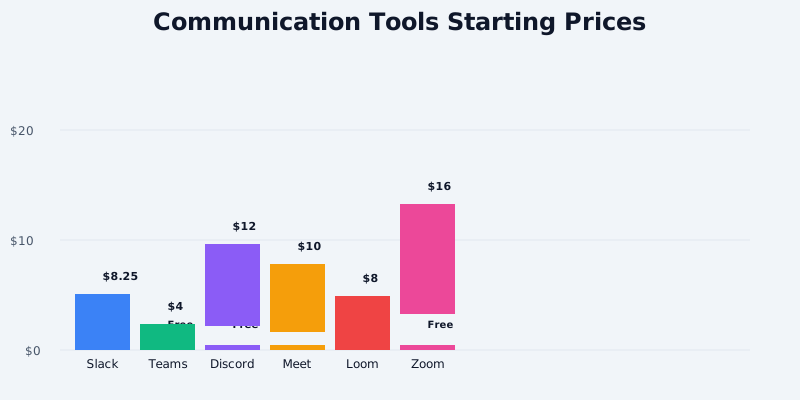
Quick Pricing Snapshot
Zoom 2026 Pricing (USD):
- Free: $0/month (40-minute group limit, 100 participants)
- Pro: $13.33/user/month (annual), $15.99/user/month (monthly)
- Business: $18.33/user/month (annual), $21.99/user/month (monthly)
- Enterprise: Custom pricing
Get the free SaaS Pricing Playbook
How 500+ SaaS tools really price themselves. Pricing tier breakdowns, hidden costs, negotiation tactics. PDF-ready guide delivered to your inbox.
Free forever. No spam. Unsubscribe anytime.
Google Meet 2026 Pricing (USD):
- Standalone Free: $0/month (60-minute group limit, 100 participants)
- Bundled with Google Workspace:
- Starter: $7/user/month (email, Meet, Drive, Docs)
- Standard: $14/user/month (+ advanced admin, analytics)
- Plus: $22/user/month (+ advanced security, compliance)
The headline: Google Meet is free standalone, while Zoom's free tier caps calls at 40 minutes. But here's the wrinkle - if you're buying Workspace anyway (most organizations do), Meet is bundled, which changes the cost equation entirely.
Free Tier Comparison
Zoom Free ($0)
- Group meetings: up to 40 minutes with 3+ participants
- Unlimited 1:1 meetings (no time limit)
- Up to 100 participants per meeting
- Basic features: screen share, recording, chat
- Basic integrations: Slack, Teams, Calendar
- HD video
Google Meet Free ($0)
- Group meetings: up to 60 minutes with 3+ participants
- Unlimited 1:1 meetings
- Up to 100 participants per meeting
- Screen share, chat, basic recording (3-hour limit on recording length)
- Recording stored in Google Drive
- HD video (adaptive to bandwidth)
Winner: Google Meet by 20 minutes. Both free tiers support 100 participants and unlimited 1:1 calls. The difference: Meet's 60-minute group limit vs Zoom's 40 minutes. For small teams doing occasional calls, both are solid. But if you need recurring group meetings longer than 40 minutes, Zoom free becomes friction.
The real difference emerges if you're already using Google Workspace. Then Meet isn't a separate cost - it's included.
Pro/Starter Tier Comparison (5-30 User Teams)
This is where most remote-first startups operate.
Zoom Pro: $13.33/user/month (annual) = $133.30/month for 10 users
- Unlimited meeting duration
- Unlimited group meetings (no participant limit)
- Up to 300 participants
- HD/UHD video
- Screen share, whiteboard, recording (local + cloud)
- Calendar integration (Outlook, Google Calendar)
- Zoom Phone add-on: $9.99/user/month (optional)
- Advanced features: virtual backgrounds, waiting room, breakout rooms
Google Workspace Starter + Meet: $7/user/month = $70/month for 10 users
- Unlimited Meet sessions
- Up to 100 participants per call (sufficient for most teams)
- HD video
- Screen share, chat, recording (to Drive)
- Email: 30GB mailbox per user
- Google Drive: 30GB storage per user
- Docs, Sheets, Slides, Forms (all included)
- Calendar, Tasks, Keep (notes)
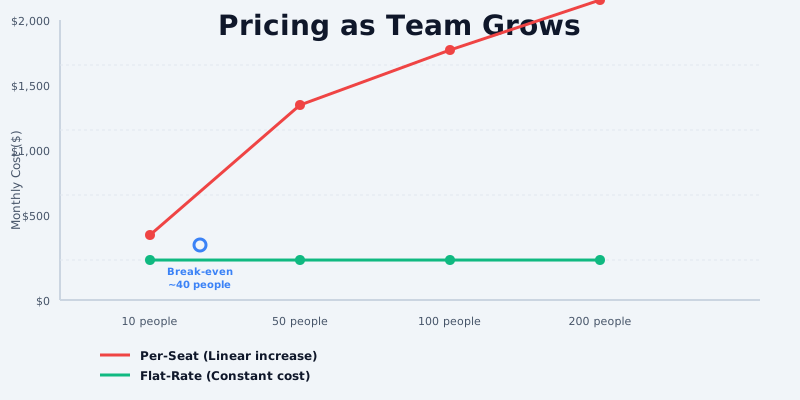
Cost difference at 10 users: Zoom $133.30 vs Workspace $70 = $63.30/month ($760/year) in favor of Workspace
Cost difference at 25 users: Zoom $333.25 vs Workspace $175 = $158.25/month ($1,899/year) in favor of Workspace
Here's the critical insight: Workspace Starter is $7/user/month and includes email, cloud storage, and office tools alongside Meet. Zoom Pro is $13.33 and is *only* video conferencing. If you need email and collaboration tools anyway (you do), Workspace is the better deal.
The 100-participant limit on Meet is rarely a bottleneck for non-enterprise teams. And if you do exceed it, you upgrade to Workspace Standard ($14/user) rather than pay Zoom Pro.
Business/Standard Tier Comparison (30-200 User Teams)
Zoom Business: $18.33/user/month (annual) = $458.25/month for 25 users
- Everything from Pro plus:
- Zoom Phone (PSTN): $9.99/user/month (optional)
- 300 participants (up from Zoom Pro limit)
- Webinar license: $40.99/month add-on (separates webinars from meetings)
- Advanced security: meeting encryption, waiting room
- Advanced admin controls: automatic recording, IP restrictions
- Priority support
Google Workspace Standard: $14/user/month = $350/month for 25 users
- Everything from Starter plus:
- Advanced admin and security (group policies, DLP)
- 150GB Drive storage per user
- Audio/video conferencing analytics
- eDiscovery for legal holds
- Security sandbox (suspicious downloads isolated)
- Better support tier
Cost difference at 25 users: Zoom Business $458.25 vs Workspace Standard $350 = $108.25/month ($1,299/year) in favor of Workspace
Cost difference at 100 users: Zoom Business $1,833 vs Workspace Standard $1,400 = $433/month ($5,196/year) in favor of Workspace
Workspace Standard pulls ahead here because:
- Email is included - you're getting Gmail, calendar, and Meet (vs Zoom + separate email solution)
- Collaboration suite is integrated - Docs editing, Drive storage, and video are one ecosystem
- Admin tooling is native - no third-party security apps needed for compliance
If you're comparing Zoom Business + Google Workspace Starter (for email), that's $28.32/user/month. Workspace Standard is $14/user/month - half the cost for roughly equal functionality.
Total Cost of Ownership: Real-World Scenarios
Let's model actual TCO including integrations, phone, and ecosystem costs.
Scenario 1: 20-Person Design Agency
Baseline (Zoom):
- 20 users × $13.33 Pro = $266.60/month
- Zoom Phone (for PSTN/calling): 5 users × $9.99 = $49.95/month
- Webinar add-on (monthly client presentations): $40.99/month
- Recording storage (Zoom Cloud, 500GB overage): ~$50/month
- Email (Zoho Mail or Google): $6/user × 20 = $120/month
- Cloud storage (Dropbox): $9.99/user × 20 = ~$200/month
- Total: $727.54/month ($8,730/year)
Baseline (Google Workspace):
- 20 users × $14 Standard = $280/month
- Includes: Meet, Gmail, Drive (150GB/user), Docs, Sheets, Slides, Calendar
- Google Workspace marketplace: Figma integration, project tools, etc. (often free or <$50/month)
- Total: $330/month ($3,960/year)
Verdict: Workspace is 55% cheaper because you're not double-paying for email and storage.
Scenario 2: 100-Person SaaS Company
Baseline (Zoom):
- 100 users × $18.33 Business = $1,833/month
- Zoom Phone (25 users for internal calling): 25 × $9.99 = $249.75/month
- Recording storage (cloud): ~$200/month
- Email (Microsoft 365 Business Standard): $12.50 × 100 = $1,250/month
- Slack (communication): $8.25 × 100 = $825/month
- Total: $4,357.75/month ($52,293/year)
Baseline (Google Workspace + Meet):
- 100 users × $22 Plus = $2,200/month
- Includes: Advanced Meet features, Gmail, Drive (1TB/user), Docs, Sheets, Slides, advanced security/compliance
- Workspace Marketplace integrations: ~$100/month (Slack alternative, project tools)
- Total: $2,300/month ($27,600/year)
Verdict: Workspace Plus is 47% cheaper because it consolidates email, collaboration, video, and advanced security. You're not maintaining separate stacks.
This assumes you're not already on Microsoft 365. If you are, Teams is bundled and this calculation changes (see Teams vs Meet comparison).
Scenario 3: 500-Person Enterprise
At this scale, both have custom pricing.
Zoom Enterprise:
- Base: ~$18.33/user/month (often volume discount to $15–16/user)
- 500 users × $16/month (negotiated) = $8,000/month
- Zoom Phone (enterprise lines): ~$3,000/month
- Advanced security, recording storage, compliance: ~$2,000/month
- Zoom webinar, events platform: ~$1,000/month
- Integration with existing comms/directory (Okta, Active Directory): ~$500/month
- Total: ~$14,500/month ($174,000/year)
Google Workspace Enterprise Plus + Meet:
- 500 users × $25/month (Enterprise Plus) = $12,500/month
- Includes: Meet, Gmail, Drive (unlimited/user), Docs, Sheets, Slides, advanced security, compliance, eDiscovery, DLP
- Google Voice (PSTN) for team phone: ~$1,000/month
- Professional support tier: ~$500/month
- Total: ~$14,000/month ($168,000/year)
Verdict: Essentially tied on cost, but Workspace Enterprise Plus includes email, advanced security (DLP, Advanced Phishing), compliance features, and unlimited Drive storage. Zoom requires building a matching security/compliance stack separately.
Hidden Costs & Gotchas
Zoom Hidden Costs
- Recording storage: Free recordings stored locally; cloud storage charges $0.50GB/month (5GB free, then paid)
- Webinars are separate: Group meetings vs webinars require different licenses; upgrading to Zoom Pro doesn't include webinar capability
- Phone system: Zoom Phone ($9.99/user/month) is required for PSTN calling; without it, you're meetings-only
- Participant overages: Zoom Business supports 300 participants, but Enterprise Grid needed for unlimited
- Cloud storage scaling: Large organizations hit recording limits quickly; archive tools ($100+/month) often needed
Google Meet Hidden Costs
- 100-participant limit (free/Starter): Workspace Standard gets 150 participants; Plus/Enterprise gets 500+
- Recording storage: Recordings stored in Google Drive; 100GB Starter limit fills up with video
- Phone system: Google Voice is separate ($6/user/month) for PSTN; not included in Workspace base tiers
- Advanced compliance: DLP, retention policies, eDiscovery require Workspace Plus or higher
- Directory sync: Okta/AD sync is free, but managing multiple identity sources adds admin overhead
Migration Costs & Switching Friction
From Zoom to Google Workspace/Meet:
- Recordings: Can export from Zoom cloud (requires admin access)
- Calendar integration: Outlook calendars import to Google Calendar (mostly automatic)
- Integration reconfiguration: Slack, Teams, other apps need new Meet links
- User training: Minimal - Meet UI is simpler than Zoom
- Estimated cost: 3–5 person-days of IT/admin time
From Google Meet/Workspace to Zoom:
- Email migration: Requires external email provider (Microsoft 365 or separate)
- Recording export: Limited tooling; often requires third-party services
- Calendar recreation: Calendar events don't auto-migrate
- User training: Zoom has more features; ~1–2 weeks ramp-up
- Estimated cost: 10–15 person-days
Feature Parity Analysis
| Feature | Zoom Pro | Google Workspace Starter | Winner |
|---|---|---|---|
| Meeting Duration | Unlimited | Unlimited | Tie |
| Participants | 300 | 100 | Zoom |
| Video Quality | HD/UHD | HD (adaptive) | Zoom |
| Recording | Local + Cloud | Google Drive | Tie |
| Screen Share | Yes | Yes | Tie |
| Whiteboard | Yes | Google Jamboard | Tie |
| Not included | 30GB Gmail | Workspace | |
| Collaboration Tools | Zapier integration | Docs, Sheets, Drive native | Workspace |
| Calendar | Outlook/Google import | Google Calendar native | Workspace |
| Phone System | Add-on ($9.99/user) | Google Voice add-on ($6/user) | Tie |
| Admin Controls | Basic | Advanced (DLP, SSO, 2FA) | Workspace |
| Storage | Add-on cost | 30GB included | Workspace |
| Price for 100 users | $1,833/month | $700/month | Workspace |
Recommendations by Team Size & Use Case
Choose Zoom if:
- You need 300+ participants in a single meeting (uncommon for most teams)
- You're deeply invested in Zoom Phone for enterprise calling
- You want best-in-class webinar hosting (separate product, but mature)
- You're comparing Zoom + existing email solution (not starting fresh)
- You have complex PSTN/phone requirements
Choose Google Workspace/Meet if:
- You need integrated email, collaboration, and video (most organizations do)
- You want to consolidate vendors and reduce complexity
- You're building a fresh tech stack
- You value native integrations (Drive, Docs, Calendar) over third-party apps
- You want lower total cost of ownership
Cost Summary:
- Under 10 users: Both free tiers are equivalent (Zoom 40 min vs Meet 60 min)
- 10–30 users: Workspace Starter ($70/month) is 2.5x cheaper than Zoom Pro ($133/month)
- 30–100 users: Workspace Standard ($14/user) is 30% cheaper than Zoom Business ($18.33/user), plus includes email and storage
- 100–500 users: Workspace Plus/Enterprise Plus is competitive with Zoom Enterprise and includes email, compliance, and security
- 500+ users: Roughly equivalent all-in cost, but Workspace ecosystem is more integrated
Conclusion
Zoom and Meet serve different markets. Zoom is pure-play video conferencing - mature, reliable, feature-rich. Google Meet is video *plus* email, storage, and collaboration.
If you're choosing only for video calls, Zoom's participant limits and whiteboard features are advantages. But few teams buy video conferencing in isolation. You need email, chat, file storage, and collaboration. That's where Workspace wins decisively on cost and integration.
The real comparison is Zoom + Gmail + Dropbox ($28+/user) vs Workspace Starter ($7/user). Once you factor in ecosystem costs, Workspace becomes the obvious choice for most organizations.
For a detailed side-by-side breakdown of all features and pricing, check out our Zoom vs Google Meet comparison page.
