


Notion vs Monday.com Pricing: Complete Comparison (2026)
Notion and Monday.com both occupy space in the "all-in-one workspace" category, but they're solving fundamentally different problems. Notion is a flexible workspace for building interconnected documentation, wikis, and databases. Monday.com is a project management platform built around structured work: tasks, statuses, deadlines, and automation.
That distinction shapes the pricing conversation entirely. Neither tool is "cheaper" - they serve different purposes, and attempting to use one for the other's core strength is usually a false economy.
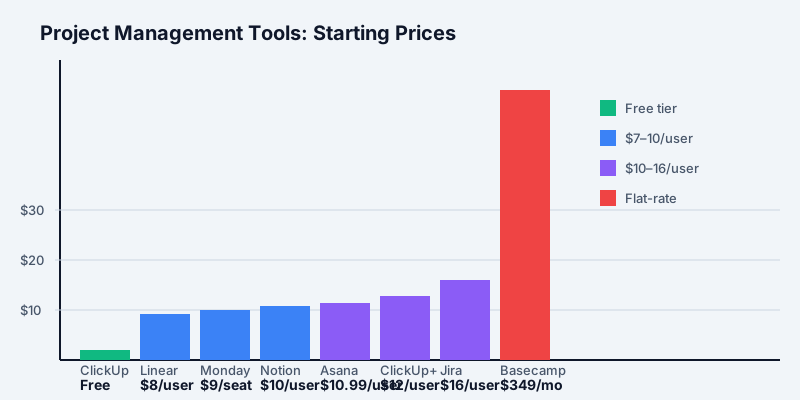
The headline: Notion Plus costs $10/user/month while Monday.com Basic costs $9/seat/month with a 3-seat minimum. For a small team, Monday's per-seat advantage evaporates once you factor in the minimum. For a team that needs project management features, Monday.com Standard ($12/seat) is the true apples-to-apples comparison at a $2/seat premium.
Here's how to think about it: if your team's primary workflow is building and managing shared documentation - internal wikis, product specs, meeting notes, design briefs - Notion is almost certainly cheaper and better suited. If you're managing projects with deadlines, task dependencies, and status tracking across a team, Monday.com's structure wins out, and the cost difference becomes negligible compared to the feature gap.
Quick Pricing Snapshot
Get the free SaaS Pricing Playbook
How 500+ SaaS tools really price themselves. Pricing tier breakdowns, hidden costs, negotiation tactics. PDF-ready guide delivered to your inbox.
Free forever. No spam. Unsubscribe anytime.
Notion 2026 Pricing (per user, billed annually):
- Free: $0 (individual use, limited team features)
- Plus: $10/user/month
- Business: $18/user/month
- Enterprise: Custom pricing
- AI included in Plus and above
Monday.com 2026 Pricing (per seat, billed annually):
- Free: $0 (up to 2 seats, very limited)
- Basic: $9/seat/month (3-seat minimum, so $27/month floor)
- Standard: $12/seat/month (3-seat minimum, so $36/month floor)
- Pro: $19/seat/month (3-seat minimum, so $57/month floor)
- Enterprise: Custom pricing
Both tools charge 15–30% more for monthly billing, so always calculate with annual commitment. Monday.com's 3-seat minimum is critical - even a 2-person team pays for 3 seats, which changes the cost math significantly for small organizations.
Free Tier Comparison
Notion Free ($0)
Notion's free plan is useful for individuals and light evaluation. You get unlimited pages, unlimited blocks, all core editing features (rich text, kanban boards, calendars, tables, galleries), and can invite up to 10 guests. However, the critical limitation: team collaboration is minimal on free. You cannot create a true shared workspace where multiple team members work together with full permissions.
Notion Free is best for evaluating the product solo or for a single person using Notion as a personal workspace. The moment you want a team wiki or shared project docs, you need Plus.
Monday.com Free ($0, 2-seat limit)
Monday's free plan caps at 2 seats and 3 boards. You get unlimited documents, 200+ templates, and mobile apps. That's a tighter constraint than Notion - only two collaborators on three boards is extremely limiting. The free plan is useful for a solo user or two people testing the interface, but doesn't scale to real team work.
Verdict on free: Both are genuinely free but limited. Notion Free is better for documentation and solo use. Monday.com Free is not practical for team projects - you'll hit the 2-seat limit immediately.
Mid-Tier: Notion Plus vs Monday.com Standard
This is where real team work begins.
Notion Plus - $10/user/month (annual)
Notion Plus unlocks true team collaboration: unlimited team members in your workspace, unlimited blocks for all members, unlimited file uploads, 30-day version history, and a published page domain. Crucially, Notion AI is included at no extra cost - AI summarization, drafting, action item extraction, and database queries are built in.
Plus is designed for teams building interconnected knowledge bases. Product teams create specs that link to roadmaps. Engineering teams maintain RFCs and architecture docs. HR teams build onboarding flows and policy wikis. Sales teams maintain collateral and deal tracking. Notion doesn't force you into one structure - you build what fits.
Monday.com Standard - $12/seat/month (annual, 3-seat minimum)
Monday.com Standard adds the features teams actually need for project work: timeline and Gantt views, calendar view, guest access (2 guests per paid seat), 250 automations/month, 250 integrations/month, and 20 GB file storage. This is where Monday.com becomes practically useful rather than constraining.
Standard is the most popular tier - it gives teams the structure and visibility to track work across projects, departments, or client work without forcing expensive upgrades immediately.
Head-to-head:
| Feature | Notion Plus ($10) | Monday Standard ($12) |
|---|---|---|
| Collaboration model | Flexible, wiki-based | Structured, task-based |
| Timeline/Gantt | Requires workaround | Native, first-class |
| Automations | 3rd party only (Zapier) | 250/month native |
| AI assistant | Included | Not included |
| Team structure | No seats needed | 3-seat minimum + project admins |
| File storage | Unlimited | 20 GB/workspace |
| Version history | 30 days | Not specified |
| Database flexibility | Very high (relations, rollups, filters) | High but more rigid |
The real comparison: Notion Plus at $10/user/month is only $2/user less than Monday.com Standard at $12/user/month. But Notion includes AI and unlimited flexibility, while Monday.com includes native automations and structured project views. The choice isn't about price - it's about what your team actually needs to accomplish.
For a 10-person team, the difference is $120/month total ($1,440/year for Monday) versus $100/month ($1,200/year for Notion) - a modest $240/year gap. The question is whether that team benefits more from project automation and Gantt views or from a flexible documentation workspace with AI.
Business Tier: Notion Business vs Monday.com Pro
Notion Business - $18/user/month (annual)
Notion Business adds SAML SSO, advanced permissions (team spaces with granular access controls), 90-day version history (from 30 days on Plus), bulk export, and analytics. These are compliance and governance upgrades - the core feature set doesn't expand much beyond Plus.
For teams without SSO requirements, Business is hard to justify. For enterprises with audit and compliance needs, it's necessary.
Monday.com Pro - $19/seat/month (annual, 3-seat minimum)
Monday.com Pro is a major capability jump. Automations jump from 250 to 25,000/month - a 100x increase. You also get time tracking, workload view (capacity planning), private boards, formula columns, and 100 GB storage. The automation expansion is the real story here.
A team running daily automations to sync status updates across Slack, email, and task reassignment can easily exhaust 250/month. Pro's 25,000/month is genuinely unlimited for most workflows.
Verdict: Monday.com Pro at $19/seat is a more substantial feature jump than Notion Business at $18/user. Pro adds operational capabilities (automation, workload management, time tracking). Business adds compliance and security. For teams where automation is core to operations, Monday.com Pro is more valuable. For enterprise compliance scenarios, Notion Business is necessary.
Total Cost of Ownership at Different Team Sizes
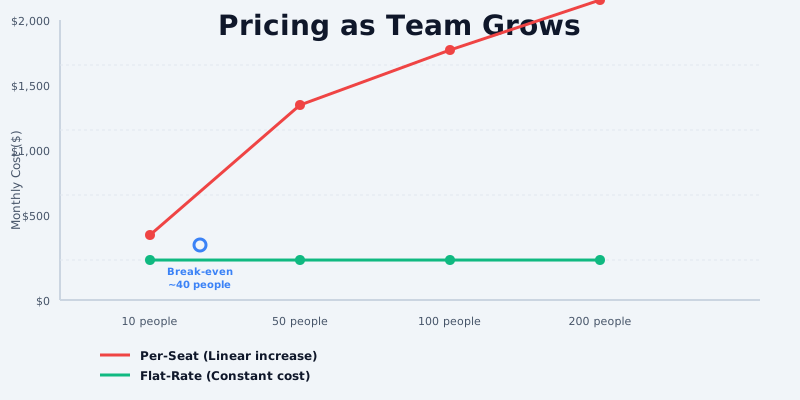
5-person team:
- Notion Plus: 5 × $10 = $50/month ($600/year)
- Monday Standard: 3-seat minimum = $36/month ($432/year)
- Monday saves $168/year due to the 3-seat minimum only applying once
10-person team:
- Notion Plus: 10 × $10 = $100/month ($1,200/year)
- Monday Standard: 10 × $12 = $120/month ($1,440/year)
- Notion saves $240/year
25-person team:
- Notion Plus: 25 × $10 = $250/month ($3,000/year)
- Monday Standard: 25 × $12 = $300/month ($3,600/year)
- Notion saves $600/year
50-person team:
- Notion Plus: 50 × $10 = $500/month ($6,000/year)
- Monday Standard: 50 × $12 = $600/month ($7,200/year)
- Notion saves $1,200/year
Notion's per-user pricing wins at every team size once you're beyond the 3-seat minimum threshold. However, this assumes both teams are getting equal value from the tool - which they're not. A team using Monday.com gets native automations and project structure. A team using Notion gets flexibility and AI.
When Monday.com Looks Cheaper
If your team only needs Monday.com Basic ($9/seat), the per-seat cost is lower. But Basic is missing timeline views, automations, guest access, and integrations - features most teams require. The moment you upgrade to Standard ($12/seat), Notion Plus at $10/user beats it.
If you add Notion AI's value - which is legitimate for teams using AI to draft content, summarize meetings, or generate database queries - the effective value per dollar shifts further in Notion's favor.
Hidden Costs & Gotchas
Notion Hidden Costs
Free plan is not for teams. Notion's free tier is designed for individuals. Teams need Plus, which means Notion's effective entry price for collaborative work is $10/user/month, not $0. Small teams evaluating Notion must budget for Plus immediately.
Version history is time-limited. Plus includes 30 days of version history. If you need longer audit trails - common for compliance or legal review - you need Business at $18/user/month. That's an $8/user/month upgrade for 60 additional days of history.
No native automations means Zapier costs. Notion lacks automation triggers like Monday.com or Asana. Teams automating Notion workflows need Zapier, Make, or custom integrations, which adds $20–50/month per 5 automations. A team that would spend $100/month on Zapier to automate Notion should strongly consider Monday.com's native automation instead.
Gantt views require workarounds. Notion doesn't have native Gantt/timeline views. Teams manage workarounds using timeline database views, but they're less polished than native tools like Monday.com, ClickUp, or Asana. If Gantt charts are core to how your team visualizes projects, Notion requires accepting limitations or building external solutions.
Monday.com Hidden Costs
The 3-seat minimum on all paid plans. Monday.com's most significant pricing quirk. A 2-person team on Standard pays for 3 seats ($36/month instead of $24/month). A solo operator needs to pay for 3 seats. This effective pricing floor can make Monday.com more expensive than advertised for very small teams.
Automation and integration caps at Standard. Standard includes 250 automations/month AND 250 integrations/month. These are separate quotas. A Slack notification triggered by a status change consumes one automation and one integration. Active teams hit both caps simultaneously. You must upgrade to Pro ($19/seat) for 25,000 each.
No AI on Standard. Monday.com Pro and above don't include AI. If you want to add AI capabilities (summarization, content generation, query assistance), you need to integrate third-party AI tools or pay separate AI subscriptions. Notion Plus includes AI at no extra cost.
Storage constraints on lower tiers. Basic includes 5 GB total. Standard includes 20 GB. Pro includes 100 GB. For teams handling media files, design assets, or video, storage becomes a forcing function for tier upgrades faster than expected.
When to Choose Notion
Notion is the better choice when:
Documentation and knowledge management are your primary workflow. Notion's block-based editor, nested pages, and database linking make it the gold standard for team wikis, company handbooks, engineering RFCs, and interconnected documentation. Monday.com's document feature exists but is secondary.
Your team values flexibility over rigid structure. Notion lets you design almost any information architecture: databases with multiple views, nested pages with custom permissions, interconnected wikis. Teams resistant to structured project management often adopt Notion more naturally.
AI writing assistance is actively used. Notion AI is included in Plus at no extra charge. Teams that use AI to draft content, summarize meetings, extract action items, or generate database filters find real value in this inclusion. Monday.com doesn't offer equivalent AI, so you'd need external tools.
You're building a company knowledge base. Product specs, engineering architecture docs, HR policies, onboarding flows, interview processes - Notion handles all of these in a single unified workspace. This is Notion's strongest use case.
Your team works across multiple departments with different needs. Marketing docs, sales collateral, engineering specs, design briefs, and HR policies can all coexist in Notion under flexible structures. Cross-functional teams often find Notion easier to standardize across departments than Monday.com.
Cost is a constraint and documentation is the primary need. At $10/user/month, Notion Plus is genuinely cheaper than Monday.com Standard at $12/seat, and includes AI. For teams that don't need project management, this difference compounds quickly.
Visit the Notion pricing page to review current plan details.
When to Choose Monday.com
Monday.com is the better choice when:
Project management with clear workflows is your primary need. Monday.com is purpose-built for managing tasks, projects, and team work with deadlines, dependencies, and status tracking. Boards organize around projects. Items track discrete work. Views expose progress across the team. This structure is far more natural than Notion for teams executing projects.
Your workflows require heavy automation. Monday.com's automation engine - status changes triggering notifications across Slack, email, and task creation; recurring automations creating tasks on a schedule; integrations syncing data across apps - is class-leading at Standard and Pro tiers. If automation is core to how your team operates, Monday.com's native capability beats Notion's Zapier-dependent approach and saves money over time.
You need Gantt charts and timeline views. Monday.com's Gantt views are native, first-class features at Standard and above. Teams managing complex projects with interdependencies, resource constraints, or long timelines will feel at home. Notion's timeline view workarounds are functional but not comparable.
Your team is management-oriented with visibility requirements. Monday.com's workload view (capacity planning), timeline visibility across projects, and progress dashboards are built for managers overseeing multiple workstreams. Notion can approximate these but requires more custom configuration.
You have 3+ people paying. Monday.com's 3-seat minimum becomes irrelevant once your team reaches that threshold. Beyond 3 seats, the per-seat pricing ($9 Basic, $12 Standard) compares directly with Notion ($10/user).
You need time tracking for billing or capacity planning. Monday.com Pro includes native time tracking with billable hours and estimates. This is valuable for agencies, consulting firms, and internally managed teams. Notion requires integrations.
Visit the Monday.com pricing page to review current plan details.
Feature Comparison Table
| Feature | Notion Plus | Monday Standard |
|---|---|---|
| Team collaboration | Unlimited members | 3-seat minimum |
| Documentation | Excellent | Basic |
| Project/task management | Manual, limited | Excellent, native |
| Timeline/Gantt | Workaround only | Native, first-class |
| Automations | None (Zapier required) | 250/month native |
| AI assistant | Included | Not included |
| File storage | Unlimited | 20 GB |
| Version history | 30 days | Not specified |
| Guest access | 10 free guests | 2 per seat |
| Integrations | 100+ (limited depth) | 250+ (deeper integrations) |
| Time tracking | No | No (Pro only) |
| Mobile apps | Yes | Yes |
The Honest Breakdown
Notion and Monday.com are not direct competitors - they're better described as complementary. Notion excels at knowledge work and documentation. Monday.com excels at project work and automation.
For most organizations, the decision isn't about price. It's about which tool solves your team's actual workflow. A small marketing team building content calendars and campaign specs probably needs Monday.com. A product team maintaining engineering specs, design briefs, and product roadmaps probably needs Notion. A fully distributed team documenting processes probably needs Notion. A distributed team running parallel projects with interdependencies probably needs Monday.com.
The price difference - $2/seat at the Standard/Plus tier, even accounting for Monday's 3-seat minimum - is modest compared to the cost of adopting the wrong tool, retraining, and eventually switching.
Choose Notion if: your team's workflow is documentation-heavy, you want AI included, or you're building a knowledge base. The $10/user cost is genuinely competitive, and Plus is feature-complete for most documentation teams.
Choose Monday.com if: your team manages projects with deadlines and dependencies, automation is core to operations, or you need Gantt views and capacity planning. Standard at $12/seat is worth the modest cost difference for teams that get value from project structure.
The hybrid approach: Many teams use both. Notion for documentation and specs, Monday.com for project execution and task tracking. At a combined $22/user/month, you cover both bases. This is often the practical choice for teams with mixed workflows.
For a side-by-side comparison, visit our Notion vs Monday.com comparison page page. You can also browse Notion, Monday.com, and explore the full project management category with Asana and ClickUp.
