


Free SaaS Tiers Are Not Charity
Free tiers are everywhere. HubSpot gives you unlimited contacts. ClickUp lets you invite unlimited collaborators. Notion doesn't cap your pages. But here's the truth: free tiers are not acts of kindness. They're conversion funnels designed to get you comfortable with the product, dependent on it, and eventually paying for it.
Understanding when free is genuinely sufficient - and when it isn't - is the difference between smart cost control and false economy. Staying on a free tier that's too limiting costs you time, productivity, and sometimes money. But upgrading to a paid plan you don't need is waste.
The goal is simple: use the cheapest tier that actually serves your needs. That tier might be free. It might be $15 a month. The framework to decide is what matters.
When Free SaaS Tiers Are Genuinely Sufficient
Get the free SaaS Pricing Playbook
How 500+ SaaS tools really price themselves. Pricing tier breakdowns, hidden costs, negotiation tactics. PDF-ready guide delivered to your inbox.
Free forever. No spam. Unsubscribe anytime.
Free plans work well in specific, predictable scenarios. If your situation matches one of these, stay on the free tier. There's no reason to pay.
Solo Users and Tiny Teams
If you're a solo founder, freelancer, or a team of 2–3 people, free tiers are often designed exactly for you. Most SaaS vendors consider this a non-paying segment and don't bother forcing upgrades. They're betting you'll grow into a paying customer eventually, but they're willing to wait.
Free Notion is excellent for a single person or small team managing internal docs, project planning, and knowledge bases. The same goes for ClickUp free tier - it genuinely doesn't cap you by user count or projects, just by features. If you don't need automation, custom fields, or integrations, you can run an entire small team on the free plan indefinitely.
HubSpot CRM free is built for solo sales reps or tiny sales teams. Unlimited contacts, unlimited users, unlimited pipelines. You won't hit a limit until you need workflows, forecasting, or advanced reporting - features that only matter when you have multiple salespeople running structured processes.
Testing and Prototyping Phases
When you're evaluating whether a tool is right for your workflow, use the free tier to validate the fit. This is the intended purpose of free tiers. Take 2–4 weeks, run realistic work through the tool, and decide whether the feature set and user experience match your needs.
If you're building a prototype or MVP, free tiers let you ship without SaaS spend. Figma's free tier is sufficient for a single designer to create mockups. Zapier's free tier (100 tasks/month) works for low-volume automation workflows. Mailchimp's free tier (up to 500 contacts) is enough for a startup validating product-market fit before scaling to paid email infrastructure.
Don't upgrade during testing unless you hit a hard limit. If the free tier serves your test, you've avoided unnecessary spend. If you hit a limit that blocks your test, upgrade just for the test, then re-evaluate.
Non-Critical, Low-Volume Use Cases
Some use cases are peripheral to your business. The tool is nice to have, not critical. You use it infrequently. Volume is low. In these scenarios, free tiers are perfect.
Example: a developer who occasionally needs to record a screencast uses Loom free (25 videos/month). A team that sends the occasional group email uses Mailchimp free. A designer who rarely uses a diagramming tool uses Lucidchart free. The free tier serves the occasional need, and you're not locked in if your workflow changes.
The key question: if this tool went away tomorrow, how much would it hurt your business or workflow? If the honest answer is "not much," and you're using it lightly, stay on the free tier.
Tools with Genuinely Generous Free Tiers
Some vendors have decided that being genuinely useful for free is a better growth strategy than crippling free tiers with limits. These tools are worth using for as long as they work for you.
Notion - no hard limits on pages, databases, or users for free. You can run entire companies on Notion free if you don't need advanced features like synced databases or templates.
ClickUp - free tier includes unlimited collaborators, unlimited tasks, unlimited lists, and core project management features. The paid tier adds automations and integrations, not core functionality.
GitHub - free for unlimited public and private repositories, unlimited collaborators, core version control. You pay for advanced security scanning and enterprise features, not basic development workflows.
Figma - free includes unlimited files and collaborators on a shared team file. Most individual designers and small teams never need the paid tier.
These tools have chosen to make free tiers actually useful rather than crippled. Use them as long as they work.
The Five Upgrade Triggers: When You Need to Pay
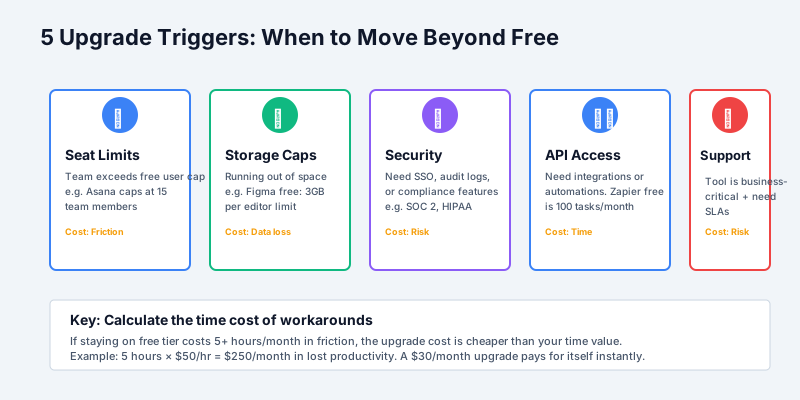
Most people wait too long to upgrade. They work around limitations, accumulating friction and wasted time. You should upgrade when one of these five triggers hits.
Trigger 1: User Seat Limits
The most common upgrade trigger. Asana caps free at 15 team members. Jira caps free at 10. Slack free has unlimited users but only 90 days of message history. Trello free allows unlimited cards but only on a single free board.
You hit a seat limit and the next person on your team can't join. Or you can't invite a contractor or consultant because they'd exceed the free limit. The cost of not upgrading becomes the inability to work - you're blocked, not just inconvenienced.
Calculate the true cost: if you have 12 people and the tool caps free at 10, you're forcing 2 people onto a second workspace, workaround, or competitor. That's friction for those 2 people daily. A $15/month upgrade for 12 users ($180/month) costs less than the cumulative friction of splitting teams.
Trigger 2: Storage or Usage Caps
Some tools cap data storage. Evernote free is 2 accounts per month, up to 2GB/month. Google Drive free is 15GB total. Figma free includes 3 projects per file.
You hit the cap when you actually need to store or process more. Waiting past this point forces you to delete old data, migrate to a competitor, or juggle multiple free accounts.
Upgrade when you're genuinely using the storage. If you're 80% through the quota and still adding content, upgrade. The upgrade cost is cheaper than migrating data to a different tool.
Trigger 3: Missing Security Features
Security features don't matter until they do. Single sign-on (SSO), audit logs, enforced two-factor authentication, role-based access control - these are almost always paid features.
Free tiers skip security because they target individuals and small teams. You need to upgrade when:
- Your company requires SSO for SaaS procurement
- You need audit trails to satisfy compliance (SOC 2, ISO 27001)
- You're handling customer data that requires controlled access
- Your security team has baseline requirements for any tool you use
Trying to work around missing security features is risky and creates bottlenecks. An admin is stuck manually managing access. You can't integrate with your identity provider. You fail security reviews. Upgrade to the tier that includes the security features your environment requires.
Trigger 4: No API Access or Integrations
Free tiers often restrict or block programmatic access. Zapier free allows only 100 tasks/month. Some tools require paid plans to enable webhooks or API access.
You need to upgrade when your workflow requires integration. This happens when:
- You need to automate data flow between tools
- You're pulling data into a data warehouse or BI tool
- You're building custom scripts or internal tooling on top of the product
- You need webhooks to trigger events in your other systems
Integration is a multiplier of productivity. If you're spending an hour per week manually copying data between tools, a $20/month plan that includes API access saves 4+ hours per month of your time - worth far more than the subscription cost.
Trigger 5: Inadequate Support
Free tiers usually come with community-only support. Paid tiers offer email or chat support with SLAs. Priority support comes even higher.
You need paid support when:
- A tool is critical to your business and you can't tolerate downtime
- You have a customization or configuration question that requires expert help
- You need guaranteed response times (under 24 hours)
- You're running a compliance-critical workflow and need accountability
Support matters when your business depends on the tool. A production outage in your CRM or payment system isn't fixed by asking a forum. You need someone accountable.
Hidden Limitations That Vendors Don't Advertise
Free tiers come with invisible gotchas. These aren't listed on the pricing page but they will frustrate you.
Branding and watermarks: Some tools add your free status to exports, reports, or outputs. Canva free adds a Canva watermark to designs. Loom free includes a Loom watermark on recordings. This is fine for personal use but embarrassing for client work.
Rate limits and throttling: Tools silently slow down free users. Your exports process slower. Your API calls are rate-limited. Your reports refresh less frequently. You notice your free account feels sluggish compared to trial accounts.
Data retention limits: Slack free keeps only the last 90 days of messages. Dropbox free only syncs active files. Some analytics tools delete data after 6 months on the free tier. You can't access historical data when you need it.
Limited export formats: You can export from Notion as HTML or Markdown on free, but not as PDF. Some tools limit export frequency - you can only export once per day. This locks you into the vendor's format until you upgrade.
No SLA or uptime guarantee: Free accounts are deprioritized. If the service has problems, free users are down first, up last. No one is responsible for fixing your issue because you're not paying.
These limits are designed to be just annoying enough to motivate an upgrade. They're rarely deal-breakers on their own, but they're worth knowing.
The Real Cost of "Free"
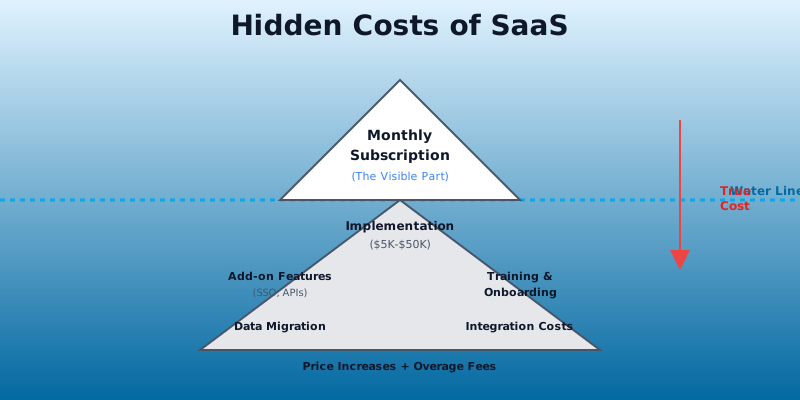
The lowest direct cost isn't always the lowest total cost. Working around free tier limits costs time, and time has real value.
Example 1: Spreadsheets instead of CRM. A small sales team stays on CRM free, which doesn't include sales forecasting or pipeline automation. Every week, a sales manager spends 3 hours manually updating a spreadsheet from the CRM data and forecasting the quarter. That's 12 hours per month, roughly $300–$600 of cost (assuming $25–$50/hour salary). A paid CRM plan at $25/seat/mo for 5 people costs $125/month. The upgrade pays for itself in the first month through time savings alone.
Example 2: Manual data syncing. A small team uses a free project management tool without integrations. Every Friday, someone manually exports the data and uploads it to Google Sheets for reporting. That's 2 hours per week, or $400/month in opportunity cost. A $30/month API access plan eliminates the manual work.
Example 3: Limited message history. A team stays on Slack free to avoid the $6.67/user/month cost for 10 people ($67/month). But they can't search message history older than 90 days. Every quarter, someone asks "where did we document that decision?" and no one can find it. They re-discuss, re-decide, and re-document. That's wasted time and risk of inconsistency. The $67/month access to full history prevents these inefficiencies.
The pattern: free tier limitations cost time. When you calculate the time cost of workarounds, the "free" plan becomes expensive.
Category-by-Category Upgrade Guidance
Here's a practical breakdown of when to stay free and when to upgrade, by category:
CRM: Stay free if you have fewer than 3 salespeople with simple pipeline structures. HubSpot Free, Zoho Free, and Freshsales Free handle this. See our CRM category for the full breakdown. Upgrade when you need sales forecasting, workflow automation, or more than 10 team members. The upgrade unlocks the features that actually drive revenue forecasting.
Project Management: Stay free if your team is under 10 and you don't need integrations or automation. Asana Free, monday.com Free, and ClickUp Free work. Compare them in our project management category. Upgrade when you need integrations, automations, or more than 15 team members.
Communication and Chat: Slack Free is fine for a team that doesn't need history. But the 90-day message limit is brutal for growing teams. Upgrade to Slack Pro ($6.67/user/mo) when you have more than 8 people or need to reference past conversations. See how it stacks up in Slack vs Microsoft Teams.
Design: Figma Free is exceptional. Stay on Figma Free unless you need advanced prototyping features or need to collaborate in real-time with more than 3 people. Figma's paid tier ($12/editor/mo) is worth it for design-heavy companies.
Development: GitHub Free is sufficient for most open-source development and solo projects. Upgrade to GitHub Pro ($4/mo) if you need private repositories, or to GitHub Teams ($21/user/mo) for team collaboration with advanced features.
Email Marketing: Mailchimp Free works up to 500 contacts. Upgrade to Mailchimp at $20–$350/month when you need automation, advanced segmentation, or more than 500 subscribers. The upgrade is worth it when email becomes a core growth channel.
Data and Spreadsheets: Google Sheets Free is unlimited. Excel Free (web version) is unlimited. Airtable Free supports one base with 1,200 records. Stay free unless you're hitting hard limits on record count or need team collaboration features.
The Decision Framework
Here's a simple three-step framework to decide:
Step 1: List your must-have features. What does the tool absolutely have to do for your workflow? Don't include nice-to-haves. Must-haves only.
Step 2: Check if the free tier includes those must-have features. Visit the pricing page, run a trial, ask in their support forum. Be honest about whether free covers what you need.
Step 3: Calculate the cost of workarounds. If the free tier doesn't include a must-have, how much time will you spend working around the limitation each month? Multiply that time by your hourly rate. Compare that cost to the upgrade cost. Upgrade if the upgrade is cheaper than the workaround.
Example: your must-haves are unlimited contacts, reporting, and API access. The free tier has unlimited contacts and reporting but no API. You'd spend 5 hours per month manually syncing contact data to your data warehouse. At $50/hour, that's $250/month. The paid tier is $75/month. Upgrade. The upgrade saves you $175/month.
Close
Free tiers are genuinely valuable when they match your actual needs. But free only saves money when it actually works. The moment a limitation forces you to work around it, research it, or spend time on it, upgrade.
You don't need every feature. You need the features that matter for your workflow, at the lowest price that delivers them.
Ready to compare tools and pricing plans? Browse our catalog or run a comparison to see free tiers and paid plans side by side - try Notion vs ClickUp or Asana vs monday.com to start.
Sources and References
- Gartner SaaS Market Forecast - Market sizing and growth trends for cloud and SaaS spending
- OpenView SaaS Benchmarks - Freemium conversion rates and free-to-paid user metrics
- Bessemer Cloud Index - Cloud market analysis and subscription business growth data
- ProfitWell Pricing Research - SaaS pricing strategy benchmarks and monetization patterns
- Loom Documentation - Feature details for free tier limits and paid plans
