




Understanding the True Cost of SaaS: Beyond the Sticker Price
When evaluating SaaS tools, most companies focus on the monthly subscription fee. But this tunnel vision leads to costly mistakes. The true cost of SaaS software often exceeds the advertised price by 40-60%, once you factor in implementation, training, hidden fees, and usage overages.
This guide walks you through calculating the total cost of ownership (TCO) for any SaaS tool-so you can make apples-to-apples comparisons and negotiate better contracts.

The SaaS Pricing Calculator Framework
Step 1: Calculate Base Subscription Cost
Get the free SaaS Pricing Playbook
How 500+ SaaS tools really price themselves. Pricing tier breakdowns, hidden costs, negotiation tactics. PDF-ready guide delivered to your inbox.
Free forever. No spam. Unsubscribe anytime.
Most SaaS tools use one of three pricing models:
Per-Seat Pricing
Monthly cost = Number of users × Price per seat
Example: Slack with 20 team members at $12.50/user/month:
- 20 users × $12.50 = $250/month ($3,000/year)
Pro tip: Many vendors offer discounts at 100+ users. Always ask for volume pricing if you exceed their published tier thresholds.
Usage-Based Pricing
Cost = Per-unit price × Number of units consumed
Example: A data platform charging $0.50 per GB processed:
- 1,000 GB/month × $0.50 = $500/month ($6,000/year)
To estimate usage-based costs, audit your current system for 4 weeks. Track API calls, data processed, storage consumed, or active instances-depending on the vendor's metric. Add 30% buffer for growth.
Hybrid Pricing
Base fee + per-unit overage
Example: HubSpot CRM at $50/month base + $0.50 per additional contact over 10,000:
- If you have 25,000 contacts: $50 + (15,000 × $0.50) = $7,550/month ($90,600/year)
Hybrid pricing is common for CRM, e-signature, and analytics platforms. Always calculate overage scenarios for realistic headcount or data projections.
Annual vs. Monthly Commitments
Most SaaS vendors offer 15-25% discounts for annual prepayment. Example:
- Monthly: $250 × 12 = $3,000/year
- Annual: $3,000 × 0.8 = $2,400/year (save $600)
The annual discount is often better value than yearly inflation. Lock in rates when possible.
Step 2: Account for Tiered Features & Add-Ons
Vendors rarely advertise that critical features are "premium" until you hit them. Audit the feature gaps:
- Storage overages: Dropbox charges $2/GB beyond 2TB. For 10TB: $2 × (10,000 - 2,000) = $16,000/year extra
- Advanced integrations: Many platforms charge per-integration. Example: $10/integration × 8 integrations = $960/year
- Premium support: Standard support is often business-hours only. 24/7 support typically adds 30-50% to cost
- Custom fields/objects: CRM platforms like Salesforce charge per custom field at scale
- SSO/SAML: Enterprise identity features add 20-40% premium
- Advanced analytics/reporting: $50-200/month in most platforms
Calculator tip: Build a feature matrix comparing your required vs. included features. For each missing feature, look up its add-on cost in the vendor's pricing page.
Step 3: Implementation & Migration Costs
The biggest hidden expense: getting data in and people trained.
Data Migration
- DIY: 40-80 hours of internal engineering time. At $150/hour fully-loaded: $6,000-12,000
- Vendor-assisted: Many vendors offer free migration for contracts >$5,000/year. But custom data transformations cost $3,000-20,000
- Third-party migration tools: Platforms like Zapier + custom scripts: $1,000-5,000
Real example: One company paid $8,000 for HubSpot migration services to avoid a 6-week project delay costing $50,000 in sales lost.
Implementation & Setup
- Project manager (part-time): 20-40 hours × $100/hour = $2,000-4,000
- Admin training: 30-60 hours × $75/hour = $2,250-4,500
- Custom configurations: Workflow setup, field mapping, integrations: $1,000-10,000 (vendor services)
Annual Training & Onboarding
New hires need 2-4 hours of training each. For 6 new hires/year: 18 hours × $75/hour = $1,350/year
Step 4: Calculate Maintenance & Support Costs
Once live, SaaS has ongoing operational overhead:
Internal Admin/Support
- 1 FTE (full-time employee) to manage platform: $60,000-80,000/year
- Smaller teams: 0.25 FTE (10 hours/week) = $15,000-20,000/year
Premium Support
- Standard: Included
- Priority 24/7: +$150-500/month = $1,800-6,000/year
Integrations & Custom Development
- Zapier automations: 5-10 per platform × $30-100/month = $1,800-12,000/year
- Custom API integrations: $200-2,000/month depending on complexity
Step 5: Hidden Costs Checklist
Run through this audit before signing:
- Switching costs when you leave: Vendor lock-in (proprietary data formats, custom fields, workflows). Estimate 30-50% of total annual cost to migrate away
- Price increases: SaaS prices rise 5-15% annually. Budget for it
- Unused licenses: Allocate 10-15% of per-seat licenses for turnover inefficiency
- Duplicate tools: Does this replace or complement existing software? Calculate overlap savings
- Payment processing fees: If paying by credit card, 2-3% fee on total cost (annual payments usually exempt)
- Compliance & security audits: SOC 2 reports, penetration testing: $500-2,000/year
- Downtime costs: SaaS availability is usually 99.5-99.9%. Estimate revenue lost during 1-2 outages/year
TCO Formula: The Complete Calculator
Use this formula to compare vendors fairly. Annual TCO equals the sum of:
- Subscription cost (monthly or annual plan fees)
- Add-ons and overages (extra seats, storage, API calls)
- Implementation and migration (setup fees, data transfer)
- Internal admin time (hours spent managing the tool)
- Support and maintenance (premium support tiers)
- Integration costs (Zapier, custom development)
- Training and onboarding (team ramp-up time)
- Compliance and security (audit requirements, SSO add-ons)
Real-World Example: Slack for a 25-Person Team
Year 1:
- Subscription: 25 users × $12.50 × 12 = $3,750
- Add-ons: Custom workflows (+$50/mo) = $600
- Implementation: Migration (4 hrs engineer) + setup = $1,200
- Training: 0.25 FTE for first 3 months = $3,750
- Integrations: Zapier, custom bots = $1,800
- Year 1 TCO = $11,100
Years 2-3 (annual):
- Subscription: $3,750
- Add-ons: $600
- Admin (0.1 FTE maintaining bots/workflows): $6,000
- Integrations & training: $800
- Years 2-3 TCO = $11,150/year
Cost per user: $11,100 ÷ 25 = $444 Year 1, $446 Years 2+ (vs. $150 sticker price)
Example 2: Salesforce for a 10-Person Sales Team
Year 1:
- Professional edition: 10 users × $165 × 12 = $19,800
- Custom objects (2 @ $50/mo): $1,200
- Advanced analytics add-on: $600
- Implementation: Data migration + config = $8,000
- Training: 1 dedicated resource (5 weeks) = $12,500
- Integration (Slack, Gmail sync): $2,000
- Year 1 TCO = $44,100
Years 2+:
- Subscription & add-ons: $21,600
- Admin (0.3 FTE for Salesforce management): $25,000
- Ongoing integrations & training: $3,000
- Years 2+ TCO = $49,600/year
Cost per user: $44,100 ÷ 10 = $4,410 Year 1, $4,960 Years 2+ (vs. $1,980 sticker price)
Free TCO Tools & Templates
You don't have to calculate manually. These tools help:
- Gartner TCO Calculator: Industry-standard cost model with vendor data
- TechValidate ROI tools: Vendor-provided, often biased but include data
- Spreadsheet template: Create a copy-build variables for users, features, growth rate, and let formulas calculate 3-year projections
- Capterra price comparisons: Aggregated vendor pricing across tools in one category
Negotiation Strategies: Save 20-40%
Armed with TCO data, you can negotiate:
1. Volume Discounts
"We're evaluating [HubSpot CRM] vs [Salesforce]. Both meet our needs. Your per-user cost is $165; competitor offers 15% discount at 10+ users. Can you match?"
Result: Typically 15-25% discount for 10+ seats.
2. Annual Commitment + Upfront Payment
"If we prepay annually, can you offer 25% off the standard monthly rate?"
Result: Most vendors discount 20% for annual, 25%+ for prepaid.
3. Extended Trial or Pilot
"We want to test with 3 users for 60 days before full rollout. Can you provide a longer trial to reduce implementation risk?"
Result: Builds confidence, smooths adoption, vendors often add onboarding hours.
4. Bundle Discounts
If evaluating multiple tools from the same vendor (Slack + Salesforce + Tableau), negotiate a bundle.
Result: 10-30% off total contract value.
5. Contract Length
"We'll commit to 2 years if the cost reflects that commitment."
Result: Multi-year deals often get 10-20% additional discount beyond annual rates.
Avoiding SaaS Budget Creep
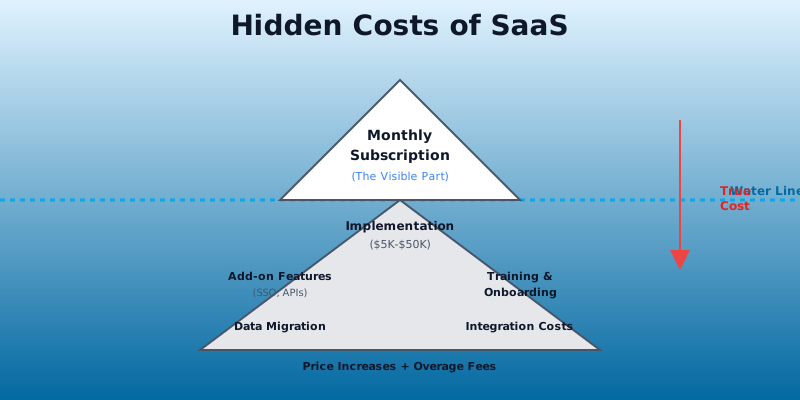
Once you've calculated TCO and signed, prevent costs from spiraling:
- Quarterly cost audits: Check unused licenses, unneeded add-ons, and billing anomalies
- Renewal negotiation deadlines: Start 90 days before renewal. Price increases often happen at renewal
- Usage monitoring: Set alerts for overage-based costs (data, API calls, storage)
- Decommissioning process: When replacing a tool, cancel immediately-not "when the contract ends"
- Cross-train: Reduce reliance on a single admin; improves security and reduces onboarding cost
TCO Comparison: The Matrix Approach
Create a simple spreadsheet comparing 2-3 finalists across 3 years:
| Cost Category | Tool A | Tool B | Tool C |
|---|---|---|---|
| Year 1 Subscription | $3,000 | $4,500 | $2,400 |
| Year 1 Implementation | $2,000 | $8,000 | $500 |
| Year 1 Training | $1,500 | $3,000 | $800 |
| Year 1 Total | $6,500 | $15,500 | $3,700 |
| Year 2 (recurring) | $4,000 | $5,500 | $3,500 |
| Year 3 (recurring) | $4,200 | $5,775 | $3,675 |
| 3-Year TCO | $18,900 | $32,275 | $14,450 |
Tool C wins on cost, but verify it meets all requirements before deciding.
When to Pay Premium Prices
Sometimes the cheapest option isn't the best:
- Vendor stability: Paying for an established tool (vs. startup) reduces switching risk
- Native integrations: Paying for built-in integration saves engineering time
- Industry-specific features: Paying for compliance (SOC 2, HIPAA, GDPR) is non-negotiable
- Proven ROI: If adoption rates and user satisfaction are high, the premium pays for itself
- Switching cost: If switching away costs $10,000+, a 10% price increase might be acceptable
The Bottom Line
SaaS is rarely as cheap as advertised. By calculating true TCO, you:
- Compare vendors fairly (not just on sticker price)
- Budget accurately (avoid surprise costs)
- Negotiate better terms (data-driven arguments work)
- Make faster decisions (quantified business case ready for approval)
Before signing any SaaS contract, run the numbers through this framework. Most companies find they can save 20-40% on their total spend-just by asking the right questions and negotiating upfront.
See also: How to Negotiate SaaS Contracts and The Hidden Costs of SaaS Pricing.
