




The Real Cost of SaaS is Higher Than the Invoice
You see a SaaS tool advertised at $29/month and think you have found a bargain. Three months in, your bill is $180. By month six, you are paying $320. What happened?
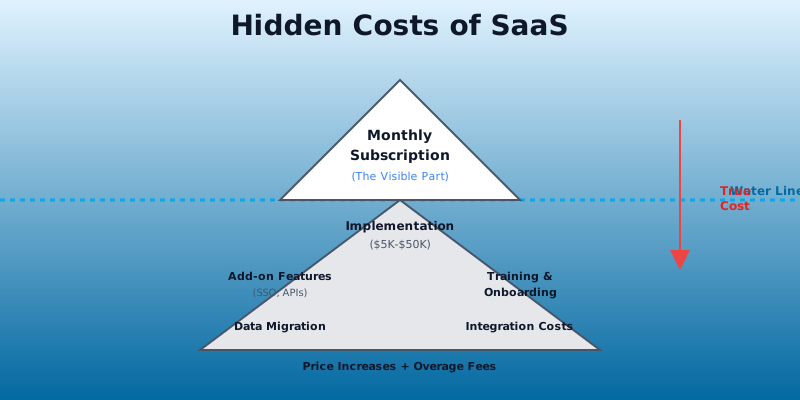
You hit the hidden cost layer. The sticker price is the entry drug. The actual cost of SaaS lives in the fine print - overage charges, feature paywalls, implementation fees, and annual commitment traps that most buyers do not account for until they are too invested to leave.
This is not accidental. Pricing is the primary lever SaaS companies use to optimize revenue per customer. The initial price is as low as possible to get you signed up. The hidden costs extract your true willingness to pay once you are locked in.
Understanding these seven categories of hidden costs will help you calculate your real cost of ownership before you commit.
Get the free SaaS Pricing Playbook
How 500+ SaaS tools really price themselves. Pricing tier breakdowns, hidden costs, negotiation tactics. PDF-ready guide delivered to your inbox.
Free forever. No spam. Unsubscribe anytime.
1. Overage Fees - The Price Per Unit Cliff
Most SaaS pricing tiers have caps. You hit a limit - API calls, storage, bandwidth, user records, contacts - and every unit beyond that threshold costs significantly more.
How overage pricing works: A marketing automation tool like Mailchimp or HubSpot charges $29/month for up to 5,000 contacts. When you exceed that, you pay $0.01 per additional contact. A month where you add 10,000 new contacts costs an extra $50. A month where you add 50,000 costs an extra $450.
Real-world math: A cloud storage service offers 100 GB at the $9.99/month tier. Additional storage costs $0.20 per GB. If you need 500 GB in a given month, that is 400 additional GB at $0.20 each - a surprise $80 charge on top of your $9.99 base fee.
Many SaaS tools do not clearly display overage pricing on their pricing page. You have to dig into the terms or discover it when the charge appears on your bill.
How to protect yourself: Ask vendors directly: "What happens when I exceed this limit? How much does it cost?" Request documentation showing overage pricing. Build a cost model with your peak usage - not your average usage - to see the true cost in your highest-consumption months.
2. Implementation and Onboarding Costs - The Hidden Professional Services Tax
Enterprise software vendors have a clear pricing model: cheap per-seat cost, expensive setup fee.
A $15/month per-user CRM like Salesforce or Zoho CRM suddenly includes a $10,000 implementation fee. A $5,000/month analytics platform requires $25,000 in professional services to integrate it with your data warehouse. These costs are not optional - they are gatekeeping features behind the actual software.
Why vendors charge for implementation: Enterprise software is complex and customizable. The vendor needs to integrate with your existing systems, migrate your historical data, set up custom workflows, and train your team. These are real costs.
But self-serve tools also have hidden implementation costs. A "self-serve" SaaS tool saves you the vendor's professional services fee, but you still need to spend time:
- Configuring workflows and automation
- Integrating with your other tools (Zapier, API scripts)
- Migrating historical data
- Training your team
- Troubleshooting during the first 30 days
This is the time cost of onboarding. If a self-serve tool takes 40 hours to get running, and you value your time at $100/hour, the true cost of implementation is $4,000 - even if the vendor did not charge a single implementation fee.
Real examples: A Slack alternative (see Slack vs Microsoft Teams) might be $5/user/month, but integrating it with your 20+ existing tools, migrating message history, and getting your team to actually use it might take 3 weeks of admin time.
How to account for this: For enterprise tools, always ask for a written statement of the total implementation cost in your contract. For self-serve tools, estimate the onboarding time and budget for it. When comparing tools, factor in total time cost, not just software fees.
3. Add-On Features Behind Secondary Paywalls - The Nickel-and-Diming Effect
The pricing page shows a "standard" plan at $99/month. But when you log in, core features you expected are paywalled behind a higher tier or add-on.
Common add-on costs:
- SSO (Single Sign-On): $3–5 per user per month extra. For a 50-person team, that is $150–250/month.
- Advanced analytics: $500–2,000/month on top of your base plan.
- API access: Locked behind enterprise tier, $500+/month.
- Custom integrations: Build API connectors to your internal tools - $2,000–10,000.
- White-labeling: $1,000–5,000/month to remove the vendor's branding.
- Priority support: $200–500/month for guaranteed response times.
- Advanced reporting: $300–1,000/month for custom dashboards.
Real example: A project management tool like Asana or monday.com advertises at $12/user/month for the "standard" plan. The total cost for 20 users is $240/month. But your IT department requires SSO for security, so you add SSO ($5/user = $100/month). Your team needs advanced analytics to track project ROI, so you add that ($500/month). Custom integrations with your internal HR system cost $3,000 upfront. Your actual cost is $640/month plus the integration, not the advertised $240/month.
The vendor's pricing page does not make this obvious. Many buyers do not realize SSO costs extra until they enable it and see the surprise charge.
How to avoid this trap: Before signing a contract, ask the vendor: "Which features are included in each tier? What costs extra?" Request a written pricing schedule showing all add-on costs for your planned feature set. Compare the true all-in cost, not the base tier price.
4. Data Export and Migration Costs - The Tax for Switching
When you decide to leave a SaaS tool, the question is not just "Is the new tool better?" It is "How much will it cost to get my data out and move it?"
Some vendors make migration painful on purpose.
How migration costs manifest:
- Paid data export: Some vendors charge per GB of data exported. A vendor storing 500 GB of your data might charge $500–1,000 to export it.
- Proprietary formats: Your data is in a format that requires conversion or custom scripting to use elsewhere. A consultant charges $2,000–5,000 to transform and migrate it.
- Limited export windows: Some contracts restrict how often you can export data or at what volume.
- Time cost of manual migration: If no automated migration path exists, your team spends weeks exporting, cleaning, and reimporting data.
Real example: A design collaboration tool stores 10 years of design files and project history. When you want to switch to a competitor, the vendor offers a bulk export for $2,000. Or you can manually download files one at a time (estimated 80 hours of work).
Why vendors do this: Migration costs are a form of lock-in. The higher the cost to leave, the less likely you are to do it, even if a better tool exists.
How to protect yourself: Before signing a contract, ask: "Can I export all my data in a standard format (CSV, JSON, etc.) with no extra charge? How long does export take?" For tools where data migration is critical, factor in the switching cost as a real cost of that vendor relationship.
5. Per-Seat Creep - The Inactive User Tax
Per-seat pricing grows silently because most SaaS tools count anyone who logs in, even once.
Common seat creep scenarios:
- Inactive users: A contractor worked with you for 3 months. You are no longer paying them, but they still have a login. That seat is "active" unless you manually deactivate it.
- Shared service accounts: A shared email account or service principal counts as a seat. You are paying per account, not per person.
- License hoarding: Teams over-provision licenses (buy 30 seats when they have 20 users) to avoid paying for additional seats mid-month.
- Guest or partner access: Inviting a client, vendor, or partner to collaborate counts as an additional seat.
Real example: A SaaS CRM charges $30/user/month. Your sales team has 15 people, so you provision 15 seats at $450/month. Over 12 months, you have seasonal contractors, client portal users, and former team members still with active logins. Your bill grows to 22 seats ($660/month) even though your actual team size is still 15.
Most tools do not warn you when you are approaching seat limits or automatically downgrade unused licenses.
How to manage this: Quarterly, audit your active users. Most SaaS tools provide a usage report showing last login date. Deactivate anyone who has not logged in for 30+ days. Ask vendors if they offer dormant seat discounts (inactive users cost less). Some tools charge per "active user," which is better - but you need to verify how they define active.
6. Annual Commitment Traps - The Discount Lock-In
SaaS vendors offer 15–25% discounts for annual billing. The math is attractive: $99/month becomes $900/year instead of $1,188.
But the discount is a retention mechanism disguised as a deal.
The hidden cost of annual commitment:
- Breaking the contract early: Most annual contracts charge a cancellation fee equal to the remaining prepaid amount. If you prepay $900 for the year and cancel in month 6, you lose the remaining $450.
- Price increases at renewal: The discount applies only to the first year. At renewal, the vendor charges you the new (higher) price. You locked in a discount, but you also locked in the vendor relationship.
- No way to downgrade: Monthly plans let you step down to a cheaper tier mid-month. Annual plans force you to keep paying until renewal.
- Inflation devaluation: If you prepay for a year, you are betting that the tool will still be worth what you paid. If the vendor makes unfavorable changes (removes features, adds friction), you are stuck paying through renewal.
Real example: A productivity tool offers $9.99/month or $99/year (effectively $8.25/month). You prepay $99 for the year. In month 3, the vendor changes a core workflow that breaks your existing process. You need to switch tools, but canceling costs you $75 (six months of remaining prepaid fees). You stay with a tool you dislike because the switching cost is too high.
How to think about this: Annual plans are cheaper on a per-month basis, but they have a higher switching cost. If you are confident in a vendor and want cost predictability, annual is reasonable. If you are uncertain or in a category with rapid innovation, pay monthly. The 15–20% markup is worth the flexibility.
7. Price Increases and Tier Restructuring - The Moving Target
SaaS vendors raise prices constantly. The average increase is 5–15% annually, but some restructure their entire tier system, moving features from lower to higher tiers.
How price increases work:
- Annual price increases: Your $99/month plan becomes $109/month at renewal. Most vendors grandfather existing customers for 6–12 months, then apply the new price.
- Tier restructuring: A vendor moves "advanced search" from the $29 tier to the $59 tier. If you rely on that feature, your cost doubles.
- Feature deprecation: A feature you use gets removed or moved to a premium tier. You did not request this change, but you have to pay more to keep using the same functionality.
Real example: A SaaS analytics tool you have used for three years charges $199/month. At renewal, the vendor announces a price increase to $229/month. You have also lost access to custom report scheduling, which is now only available in the $399 tier. Your true cost increases from $199 to $399 because the tier structure changed.
Why this matters: When evaluating a SaaS tool, price is not static. A $29/month tool could cost $50/month in five years, especially if the vendor has significant capital behind them (they need growth to justify returns).
CompareTiers tracks historical pricing for 500+ SaaS tools. You can see when and how much vendors increase prices, and identify which vendors are aggressive with price hikes. Before committing to a tool, check its price history. A vendor that has increased prices twice in two years is a signal that cost inflation is a risk.
How to Calculate Your True SaaS Cost

Sticker price does not equal real cost. Here is a framework to calculate the true cost of ownership for any SaaS tool.
Step 1: Start with the base subscription cost
Determine which tier you actually need, based on your usage (not the cheapest tier). Multiply by number of months in your planning horizon (usually 12–36 months).
Example: $99/month × 12 months = $1,188/year.
Step 2: Add all mandatory add-ons
Identify features you absolutely need but are not in the base tier. SSO, advanced analytics, API access, priority support - list them and their costs.
Example: SSO ($50/month) + Analytics ($200/month) = $250/month extra = $3,000/year.
Step 3: Factor in implementation and onboarding time
For enterprise tools, get a written implementation cost. For self-serve tools, estimate hours to configure, integrate, and train. Multiply by your hourly rate.
Example: 40 hours × $100/hour = $4,000 one-time cost.
Step 4: Account for overage risk
Identify which metrics have per-unit overage charges. Model your peak month, not your average month, to account for overages.
Example: Storage overage ($0.20/GB) × 100 GB over-limit × 12 months = $240/year.
Step 5: Build in growth and price increase risk
Project usage and seat growth at realistic rates. Also assume a 10% annual price increase (conservative estimate).
Example: Seats grow from 10 to 15 users. At $50/user/month, your cost grows from $6,000/year to $9,000/year. Then add 10% price increase = $9,900/year by year 2.
Step 6: Calculate exit cost
What does it cost to leave if you change your mind? Factor in time to export data and migrate to an alternative.
Example: 20 hours of migration time × $100/hour = $2,000.
Step 7: Compare the total to alternatives
Now you can compare tools fairly. A $29/month tool that requires $4,000 in implementation and $200/month in add-ons costs $5,288/year - much more than a $50/month tool with no add-ons.
Make Better SaaS Buying Decisions
Hidden costs are real costs. By modeling all seven categories - overage fees, implementation, add-ons, migration costs, seat creep, annual traps, and price increases - you can predict your true cost before you sign.
CompareTiers helps you see past the sticker price. Our catalog includes detailed tier breakdowns, add-on costs, and historical pricing for 500+ tools. Use the comparison tool to see the true all-in cost of competing solutions, side by side - for example, compare HubSpot vs Salesforce or Asana vs monday.com.
Smart SaaS buying is about understanding not just what you are paying now, but what you will be paying in 6, 12, and 24 months. The lowest advertised price is rarely the lowest total cost.
Sources and References
- Gartner IT Spending Forecast - Enterprise SaaS spending trends and budget allocations
- Zylo SaaS Management Report - SaaS sprawl statistics and cost waste analysis
- Flexera State of ITAM - Software license waste and underutilization data
- Productiv SaaS Intelligence - SaaS tool usage patterns and adoption metrics
- Blissfully SaaS Trends - Benchmarking and average SaaS spend per employee
