




Why SaaS Pricing Models Matter
When you are evaluating software for your team, the sticker price is only half the story. The pricing model - how a vendor structures what you pay and when - determines whether that tool stays affordable as you grow, or quietly becomes your largest software line item.
Understanding the four dominant SaaS pricing models gives you a framework for comparing tools fairly and predicting your total cost of ownership before you commit.
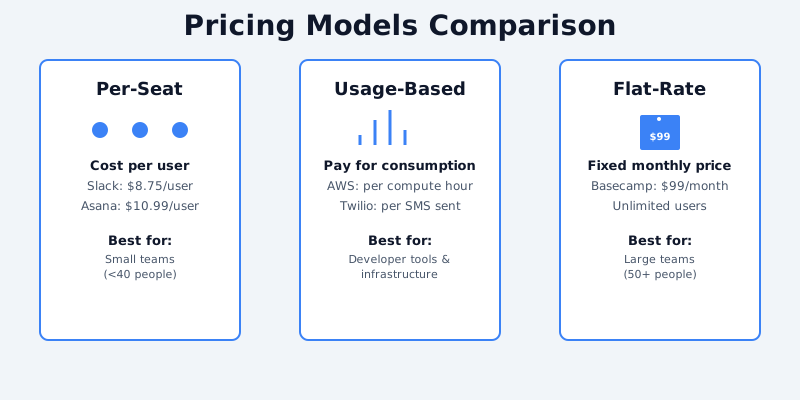
1. Per-Seat (Per-User) Pricing
Per-seat pricing is the most common model in SaaS. You pay a fixed monthly fee for each user who needs access.
Get the free SaaS Pricing Playbook
How 500+ SaaS tools really price themselves. Pricing tier breakdowns, hidden costs, negotiation tactics. PDF-ready guide delivered to your inbox.
Free forever. No spam. Unsubscribe anytime.
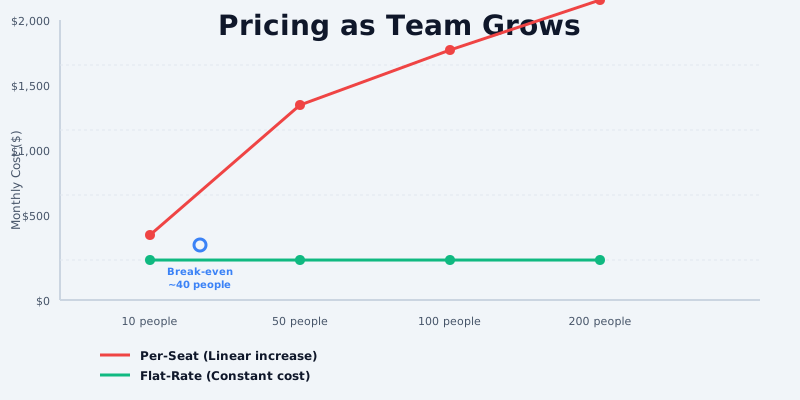
How it works: A tool charges $15/user/month. A team of 10 pays $150/month. A team of 100 pays $1,500/month.
Best for: Tools where individual access is the core value - communication apps, CRMs, project management software.
Watch out for: Seat costs compound fast. A tool that feels cheap for a 5-person startup can become expensive by the time you reach 50 people. Always model your 12-month and 24-month cost at realistic team sizes.
Examples: Slack, Notion, Linear, Salesforce
See how these tools compare: Slack pricing, Notion pricing, or browse the full communication tools category. Try our HubSpot CRM vs Salesforce comparison for a real per-seat pricing showdown.
2. Usage-Based Pricing
Usage-based pricing charges you for what you actually consume - API calls, messages sent, rows processed, or minutes used.
How it works: A tool charges $0.01 per API call. You make 500,000 calls in a month and pay $5,000.
Best for: Developer tools, AI APIs, data platforms, and infrastructure services where usage varies significantly between customers.
Watch out for: Usage-based pricing can be hard to forecast. A spike in traffic or a runaway process can generate a bill you did not expect. Look for tools that offer spending caps or usage alerts.
Examples: Twilio, AWS, OpenAI, Datadog
Compare OpenAI pricing plans or explore AI & ML tools in our catalog.
3. Flat-Rate Pricing
Flat-rate (or flat-fee) pricing charges a single price for full access, regardless of how many users or how much you use the product.
How it works: A tool charges $99/month for unlimited users and usage. You pay $99 whether you have 1 user or 1,000.
Best for: Small teams that want cost predictability. Also common for tools with a fixed feature set where the value does not scale linearly with usage.
Watch out for: Flat-rate tools often have hidden usage caps in the fine print. "Unlimited" frequently comes with fair-use policies. Read the terms carefully.
Examples: Basecamp (historically), many niche B2B tools
4. Freemium Pricing
Freemium tools offer a free tier with limited features or usage, and charge for access to advanced capabilities.
How it works: A tool is free for up to 3 users or 5 projects. Beyond that, you pay $12/user/month.
Best for: Buyers who want to try before they buy, or tools where a subset of features genuinely covers many users' needs.
Watch out for: Freemium tiers are often designed to create friction at the exact point you become reliant on the tool. Feature paywalls that appear after months of use can force rushed upgrade decisions. Map out what you will actually need before assuming the free tier is sufficient.
Examples: Figma, HubSpot, Zoom, Airtable. Compare freemium models in action with Asana vs ClickUp or Jira vs Linear.
Hybrid Models
Most modern SaaS tools combine elements of multiple models. A common pattern is per-seat pricing with a usage-based component - for example, a base fee per user plus a charge per GB of storage.
When evaluating hybrid pricing, build a cost model with your actual usage numbers. Tools with pricing calculators on their site are worth a closer look, because they are at least being transparent about the complexity.
How to Compare Pricing Models Effectively
- Identify your usage baseline. How many users? What volume of the core unit (messages, records, API calls)?
- Project growth. Model costs at 1x, 3x, and 10x your current scale. Some tools are cheap now but prohibitively expensive at scale.
- Account for the full tier. Free and entry-level tiers often exclude features you will eventually need. Check what is behind the next paywall.
- Compare total annual cost. Most tools offer an annual discount of 15–25%. Factor this in when comparing monthly-billed alternatives.
- Read the change history. SaaS vendors raise prices. A vendor that has changed pricing twice in three years is a signal to factor in future cost risk.
Tools to Compare
CompareTiers tracks pricing for 500+ SaaS tools across all major categories. Use the comparison tool to run side-by-side pricing breakdowns - try Slack vs Notion or Asana vs monday.com to see per-seat pricing in action, or compare Figma vs Canva for freemium models.
Start by browsing the catalog or explore categories like CRM tools, project management, or design tools to see these pricing models across real tools.
Deep Dive: Each Pricing Model with Real Examples
Per-User/Per-Seat Pricing (Detailed Analysis)
Per-user pricing is the most common model for B2B SaaS, where cost scales directly with team size. Slack ($8.75/user/month), Asana ($10.99/user/month), and Microsoft 365 ($6-20/user/month) all use this model. The advantage is predictability-companies know exactly what they'll pay based on headcount. This model aligns vendor incentives with customer success: the larger your team using the tool, the more the vendor earns, creating motivation to deliver value. However, per-user pricing creates perverse incentives for companies trying to minimize costs. Teams often restrict access to "power users" only, limiting adoption. For organizations with seasonal hiring or contractor bases, this model can feel inefficient-you pay for seats you don't use during slow periods.
Real-world example: A 50-person marketing agency on Asana Pro pays $549/month. When they hire 10 contractors for a campaign, costs spike to $659/month. After the campaign ends, they're stuck paying for unused seats if they want to keep the contractors on their team structure. This is why many teams on per-user models negotiate annual discounts or multi-year commitments. Research from Bessemer Venture Partners shows per-seat models remain the most predictable revenue driver for SaaS companies, even as customer acquisition costs rise.
Flat-Rate/Tiered Pricing (Detailed Analysis)
Flat-rate pricing charges one price regardless of team size (e.g., Basecamp $99/month for unlimited users). Tiered pricing offers predefined plans: Starter ($29/month for up to 50 items), Professional ($79/month for unlimited items). The advantage for customers is simplicity and cost certainty-you know your maximum spend. For vendors, flat-rate models encourage larger team adoptions (no incentive to restrict access), but they sacrifice revenue optimization (why would a 100-person company pay the same as a 5-person team?). Tiered pricing solves this by creating multiple price points for different company sizes.
Real-world example: Basecamp uses flat-rate pricing ($99/month per workspace regardless of team size). This attracts early-stage startups that would balk at per-user pricing but deters large enterprises from upgrading (they'd get better per-seat rates from competitors). Conversely, Slack's tiering strategy ($0 free, $8.75/user, $12.50/user) captures price-sensitive startups with the free tier while extracting higher per-seat rates from larger, well-funded companies. According to OpenView Partners, tiered pricing with a freemium component has become the standard for high-growth SaaS.
Usage-Based Pricing (Detailed Analysis)
Usage-based pricing charges based on actual consumption: Twilio bills per SMS sent, AWS bills per compute hour, Stripe bills per transaction. This model is ideal for infrastructure and data-heavy services where customers' usage varies wildly. The customer perspective is appealing (pay for what you use, not for unused capacity), but usage-based pricing introduces unpredictability. A sudden traffic spike or integration bug can result in an unexpectedly large bill. For vendors, usage-based pricing requires robust metering, billing infrastructure, and creates churn risk when bills spike unexpectedly.
Real-world example: A startup using AWS might spend $500/month during normal operation but $5000/month during a product launch with heavy traffic. This unpredictability is why many companies prefer reserved instances or committed use agreements, essentially converting usage-based pricing back into flat-rate contracts. Compare usage-based AI tools in our Anthropic vs OpenAI pricing breakdown. Pricing Intelligently warns that unpredictable usage-based pricing is a leading cause of SaaS churn-customers abandon tools when they experience bill shock.
Hybrid Pricing (Detailed Analysis)
Many successful SaaS platforms combine models: HubSpot bundles per-user CRM with flat-rate marketing spend allocations. Stripe charges a percentage per transaction (usage) plus fixed monthly fees. Hybrid models balance vendor revenue optimization with customer cost predictability. The downside is complexity-customers struggle to understand their true cost of ownership and can be surprised by bills. ProfitWell research indicates hybrid models achieve the highest customer satisfaction when transparent pricing calculators are provided upfront.
How to Choose the Right Pricing Model for Your SaaS
When designing pricing for your SaaS product, consider these factors:
1. Customer perception of value: Per-user pricing works for tools perceived as team-wide productivity boosters (Slack, Asana). Usage-based pricing works for utilities (Twilio, AWS) where customers equate usage with benefit. Flat-rate pricing works when you've solved a specific problem uniformly (project management, social listening).
2. Competitive landscape: Match your competitors' pricing model unless you have a specific differentiation. Competing against Slack on per-user pricing is harder than on flat-rate (you have to be cheaper per user). Instead, compete on value (superior integrations, lower cost of ownership).
3. Revenue optimization: Usage-based pricing maximizes revenue from power users but requires infrastructure investment. Per-user pricing is easy to implement but caps revenue per customer (100-person company pays only 100x base price, regardless of impact generated). Stripe Atlas provides extensive analysis on which model optimizes for revenue per customer across different software categories.
4. Customer acquisition: Freemium and free tiers lower barriers to entry but create upgrade friction. Per-user pricing makes the upgrade path clear (add more users = automatic upgrade). Flat-rate pricing can feel expensive to small teams but appealing to large ones.
5. Churn risk: Usage-based pricing with unpredictable bills creates churn. Per-user pricing with aggressive per-user rates creates churn for cost-conscious teams. Hybrid pricing with clear overages and committed spend levels reduces churn.
